Azure Stack HCI

Dell APEX - Create Service Principal and Assign Roles via Azure CLI

Automating the Deployment of Azure Stack HCI Series

There are several key differences when deploying an Azure Stack HCI Cluster using a premier solution like Dell’s APEX Cloud Platform for Microsoft Azure versus using an integrated system. For detailed information about Azure Stack HCI solution categories, please visit Azure Stack HCI Solutions.

One notable difference is the use of a service principal in the cluster deployment for APEX and the necessary Azure roles that need to be assigned. In contrast, integrated systems require deployment through Microsoft Cloud, either via the portal or ARM Templates. When using the portal method, the deploying account must have the appropriate Azure roles assigned. With the ARM Template method, a service principal is required, but the deployment process will assign the necessary roles to that service principal. While access to run the ARM template is still required, the template will handle the rest of the role assignments.

Deploying Azure Stack HCI OS using Canonical MAAS

Deploying Azure Stack HCI OS using Canonical MAAS

Automating the Deployment of Azure Stack HCI Series

There are several methods to deploy an Azure Stack HCI OS Image. You can use solutions like System Center Configuration Manager (SCCM/ConfigMgr), Microsoft Deployment Toolkit (MDT), Windows Deployment Services (WDS), or other Infrastructure as Code (IaC) tools like Terraform and Ansible, with the appropriate configurations. Additionally, Canonical offers a solution called MAAS (Metal-As-A-Service).

Throughout my career, I’ve generally preferred Microsoft solutions for deploying Microsoft Operating Systems, favoring tools like MDT and WDS. However, my current company isn’t a Microsoft-centric environment. Instead, they use Terraform and Ansible for IaC, which I’m not very experienced with, but I’m open to learning.

Azure Stack HCI - Series Ended

Azure Stack HCI - Series Ended

This is a series of blogs about my experiences with Azure Stack HCI

In this blog series I plan to blog about everything I know about Azure Stack HCI. So, it should be a very short blog series. Just kidding. Again, I tend to blog about subjects that I am currently working on or will be currently working on. So, Azure Stack HCI is fresh on my mind again these days.

I have decided to end this blog series but not end blogging about Azure Stack HCI. For those that don’t know, Azure Stack HCI 23H2 Preview has been released. The GA date isn’t officially published yet. However, I feel blogging about release 22H2 will be a mute point now with some of the major changes coming in release 23H2.

Azure Stack HCI - Part IX - Azure Kubernetes Service Deployment

Azure Stack HCI - Part IX - Azure Kubernetes Service Deployment

This is a series of blogs about my experiences with Azure Stack HCI

In this blog series I plan to blog about everything I know about Azure Stack HCI. So, it should be a very short blog series. Just kidding. Again, I tend to blog about subjects that I am currently working on or will be currently working on. So, Azure Stack HCI is fresh on my mind again these days.

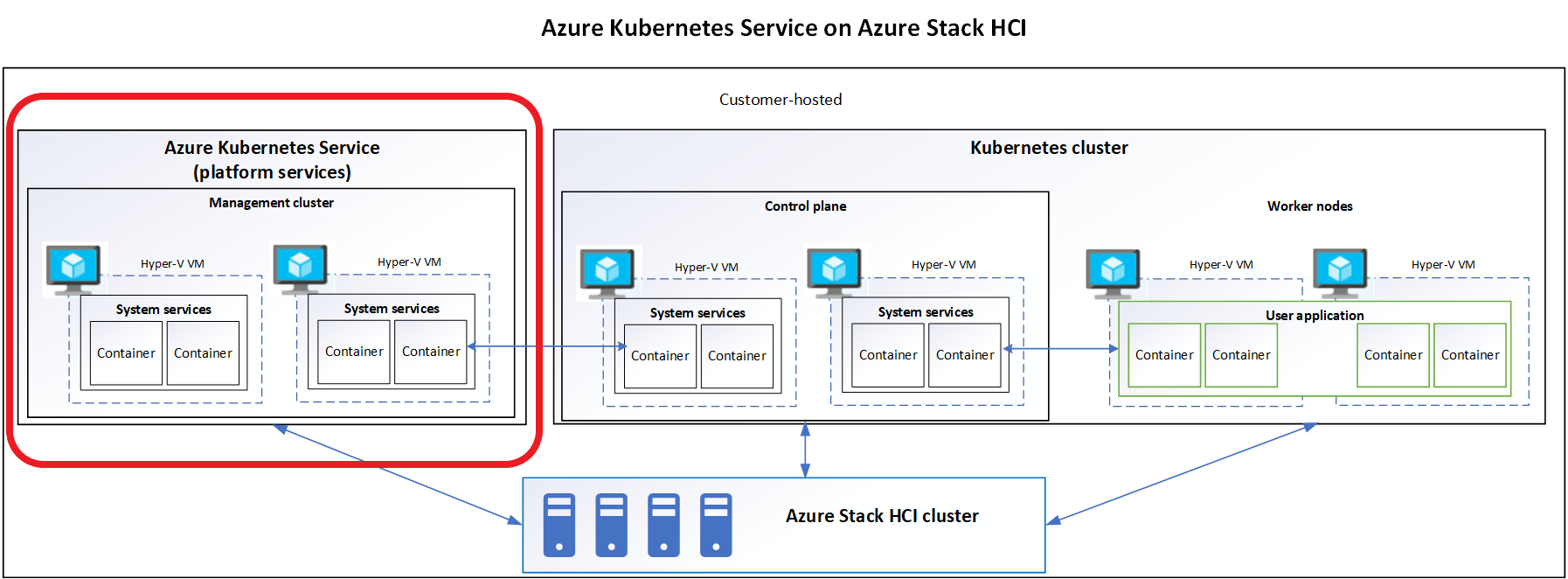
I now have Azure Stack HCI cluster deployed. We can manage it using Windows Admin Center or PowerShell. In later blogs I will go into how to us Azure Arc services to manage our workloads that we will deploy on our cluster. This blog I want to focus on deploying Azure Kubernetes Service and deploying an AKS host on my HCI cluster. This will enable my me to deploy Kubernetes clusters for various workloads later.

Azure Stack HCI - Part VIII - Manage AzSHCI Using Windows Admin Center for Azure

Azure Stack HCI - Part VIII - Manage AzSHCI Using Windows Admin Center for Azure

This is a series of blogs about my experiences with Azure Stack HCI

In this blog series I plan to blog about everything I know about Azure Stack HCI. So, it should be a very short blog series. Just kidding. Again, I tend to blog about subjects that I am currently working on or will be currently working on. So, Azure Stack HCI is fresh on my mind again these days.

My last blog Azure Stack HCI - Part VII - Configure Windows Admin Center Access, was actually all about Windows Admin Center and nothing really about Azure Stack HCI. However, this blog is going to be focused on using Windows Admin Center for Azure (Preview) to manage our Azure Stack HCI clusters from anywhere without a VPN or a direct connection. So go get some coffee so I don’t put you to sleep.

Azure Stack HCI - Part VII - Configure Windows Admin Center Access

Azure Stack HCI - Part VII - Configure Windows Admin Center Access

This is a series of blogs about my experiences with Azure Stack HCI

In this blog series I plan to blog about everything I know about Azure Stack HCI. So, it should be a very short blog series. Just kidding. Again, I tend to blog about subjects that I am currently working on or will be currently working on. So, Azure Stack HCI is fresh on my mind again these days.

So this blog, which I hope will be short, will be about how to secure your access to the Windows Admin Center that is being used to manage your Azure Stack HCI cluster. I will be honest, up until right before I just created this blog, I never really gave any thought to this. Well, maybe some thought but since I don’t really use WAC a lot, I never saw it as a need in my environment. Plus, I am the only one who has access to my lab environment anyway. (That I am aware of!)

Azure Stack HCI - Part VI - Using The Windows Admin Center To Deploy A Cluster

Azure Stack HCI - Part VI - Using The Windows Admin Center To Deploy A Cluster

This is a series of blogs about my experiences with Azure Stack HCI

In this blog series I plan to blog about everything I know about Azure Stack HCI. So, it should be a very short blog series. Just kidding. Again, I tend to blog about subjects that I am currently working on or will be currently working on. So, Azure Stack HCI is fresh on my mind again these days.

The last few blogs I have talked about deploying a single-node cluster and then how to scale that single-node cluster to a two-node cluster, then again on how to add a third-node and more to that existing cluster. We also did everything in PowerShell. This blog will be my last blog on how to deploy an Azure Stack HCI cluster but I wanted to show how to do it using Windows Admin Center.

Azure Stack HCI - Part V - From one to Sixteen

Azure Stack HCI - Part V - From one to Sixteen

This is a series of blogs about my experiences with Azure Stack HCI

In this blog series I plan to blog about everything I know about Azure Stack HCI. So, it should be a very short blog series. Just kidding. Again, I tend to blog about subjects that I am currently working on or will be currently working on. So, Azure Stack HCI is fresh on my mind again these days.

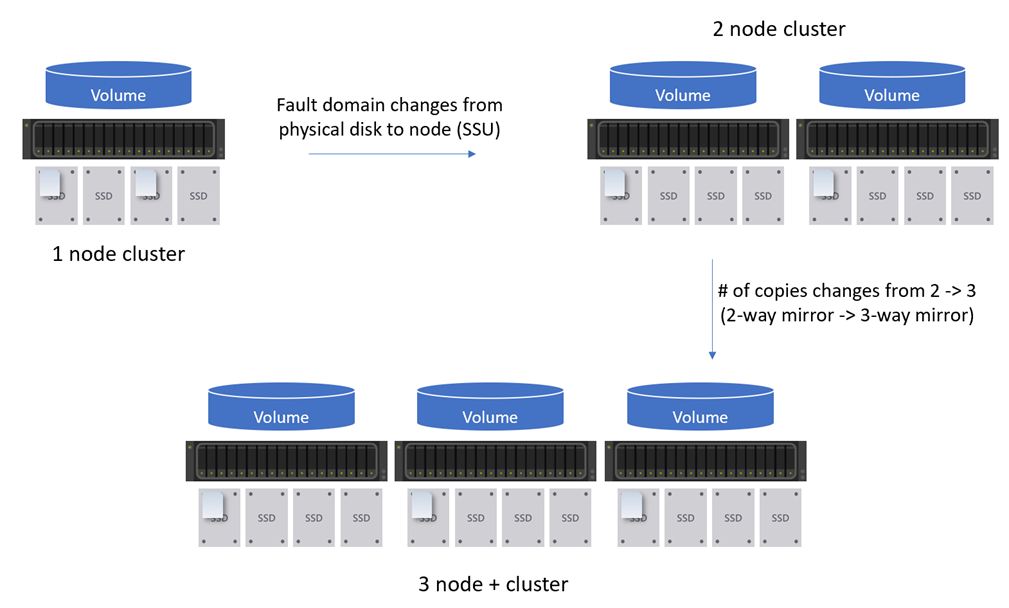
The last three or so blogs I have talked about deploying a single-node cluster and then how to scale that single-node cluster to a two-node cluster. This blog I want to share my experience about scaling my Azure Stack HCI cluster to a three-node cluster and more. The over all process is fairly the same as scaling out a one-node to a two-node cluster. However, there are some differences that I wanted to call out. So instead of actually walking through the scale out process, I will discuss the differences between scaling out to a two-node cluster to three-nodes or more.

Azure Stack HCI - Part IV - Scale-out Azure Stack HCI Single Node Cluster

Azure Stack HCI - Part IV - Scale-out Azure Stack HCI Single Node Cluster

This is a series of blogs about my experiences with Azure Stack HCI

In this blog series I plan to blog about everything I know about Azure Stack HCI. So, it should be a very short blog series. Just kidding. Again, I tend to blog about subjects that I am currently working on or will be currently working on. So, Azure Stack HCI is fresh on my mind again these days.

This blog will be about scaling out a single-node Azure Stack HCI cluster up to a two-node cluster. My previous blog, Azure Stack HCI - Part III - Advance Deployment of A Single Node Cluster discussed my experiences deploying a single-node cluster. There is a lot of information about my environment, how I setup my lab, and more that would be good to know before continuing with this blog. However, I will try and include as much as I can within this blog to make sense of everything.

Azure Stack HCI - Part III - Advanced Deployment of A Single Node Cluster

Azure Stack HCI - Part III - Advanced Deployment of A Single Node Cluster

This is a series of blogs about my experiences with Azure Stack HCI

In this blog series I plan to blog about everything I know about Azure Stack HCI. So, it should be a very short blog series. Just kidding. Again, I tend to blog about subjects that I am currently working on or will be currently working on. So, Azure Stack HCI is fresh on my mind again these days.

I had planned to have a Part III that would have focused on scaling out a single node cluster. However, as I was writing that blog and going back to Part II, Azure Stack HCI - Part II - Deploying A Single Node Cluster I found myself wanting to add to that blog. There where things that I didn’t cover I felt would be important. So instead of deleting that blog, because it did do a decent job at a high level overview, I am going to keep that blog and write another one that goes more in-depth. Which is the birth of this blog, Part III - Advance Deployment of A Single Node Cluster.