Azure Stack HCI - Part IV - Scale-out Azure Stack HCI Single Node Cluster

Azure Stack HCI - Part IV - Scale-out Azure Stack HCI Single Node Cluster

This is a series of blogs about my experiences with Azure Stack HCI

In this blog series I plan to blog about everything I know about Azure Stack HCI. So, it should be a very short blog series. Just kidding. Again, I tend to blog about subjects that I am currently working on or will be currently working on. So, Azure Stack HCI is fresh on my mind again these days.

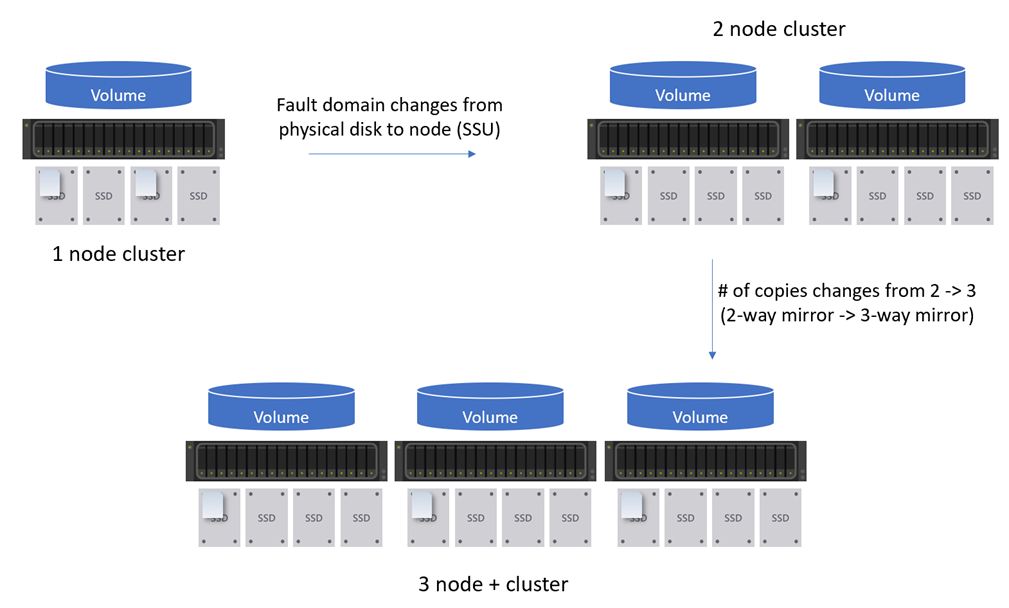
This blog will be about scaling out a single-node Azure Stack HCI cluster up to a two-node cluster. My previous blog, Azure Stack HCI - Part III - Advance Deployment of A Single Node Cluster discussed my experiences deploying a single-node cluster. There is a lot of information about my environment, how I setup my lab, and more that would be good to know before continuing with this blog. However, I will try and include as much as I can within this blog to make sense of everything.

Azure Stack HCI - Part III - Advanced Deployment of A Single Node Cluster

Azure Stack HCI - Part III - Advanced Deployment of A Single Node Cluster

This is a series of blogs about my experiences with Azure Stack HCI

In this blog series I plan to blog about everything I know about Azure Stack HCI. So, it should be a very short blog series. Just kidding. Again, I tend to blog about subjects that I am currently working on or will be currently working on. So, Azure Stack HCI is fresh on my mind again these days.

I had planned to have a Part III that would have focused on scaling out a single node cluster. However, as I was writing that blog and going back to Part II, Azure Stack HCI - Part II - Deploying A Single Node Cluster I found myself wanting to add to that blog. There where things that I didn’t cover I felt would be important. So instead of deleting that blog, because it did do a decent job at a high level overview, I am going to keep that blog and write another one that goes more in-depth. Which is the birth of this blog, Part III - Advance Deployment of A Single Node Cluster.

Azure Stack HCI - Part II - Deploying A Single Node Cluster

Azure Stack HCI - Part II - Deploying A Single Node Cluster

This is a series of blogs about my experiences with Azure Stack HCI

In this blog series I plan to blog about everything I know about Azure Stack HCI. So, it should be a very short blog series. Just kidding. Again, I tend to blog about subjects that I am currently working on or will be currently working on. So, Azure Stack HCI is fresh on my mind again these days.

Note: After reading this blog a few times myself I have decided to write another blog but adding more details around areas I did not bring up in this current blog. More details into how to get hardware setup for a single node with either physical hardware or even an Azure VM. More information on how to configure storage and more. I figure the more advanced one would be better to follow when moving into scaling out the single node cluster to two or more nodes in my future blogs.

Azure Stack HCI - Everything I know Series

Azure Stack HCI - Everything I know Series

This is a series of blogs about my experiences with Azure Stack HCI

In this blog series I plan to blog about everything I know about Azure Stack HCI. So, it should be a very short blog series. Just kidding. Again, I tend to blog about subjects that I am currently working on or will be currently working on. So, Azure Stack HCI is fresh on my mind again these days.

In this series I plan to touch on the following topics:

  • My Azure Stack HCI Infrastructure
  • Deploying a Single Node HCI Cluster
  • Single server scale-out of my Azure Stack HCI cluster to a two node cluster then on to a three node cluster and beyond.
  • Monitoring and Managing Azure Stack HCI
    • Backups
    • Site Recovery
    • Monitoring with Azure Monitor
    • Managing with Azure Arc-enabled VMs for Azure Stack HCI
  • Azure Kubernetes Service (AKS) on Azure Stack HCI
  • Azure Virtual Desktop on Azure Stack HCI
  • Application Services on Azure Stack HCI
  • Use cases and more…

Or and one more subject that may be in this series or it’s own. My learning of how to automate as much of this as possible using Terraform. Which I have never used but now need to learn.

My MicroK8s Cluster Is Now Manged by Azure. What is next? - Part II - Monitoring

My MicroK8s Cluster Is Now Manged by Azure. What is next? - Part II - Monitoring

Using Azure Arc-enabled Kubernetes to Monitor, Secure, Regulate, Deploy and more

This is next blog in a series of blogs I just started that share my experiences with integrating Azure services with my on-premises deployment of MicroK8s Kubernetes cluster running in WSL. These blog series are an extension of another blog series I did called MicroK8S and WSL Managed by Azure Arc.

At a high level there is a lot of Azure Services we can integrate and use with our Kubernetes clusters running anywhere, such as on-premises, or even GCP and AWS. As long as we can manage them using Azure Arc there is a good number of Azure tools and services we now have access to. Here is a short list of things I will try to blog about here:

My MicroK8s Cluster Is Now Manged by Azure. What is next?

My MicroK8s Cluster Is Now Manged by Azure. What is next?

Using Azure Arc-enabled Kubernetes to Monitor, Secure, Regulate, Deploy and more

In a previous blog series MicroK8S and WSL Managed by Azure Arc - A blog series about my experiences with MicroK8S, WSL, and Azure Arc I had a curiosity to see if I could deploy MicroK8s on my WIndows 10 WSL instance and then manage the WSL instance with Azure Arc and then manage the MicroK8s cluster using Arc-enabled Kubernetes.

So let’s refresh here a little. I was able to get a MicroK8s cluster deployed on WSL running on my Windows 10 laptop. I was able to get the Azure Arc Agent (Azure Connected Machine Agent) connected and now my WSL instance is a managed Azure resource using Azure Arc-enabled Servers. Last but not least, I was able to get the MicroK8s cluster connected using Azure Arc-enabled Kubernetes as well. So now, I want to discuss some of the things we can do with that Kubernetes cluster now that it is being manged by Azure.

MicroK8S and WSL Managed by Azure Arc -Part IV - Arc Kubernetes

MicroK8S and WSL Managed by Azure Arc -Part IV - Arc Kubernetes

A blog series about my experiences with MicroK8S, WSL, and Azure Arc

In this blog series I am going to discuss my experiences with MicroK8S, installing it on Windows Subsystem for Linux, and how to connect the cluster to Azure using Azure Arc-Enabled Kubernetes.

The blog will be broken up into the following three sections:

  1. Installing MicroK8s on Windows Subsystem for Linux (WSL)
  2. Azure Arc-enabled servers: Installing Azure Connected Machine Agent
  3. Azure Arc-enabled Kubernetes: Connecting my MicroK8S cluster to Azure

Managing MicroK8s Cluster with Azure Arc-Enabled Kubernetes

In this blog I will discuss my experience connecting my newly deploy MicroK8s cluster to Azure using Azure Arc-enabled Kubernetes. In this blog I will go over creating the prerequisites and how to connect this cluster to Azure. This blog assumes we already have MicroK8s installed and running on the WSL instance and that the Azure Arc Agent is installed and connected.

MicroK8S and WSL Managed by Azure Arc -Part III - Azure Arc

MicroK8S and WSL Managed by Azure Arc -Part III - Azure Arc

A blog series about my experiences with MicroK8S, WSL, and Azure Arc

In this blog series I am going to discuss my experiences with MicroK8S, installing it on Windows Subsystem for Linux, and how to connect the cluster to Azure using Azure Arc-Enabled Kubernetes.

The blog will be broken up into the following three sections:

  1. Installing MicroK8s on Windows Subsystem for Linux (WSL)
  2. Azure Arc-enabled servers: Installing Azure Connected Machine Agent
  3. Azure Arc-enabled Kubernetes: Connecting my MicroK8S cluster to Azure

Azure Arc-Enabled Servers - Installing the Azure Connected Machine Agent (Azure Arc Agent)

In this blog I will discuss my experience installing the Azure Arc agent, also known as the Azure Connected Machine Agent in in order to manage this WSL instance within Azure. In this blog I will go over creating the prerequisites needed to install the Arc Agent on Windows Subsystem for Linux (WSL)

MicroK8S and WSL Managed by Azure Arc - Part II - Installing MicroK8S on WSL

MicroK8S and WSL Managed by Azure Arc - Part II - Installing MicroK8S on WSL

A blog series about my experiences with MicroK8S, WSL, and Azure Arc

In this blog series I am going to discuss my experiences with MicroK8S, installing it on Windows Subsystem for Linux, and how to connect the cluster to Azure using Azure Arc-Enabled Kubernetes.

The blog will be broken up into the following three sections:

  1. Installing MicroK8s on Windows Subsystem for Linux (WSL)
  2. Azure Arc-enabled servers: Installing Azure Connected Machine Agent
  3. Azure Arc-enabled Kubernetes: Connecting my MicroK8S cluster to Azure

Installing MicroK8s on WSL

In this blog I will discuss my experience with installing Microk8s on Windows Subsystem for Linux (WSL). I will add a short section on how to get WSL 2 installed on Windows 10 which should also work for Windows 11. Then I will go into how to install MicroK8s on WSL. So let the demo begin?

MicroK8S and WSL Managed by Azure Arc

MicroK8S and WSL Managed by Azure Arc

A blog series about my experiences with MicroK8S, WSL, and Azure Arc

I recently started a new job with a company that isn’t a 100% Microsoft shop. It has been many years since I have worked in a environment that everyone wasn’t drinking the Microsoft Kool-Aid. Not a bad thing if you do, I did and I loved that flavor. However, new job means new challenges and new way of doing things.

In this blog series I am going to discuss my experiences with MicroK8S. Since that is a solution that seems to be one of the favorites in a lot of meetings I am in. So,sit right back and hear my tail, a tail of a fateful experience, that started from my lack of experience, aboard this MicroK8s ship! The blogger a bearded and burly man, a learning, eager and pure. Many people will try to read this blog, for a 3 hour technical deep dive for sure. (Thanks Gilligan! I am guessing just my older readers will understand this one?)