Backup Strategies for Hyper-V
Veeam, Commvault, Rubrik, HYCU, and the Backup Architecture That Fits

Untested backups aren’t backups. They’re hope.
Every organization says backup is important. Few treat it as an architecture decision. In a Hyper-V environment, the backup solution you choose determines your Recovery Point Objective (how much data you can afford to lose), your Recovery Time Objective (how quickly you can recover), and whether your “backups” actually work when you need them.
This post focuses specifically on data protection and recovery , getting copies of your VMs off the production storage and into a location where you can restore from them. Replication-based DR strategies (Hyper-V Replica, Storage Replica, SAN-level replication) are covered separately in Post 14: Multi-Site Resilience, which complements this post.
That distinction matters in this series because cost pressure is what got most readers here in the first place. Hyper-V on existing hosts and an existing SAN can be materially cheaper than a VCF 9 renewal or an Azure Local refresh, but only if your backup and recovery posture stays production-grade. Cheap infrastructure with weak recovery discipline is not a savings story.
In this thirteenth post of the Hyper-V Renaissance series, we’ll map the backup landscape for Hyper-V, explain how backup integration works at the hypervisor level, evaluate the leading solutions honestly, and build an RPO/RTO planning framework.
Repository: Backup validation scripts, RPO/RTO planning worksheets, and solution comparison templates are in the series repository.
How Hyper-V Backup Works , VSS and RCT
Before evaluating backup products, understand how backup integration works at the hypervisor level. Every backup solution for Hyper-V relies on two mechanisms.
VSS , The Consistency Engine
Volume Shadow Copy Service (VSS) is the coordination framework that enables consistent backups of running VMs without shutting them down. When a backup application initiates a VM backup:
- The backup app calls the Hyper-V VSS Writer on the host
- The writer signals the VM’s Integration Services to quiesce the guest OS
- Inside the guest, the guest VSS coordinates with application VSS writers (SQL Server, Exchange, Active Directory) to flush buffers and create application-consistent state
- A point-in-time shadow copy is created
- The backup app reads from the shadow copy while the VM continues running
- After the backup completes, the shadow copy is released
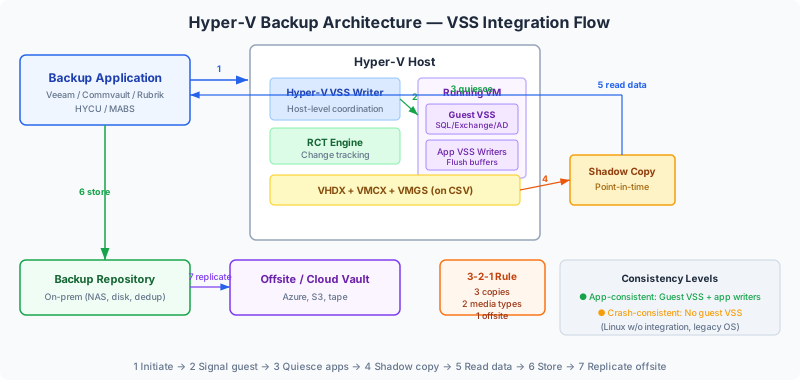
Application-consistent vs. crash-consistent:
| Consistency Level | When It Happens | What It Means |
|---|---|---|
| Application-consistent | Guest VSS integration services are enabled + guest OS supports VSS + applications have VSS writers | All applications flushed their buffers. SQL databases are in a clean state. No transaction log replay needed on restore. |
| Crash-consistent | Guest VSS unavailable (Linux without integration, legacy OS, VSS disabled) | Equivalent to pulling the power cord. The VM state is consistent but applications may need recovery (SQL log replay, filesystem check). Safe for most workloads but not ideal for databases. |
RCT , Efficient Incremental Backups
Resilient Change Tracking (RCT), introduced in Windows Server 2016, tracks which disk blocks have changed since the last backup at the hypervisor level. This replaces the older Changed Block Tracking (CBT) and provides:
- Efficient incrementals: Only changed blocks are backed up, not the entire VHDX
- Resilience to failures: If a backup is interrupted, RCT can resume from the last successful point without a full rescan
- Hypervisor-native: No in-guest agents required for block-level change tracking
All modern backup solutions (Veeam, Commvault, Rubrik, HYCU) use RCT for incremental backups on Hyper-V.
Files That Constitute a VM Backup
A complete VM backup must capture:
| File | Purpose |
|---|---|
.VMCX | VM configuration (replaces XML-based config from WS2012 R2) |
.VMGS | Guest state (vTPM data, guest firmware variables) |
.VMRS | Runtime state (saved state, if applicable) |
.VHDX / .AVHDX | Virtual hard disks and differencing disks (checkpoints) |
The Backup Solution Landscape
Here’s the honest assessment of each major backup solution for Hyper-V production environments.
Veeam Backup & Replication
Veeam dominates the Hyper-V backup market, and for good reason. It was designed for virtual infrastructure from the ground up, and its Hyper-V integration is mature and comprehensive.
Current version: v13.0.1 (November 2025). Supports Windows Server 2025 Hyper-V.
Architecture: Backup server + off-host backup proxies + backup repository. Agentless , no software installed inside VMs. Optional SCVMM integration for fabric awareness.
| Capability | Details |
|---|---|
| Backup types | Full, incremental (RCT-based), synthetic full, reverse incremental |
| Consistency | Application-aware processing for SQL, Exchange, AD, SharePoint, Oracle |
| Instant VM Recovery | Mount a VM directly from the backup repository on a Hyper-V host. Near-zero RTO , VM is running within minutes, then storage-vMotioned to production storage in the background. |
| SureBackup | Automated backup verification , boots VMs from backup in an isolated sandbox, runs health checks, reports success/failure. Proves your backups actually work. |
| Scale | Handles thousands of VMs. Enterprise Manager for multi-site orchestration. |
| Licensing | Per-workload (VUL) , perpetual or subscription. Legacy per-socket licenses convert to VUL. |
Honest assessment: Veeam is the de facto standard for Hyper-V backup. Instant VM Recovery and SureBackup are genuinely differentiating features. The licensing cost is meaningful but the capabilities justify it for most production environments. If you’re coming from VMware and already used Veeam, your investment carries over , Veeam supports both hypervisors with the same infrastructure.
Commvault
Commvault provides enterprise-grade data protection with deep Hyper-V integration, particularly for organizations with complex storage environments.
| Capability | Details |
|---|---|
| Architecture | Virtual Server Agent (VSA) on Hyper-V hosts , agentless VM backup |
| IntelliSnap | Hardware snapshot integration with SAN arrays (Pure, Dell, NetApp, HPE, Hitachi). Offloads backup to array-level snapshots , backups complete in minutes regardless of VM size. |
| Granular recovery | Individual files, folders, and application objects (Exchange mailboxes, SQL databases) from VM backups |
| Cloud tiering | Native tiering to Azure Blob, AWS S3, or any S3-compatible target |
| SCVMM integration | Fabric-aware backup policies based on SCVMM clouds and host groups |
Honest assessment: Commvault’s strength is IntelliSnap , if you have a Pure Storage, Dell, NetApp, or HPE array, SAN-level snapshot integration can dramatically reduce backup windows for large VMs. The platform is more complex than Veeam and requires more operational investment. Best suited for large enterprises with diverse storage and multi-platform protection needs.
Rubrik
Rubrik takes a fundamentally different approach , a scale-out appliance with an immutable filesystem and policy-driven automation.
| Capability | Details |
|---|---|
| Architecture | CDM (Cloud Data Management) appliance , physical or virtual. Scale-out, no master/media server architecture. |
| SLA Domains | Policy-based protection applied at SCVMM, cluster, host, or VM level. Defines frequency, retention, replication, and archival in a single policy. |
| Instant Recovery | Mount VMs directly from the Rubrik appliance for near-zero RTO. Bulk recovery of hundreds of VMs simultaneously. |
| Immutable backups | Rubrik’s filesystem is immutable by design , backups cannot be modified or encrypted by ransomware after write. |
| Cloud Data Management | Automated archival to AWS S3, Azure Blob, or GCP with global search across all data. |
Honest assessment: Rubrik’s strength is simplicity and ransomware resilience. The SLA Domain model eliminates the complex job scheduling of traditional backup. Immutable backups are genuinely valuable in the current threat landscape. The appliance model means higher upfront cost but lower operational complexity. Best suited for organizations that want a self-contained, policy-driven backup platform.
HYCU
HYCU is purpose-built for Hyper-V and designed for lean IT teams that don’t want the complexity of enterprise backup platforms.
| Capability | Details |
|---|---|
| Architecture | Fully agentless , no proxies, no agents, no SCVMM required. Native Hyper-V API integration. |
| Deployment | Single virtual appliance. Deploy and begin protecting VMs within an hour. |
| Application awareness | Auto-discovers SQL Server, Active Directory, Exchange for application-consistent backups |
| DR | Built-in failover/failback without separate DR products |
| Immutable backups | Anomaly detection with immutable backup copies |
| Cloud targets | S3, Azure Blob, Wasabi, Nutanix Objects |
Honest assessment: HYCU’s differentiator is simplicity and speed to value. No proxies to manage, no SCVMM dependency, no complex architecture. If you’re a small-to-medium organization without existing backup infrastructure and you want something purpose-built for Hyper-V, HYCU deserves evaluation. It won’t match Veeam’s feature depth for large enterprises, but it covers the core requirements with significantly less operational overhead.
Azure Backup (MABS)
Microsoft Azure Backup Server (MABS) provides on-premises Hyper-V backup with cloud vault integration.
| Capability | Details |
|---|---|
| Architecture | MABS v4 deployed on-premises, backs up Hyper-V VMs (host-level), replicates to Azure Recovery Services vault via MARS agent |
| Supported environments | Hyper-V on CSVs, local storage, and clustered environments. Currently supports through WS2022; monitor Microsoft for WS2025 confirmation. |
| Cost | MABS itself is free with Azure subscription. You pay for Azure vault storage (per-GB/month) and protected instance fees. |
| Recovery | Restore to original or alternate Hyper-V host. Individual file recovery from VM backups. |
Honest assessment: MABS is a reasonable option if you’re already invested in Azure and want unified cloud-integrated backup management. It’s less feature-rich than Veeam, Commvault, or Rubrik , no instant VM recovery, no SureBackup-equivalent, limited application awareness compared to third-party tools. WS2025 support status should be verified before committing. Best suited as a secondary backup target (on-prem primary + Azure vault for offsite).
Note: The standalone MARS agent (without MABS) only backs up files, folders, and system state , not full VM-level backup. For VM-level Hyper-V backup to Azure, MABS is required.
Windows Server Backup
Built into Windows Server, no additional licensing. Supports host-level Hyper-V backup via VSS.
Honest assessment: Not recommended as the sole backup solution for production clusters. Limitations include: BMR backup only covers system volumes (VMs on other volumes excluded), no centralized management, no scheduling flexibility, no application-granular recovery, no incremental-forever, no cloud tiering. Appropriate for emergency backup when the primary solution is unavailable, or for single-host lab environments.
Backup Solution Decision Matrix
| Factor | Veeam | Commvault | Rubrik | HYCU | Azure Backup (MABS) |
|---|---|---|---|---|---|
| Best for | Most environments | Large enterprise with SAN snapshots | Policy-driven, ransomware focus | Lean teams, simplicity | Azure-integrated environments |
| Complexity | Medium | High | Low–Medium | Low | Medium |
| SAN snapshot integration | Limited | IntelliSnap (deep) | API-based | No | No |
| Instant VM Recovery | Yes | Yes | Yes | Yes (failover) | No |
| Backup verification | SureBackup | Yes (manual) | Yes (automated) | Anomaly detection | No |
| Immutable backups | Hardened repository | Yes | Native | Yes | Vault-level |
| Agentless | Yes | Yes (VSA) | Yes | Yes | MABS agent on host |
| WS2025 support | Yes (v13) | Verify current matrix | Verify current matrix | Yes | Verify MABS v4 matrix |
| Licensing | Per-workload (VUL) | Per-VM or capacity | Appliance + subscription | Per-VM subscription | Per-instance + vault storage |
RPO/RTO Planning Framework
Your backup strategy should be driven by workload criticality, not by a one-size-fits-all schedule.
Workload Tiering
| Tier | Workload Examples | RPO Target | RTO Target | Backup Strategy |
|---|---|---|---|---|
| Tier 1 , Critical | SQL databases, Exchange, ERP, AD domain controllers | 15 min – 1 hour | < 1 hour | App-consistent backup every 1-4 hours + SAN snapshots every 15 min + replication (Post 14) |
| Tier 2 , Important | App servers, file servers, web servers, print servers | 4–12 hours | 2–4 hours | Daily app-consistent backup + weekly full |
| Tier 3 , Standard | Dev/test, templates, non-critical utilities | 24 hours | 8–24 hours | Daily crash-consistent backup, weekly full to offsite/cloud |
The 3-2-1 Rule (Still Valid)
3 copies of your data, on 2 different media types, with 1 offsite. For Hyper-V:
- Production: VMs on CSVs (your live data)
- On-premises backup: Backup repository on separate storage (NAS, dedicated disk shelf, deduplicated target)
- Offsite: Cloud vault (Azure, S3), tape, or replicated backup to a DR site
Testing Your Backups
A backup you haven’t tested is a backup you can’t trust. Schedule regular restore tests:
| Test | Frequency | What You Verify |
|---|---|---|
| File-level restore | Monthly | Individual files recover correctly from VM backup |
| Full VM restore | Quarterly | Complete VM restores to alternate host, boots, and applications function |
| Application recovery | Quarterly | SQL database restores to a point in time, Exchange mailbox recovers |
| Instant VM Recovery | Quarterly (if available) | VM boots from backup repository within expected time |
| DR site restore | Semi-annually | Full environment restore at DR site from offsite backups |
Veeam SureBackup and Rubrik automated verification automate much of this. If your backup solution supports automated testing, use it. If not, schedule manual tests and treat them as non-negotiable.
Next Steps
With backup architecture in place, the next question is: what happens when an entire site goes down? Backup gets your data back, but replication keeps your services running. In the next post, Post 14: Multi-Site Resilience, we’ll cover Hyper-V Replica, Storage Replica, Campus Clusters, and SAN-level replication , the technologies that protect against site-level failure.
Backup recovers data. Replication recovers services. You need both.
Resources
- Series Repository: github.com/thisismydemo/hyper-v-renaissance
Microsoft Documentation
Vendor Documentation
- Veeam Backup & Replication for Hyper-V
- Veeam Instant VM Recovery
- Commvault for Hyper-V
- Rubrik for Hyper-V
- HYCU for Hyper-V
Related Posts
- Post 12: Storage Architecture Deep Dive , CSV internals and storage design
- Post 14: Multi-Site Resilience , replication-based DR strategies
Series Navigation ← Previous: Post 12 , Storage Architecture Deep Dive → Next: Post 14 , Multi-Site Resilience