Hyper-V Is Still the Smarter First Choice
The operator's case for challenging the assumption that VCF or Azure Local should be the starting point for every VMware exit.
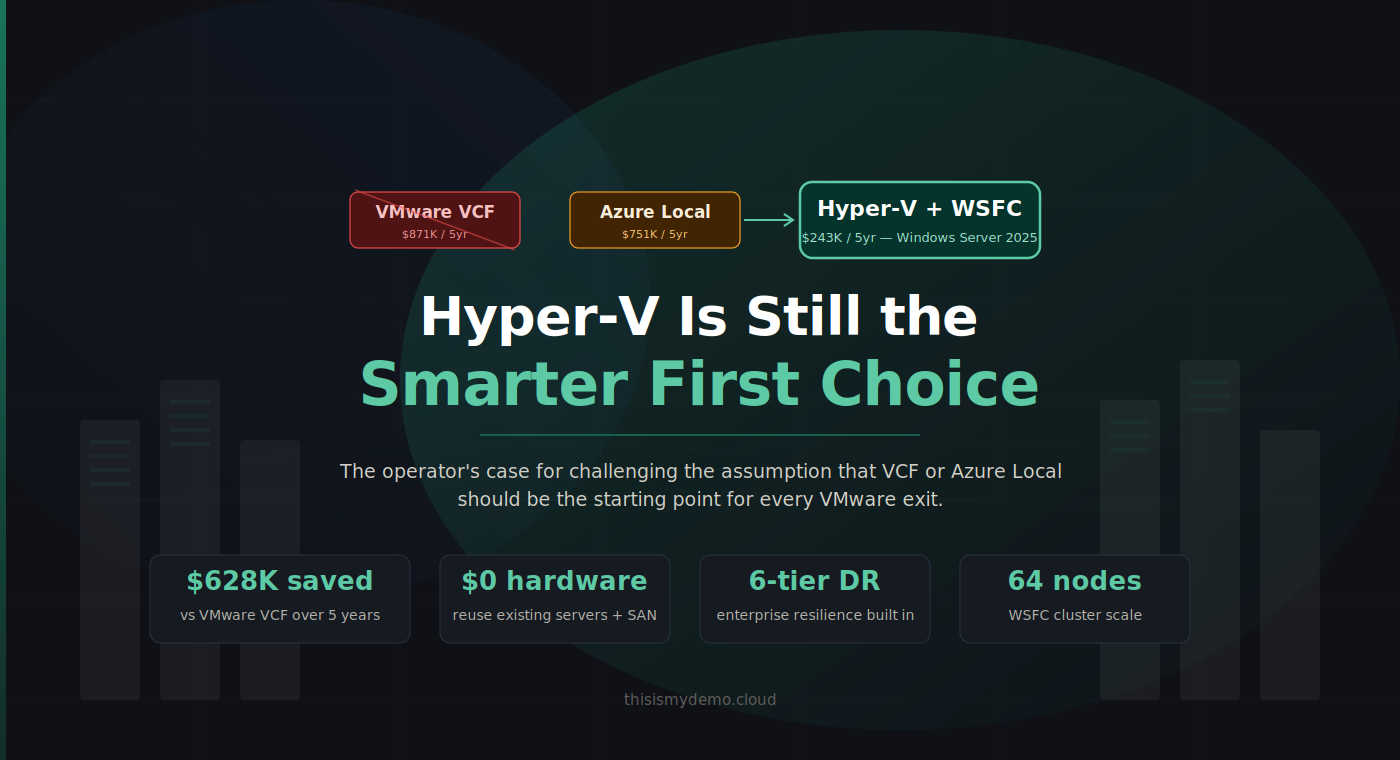
Azure Local is not the default VMware exit path. Neither is VMware Cloud Foundation the unquestioned benchmark it was two years ago. And yet the industry keeps framing the VMware exodus as a binary choice: stay and pay, or move to Microsoft’s preferred Azure-connected platform. Both options serve somebody’s agenda. Neither starts from the question that actually matters to infrastructure operators: what do I need, and what’s the cheapest way to get it without creating new dependencies?
For many organizations running primarily Windows workloads (the ones with 50, 100, 500 VMs on existing servers and SANs), the answer to that question is the same answer it has been for a decade. It’s Hyper-V. Not Azure Local. Not VCF. Hyper-V, running on Windows Server 2025, backed by the storage infrastructure you already own, managed by the tools you already know.
When you say you are leaving VMware, every VAR, every Microsoft partner, every migration specialist, and yes, Microsoft’s own sales and pre-sales teams point you in the same direction. Azure first. Then Azure VMware Solution. Then Azure Local. Hyper-V on Windows Server is the option that gets mentioned last, quietly, usually only after you push back on cost. Not because it cannot do the job. Because there is no recurring subscription attached to recommending it. That is true whether the conversation is with a reseller or with the Microsoft account team sitting across the table.
The irony is that Microsoft’s own documentation says something different than the sales motion. As I noted earlier in this series, Azure Local’s “primary focus is on edge and distributed environments.” Their own Compare Azure Local to Windows Server page points customers to Windows Server for SAN-backed storage, broad hardware compatibility, and traditional Hyper-V hosting. That is Microsoft’s engineers talking. This post makes the case the sales conversation skips.
Why This Post Exists
Two narratives dominate the VMware exit conversation right now, and both are designed to benefit someone other than the infrastructure team making the decision.
The VMware Narrative: Pay Up or Leave
Broadcom’s $69 billion acquisition of VMware in November 2023 (enterprise value including assumed debt) has fundamentally reshaped the virtualization market. The numbers tell the story:
- Cost increases of 150% to over 1,000% reported in extreme cases; CloudBolt’s 2026 CII study found 59% of customers experienced increases over 25%, with 14% exceeding 100% (CloudBolt CII Reality Report, January 2026)
- 72-core minimum per socket, effective April 2025, whether your CPUs have 16 cores or 72, you pay for 72
- 99% of VMware customers expressed concern about the acquisition’s impact in 2024; 85% remain concerned about future price increases in 2026 (CloudBolt CII Reality Report, January 2026, 302 IT decision-makers surveyed)
- Industry-reported partner reduction from 4,500+ authorized partners to 12 Pinnacle and ~300 Premier in the US, decimating the support and services ecosystem
- Widely reported late renewal penalties of up to 25% if subscriptions aren’t renewed by the anniversary date
What changed under Broadcom is not just pricing. It’s the entire purchasing model:
- Perpetual licenses eliminated. All customers forced to subscription-only
- Industry-reported ~8,000 VMware SKUs consolidated to a handful of bundles. VCF 9 forces NSX + vSAN whether you need them or not
- VCF 9 discontinues support for Broadwell and Skylake CPUs (Broadwell-DE, Broadwell-EP, Skylake-SP, Skylake-S, Skylake-D, Skylake-W) — the installer will block installation on those hosts outright. Ivy Bridge and Haswell were already dropped before VCF 9. Hardware refresh forced even if servers are perfectly functional.
- VCF 9’s management stack alone requires 48 vCPUs, 194 GB RAM, and 3.2 TB of provisioned storage for a Simple (single-node) deployment, and ~118 vCPUs, ~473 GB RAM, and ~5.7 TB for an HA (production) deployment where NSX Manager, VCF Operations, and VCF Automation are clustered at three nodes each (source: William Lam, Distinguished Platform Engineering Architect, VCF Division at Broadcom). VCF Automation alone in HA consumes 72 vCPUs and 288 GB RAM.
- OEMs are choosing NOT to re-certify older platforms for VCF, narrowing the supported hardware base
The message from Broadcom is clear: pay massively more for a stack you may not fully need, refresh your hardware whether or not it’s end-of-life, and accept that the partner ecosystem you relied on has been gutted. Customers face a forced decision: absorb massive increases or migrate.
The Azure Local Narrative: The “Natural” Microsoft Landing Zone
Microsoft’s counter-narrative positions Azure Local as the obvious next step for VMware refugees. The pitch is compelling on paper: Azure-connected management, Arc integration, a validated HCI design. But “compelling on paper” and “the right first choice for your environment” are not the same thing.
Azure Local carries its own baggage:
- $10/physical core/month subscription, a recurring platform rent that never stops
- Validated catalog hardware required. You cannot simply reuse your existing VMware servers unless they happen to appear in the Azure Local catalog, and validated nodes typically run $200K–$500K+ for a 4-node deployment
- S2D local disks only for storage (Dell PowerFlex GA; FC SAN from other vendors — Pure Storage, NetApp, HPE, Lenovo, Hitachi — in limited preview for nonproduction workloads as of November 2025. No iSCSI SAN support)
- Azure connectivity required. If connectivity is lost, existing VMs continue running normally but new VMs cannot be created until Azure Local syncs again (reduced functionality mode). Microsoft also offers a Disconnected operations option that brings the control plane on-premises for permanently disconnected scenarios (separate commercial arrangement).
- Azure Local Rack Aware Cluster is the same-campus configuration: one Azure Local instance spread across two physical racks in two different rooms or buildings for rack or room fault tolerance. It is not the older cross-site stretch-cluster model that was removed in 23H2 (2311 release).
- No Azure-Local-to-Azure-Local VM replication. The symmetric site-to-site DR story many buyers assume exists simply does not
This post exists to break the frame. It takes the capabilities that VCF bundles together, maps them across Azure Local, Hyper-V on SAN-backed failover clustering, and Hyper-V on Storage Spaces Direct, and then asks the question that vendor pitch decks never ask: which of these actually matches what your environment needs, at the lowest real cost, with the least forced change?
How to Read This Comparison
Before the tables start, some terminology matters.
Azure Local uses the same underlying Windows Server virtualization engine (Hyper-V and Windows Server Failover Clustering) as traditional Hyper-V deployments. It is not a different hypervisor. The difference is the operating model. Azure Local packages that foundation into an Azure-connected platform with Azure portal, Azure CLI, and PowerShell-driven management, Arc resource bridge integration, and a per-core subscription billing model.
When this post says “Hyper-V” as a migration target, it means traditional Windows Server 2025 failover clustering running the Hyper-V role in a customer-controlled design, split into two distinct architectures:
- Hyper-V on SAN: Windows Server Failover Clustering with external shared storage (Fibre Channel, iSCSI, or SMB3). Compute and storage scale independently. Existing enterprise arrays are fully supported.
- Hyper-V on S2D: Windows Server Failover Clustering with Storage Spaces Direct providing clustered local storage. A Microsoft-native HCI design that does not require Azure connectivity or subscription billing.
These two columns are separated throughout this post because they solve different problems. Hyper-V on SAN preserves existing storage investments and gives the broadest hardware flexibility. Hyper-V on S2D offers a software-defined storage answer without Azure Local’s platform overhead. Lumping them together hides the most important decision many operators will face.
| Platform | Storage Model | Management Model | Billing Model |
|---|---|---|---|
| VMware VCF | vSAN (bundled) or external SAN | vCenter, VMware NSX, VCF Operations (VCF 9) | Per-core subscription, 72-core minimum per socket |
| Azure Local | Storage Spaces Direct (primary), FC SAN in limited preview | Azure portal, Azure CLI, PowerShell, Arc | $10/core/month subscription |
| Hyper-V on SAN | External SAN (FC, iSCSI, SMB3) | SCVMM, WAC, FCM, PowerShell, Arc-enabled | Windows Server perpetual + optional SA |
| Hyper-V on S2D | Storage Spaces Direct (local disks) | SCVMM, WAC, FCM, PowerShell, Arc-enabled | Windows Server perpetual + optional SA |
This Isn’t Your 2012 Hyper-V
Before we compare platforms, let’s reset the baseline. Windows Server 2025 Hyper-V is the same hypervisor that powers Microsoft Azure, running the world’s largest workloads. The specifications speak for themselves:
| Capability | Hyper-V 2025 (Gen 2) | VMware VCF 9 | Advantage |
|---|---|---|---|
| Max vCPUs per VM | 2,048 | 960 | Hyper-V — 2.1x more compute per VM |
| Max RAM per VM | 240 TB | 24 TB | Hyper-V — 10x more memory per VM |
| Max Cluster Nodes | 64 (WSFC + SAN) | 96 (external NFS or VMFS on FC) / 64 (vSAN cluster) / 16 (Azure Local) | Hyper-V on SAN ties with the VCF 9 vSAN cluster maximum (64); VCF 9 with external NFS or FC SAN supports up to 96 nodes; both exceed Azure Local by 4x |
| Max VMs per Cluster | 8,000 | 8,000 | Tie |
| GPU Partitioning (GPU-P) | Native in Windows Server 2025. Live migration with GPU-P requires NVIDIA vGPU Software v18.x+ (commercial license). | Requires NVIDIA vGPU licensing for GPU passthrough and vMotion. | Hyper-V — native GPU-P at OS level; both platforms require NVIDIA licensing for live migration with GPU. |
| Storage Replica | Built-in sync/async block replication | No equivalent without vSAN stretch | Hyper-V — included free |
| Network ATC | Declarative NIC teaming, RDMA, QoS, VLAN | VMware NSX (bundled and mandatory in VCF 9) | Hyper-V — automated network intent |
Also included in Windows Server 2025 Datacenter at no extra cost:
Live Migration (zero-downtime VM moves), Cluster Shared Volumes (CSV), Hyper-V Replica (VM-level DR), Storage Spaces Direct (HCI option), Shielded VMs / VBS / Credential Guard, Workgroup clusters (no AD required), Windows Admin Center: Virtualization Mode (vMode) (FREE, Public Preview), S2D thin provisioning, accelerated disk resync, cloud witness for quorum, and unlimited Windows Server guest VMs.
No Hardware Refresh Required
This is the #1 differentiator. Customers keep their existing servers, existing SAN, existing network. Only the hypervisor changes.
What stays with Hyper-V + WSFC:
- Servers: Dell PowerEdge, HPE ProLiant, Lenovo ThinkSystem, Cisco UCS. All work as-is.
- SAN Storage: Pure Storage, NetApp, Dell EMC, HPE. Any FC/iSCSI/SMB3 SAN works with CSV.
- Network: Existing switches, VLANs, fabric. No RDMA required (nice-to-have, not mandatory)
- HCL: Any x64 server on the Windows Server HCL, far broader than BCG or Azure Local validated nodes
- No CPU restrictions: No generation deprecation like ESXi 9.0
What VCF 9 and Azure Local require:
VMware VCF 9: BCG-certified hardware only. Older CPUs deprecated. OEMs choosing NOT to re-certify older platforms. Forces NSX installation regardless of need. Management overhead alone consumes 48 vCPUs, 194 GB RAM, 3.2 TB storage in a Simple deployment, scaling to ~118 vCPUs, ~473 GB RAM, ~5.7 TB in a production HA configuration.
Azure Local: Hardware must be listed in the Azure Local Catalog to receive Microsoft support. The catalog has three tiers: Validated Nodes (individual servers), Integrated Systems (pre-configured complete systems), and Premier Solutions (premium pre-validated systems). Catalog vendors include Dell, HPE, Lenovo, DataON, Supermicro, Bluechip, Thomas-Krenn, primeLine, and others. $200K–$500K+ for typical 4-node Premier Solution or Integrated System deployment. Cannot reuse existing VMware server hardware unless it appears in the catalog. No external SAN support (S2D local disks only, FC SAN in limited preview).
The server stays. The SAN stays. The network stays. Only the hypervisor changes.
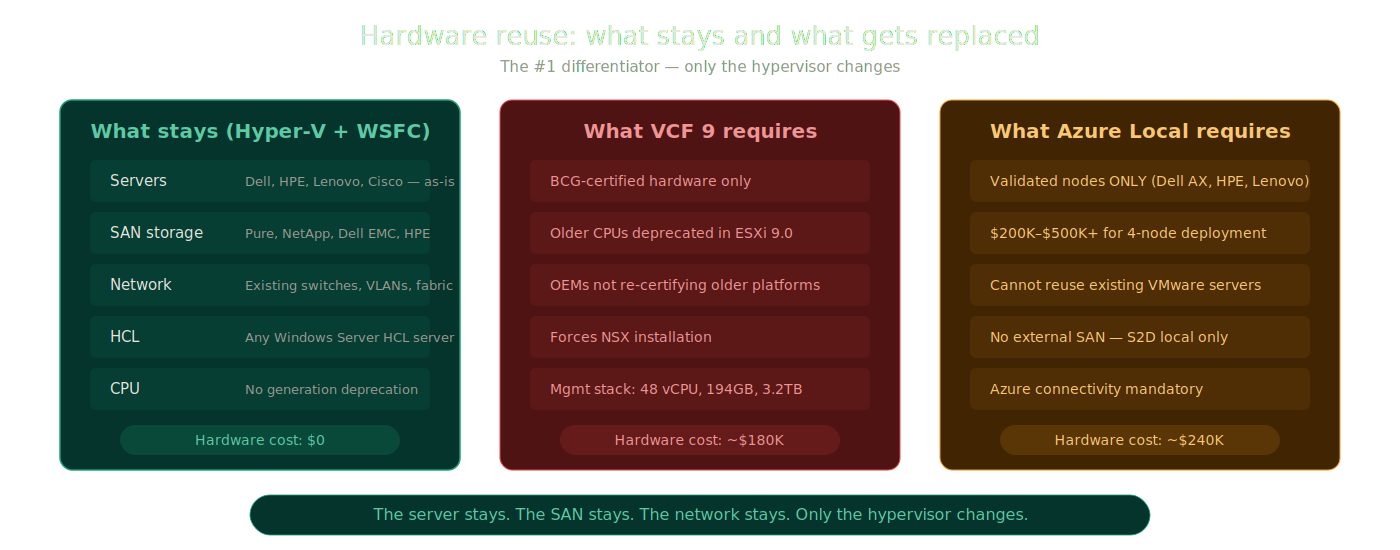 Hardware reuse: Hyper-V vs VCF vs Azure Local
The Master VCF Capability Map
This is the core comparison. Every row starts from a VCF capability or assumption, maps it to Azure Local and both Hyper-V architectures, and gives a blunt verdict.
VM Lifecycle and Mobility
| VCF Capability | Why It Matters | Azure Local | Hyper-V on SAN | Hyper-V on S2D | Verdict |
|---|---|---|---|---|---|
| VM provisioning and templates | Repeatable, fast deployments reduce manual drift | ARM templates, Bicep, Terraform via Arc resource bridge. Azure portal VM creation. | SCVMM service templates, VM templates in library. WAC VM creation. PowerShell New-VM. | Same as SAN column—SCVMM, WAC, PowerShell. | All platforms deliver workable VM provisioning. VCF may feel more polished through vCenter. Hyper-V answers depend on which management tool you invest in. |
| Live migration | Non-disruptive host maintenance, load balancing | Fully supported within cluster. | Fully supported. Compression, RDMA offload, shared-nothing options in WS2025. | Fully supported within S2D cluster. | Near parity. Live migration is mature across all platforms. Not a VCF-exclusive advantage. |
| Host maintenance workflows | How disruptive is patching and hardware work? | Azure Local solution updates in the standard Azure-connected model coordinate rolling drain, patch, and resume through Azure tooling and OEM-integrated workflows. | Cluster-Aware Updating (CAU). Drain, patch, resume. Broader firmware and driver work relies more on OEM tooling and CAU plug-ins. | Same as SAN—CAU for rolling updates, with broader stack coordination assembled from multiple tools. | VCF Operations provides the most integrated lifecycle story. Azure Local is more coordinated than traditional Hyper-V. Hyper-V CAU is functional, but broader stack coordination is less unified. |
| Storage migration for running VMs | Moving workloads without forcing all storage decisions on day one | Not applicable. | Strongest answer. Storage Live Migration moves VHDs between CSVs, LUNs, or SMB shares with zero downtime. Array-native tools add further flexibility. Workloads can land on interim storage and migrate later. | Not applicable. | Hyper-V on SAN wins decisively. Azure Local has no storage migration capability by design — its HCI architecture makes the concept meaningless. Hyper-V on SAN gives you full freedom to move data between storage targets without downtime. |
| VMware-to-target migration | How fast and clean is the exit from VMware? | Azure Migrate supported (replicates to Azure-managed storage only). Must land on S2D or preview FC SAN. Hardware must be Azure Local validated. | SCVMM V2V, third-party tools (Veeam, Zerto, Commvault, NAKIVO). Land on any supported SAN target. No hardware catalog restriction. Note: SCVMM V2V cannot convert VMs stored on vSAN — use third-party tools for those. | SCVMM V2V, third-party tools. Land on S2D storage. Note: SCVMM V2V cannot convert VMs stored on vSAN — use third-party tools for those. | Hyper-V on SAN is the easiest first landing zone when preserving storage optionality matters. No hardware catalog lock. No per-core subscription on day one. Azure Migrate only targets Azure — not standalone Hyper-V. |
Storage and Data Services
| VCF Capability | Why It Matters | Azure Local | Hyper-V on SAN | Hyper-V on S2D | Verdict |
|---|---|---|---|---|---|
| External SAN support | Preserving existing storage investments | Limited. Dell PowerFlex GA; FC SAN from other enterprise vendors in limited preview for nonproduction workloads (Nov 2025). No iSCSI SAN. | Native strength. FC, iSCSI, SMB3 all fully supported. Any enterprise array with Windows Server certification works. | Not the design center—S2D uses local disks. | Major differentiator for Hyper-V on SAN. If you own a SAN today, Hyper-V uses it. Azure Local mostly cannot. |
| HCI / local storage | All-local-disk simplicity | Native design center. S2D pools local NVMe/SSD/HDD across nodes into a single distributed storage pool with ReFS and CSVs. | Not the primary design center — SAN is the intended storage path for this option. S2D can be configured but is not the recommended layout. | Native design center. S2D pools local NVMe/SSD/HDD across nodes into a single distributed storage pool with ReFS and CSVs. | Azure Local and Hyper-V on S2D use the same underlying storage technology. Capability difference is negligible. The difference is operating model, cost, and management — not storage. |
| Storage protocol flexibility | Which storage protocols does each platform support for connecting external storage? | FC only. Dell PowerFlex GA; other vendors in limited preview for nonproduction. No iSCSI, no NVMe-oF. | FC, iSCSI, InfiniBand, SMB/NAS. Any vendor in the Windows Server catalog. | FC, iSCSI, InfiniBand, SMB/NAS — same as Hyper-V on SAN when external storage is added alongside S2D. | Hyper-V on SAN and Hyper-V on S2D (mixed mode) support the full protocol stack. Azure Local is FC-only today — no iSCSI, no NVMe-oF. |
| Storage expansion | How painful is adding capacity? | Hyperconverged only. Add drives to existing nodes or add new nodes — always adds compute and storage together. S2D rebalances across the cluster. | Independent scaling. Add storage without compute. Add compute without storage. No HCI constraint. | Hyperconverged (default) or disaggregated (separate compute and storage clusters). In disaggregated mode, storage scales independently from compute — same as Hyper-V on SAN. | Hyper-V on SAN wins outright. Hyper-V on S2D (disaggregated) also scales independently. Azure Local is hyperconverged only — compute and storage always scale together. |
| Array-native migration tooling | Moving data smarter than the hypervisor can | Not applicable—S2D is internal. FC SAN preview too early for tooling. | Strong advantage. Pure Storage, NetApp, Dell PowerStore, HPE Alletra all offer array-native data mobility for Hyper-V. | Not applicable—storage is internalized. | This row strongly reinforces the SAN argument. Customers with enterprise arrays keep proven data mobility. |
| Array-native replication and DR | Preserving proven storage-side DR patterns | Not applicable for S2D. FC SAN preview too new for replication. | Strong advantage. Array-native sync and async replication works alongside Hyper-V Replica and Storage Replica. | Storage Replica (volume-level, sync or async). No array-native option. | Hyper-V on SAN preserves mature storage DR investments. |
BCDR and Multi-Site Resilience
| VCF Capability | Why It Matters | Azure Local | Hyper-V on SAN | Hyper-V on S2D | Verdict |
|---|---|---|---|---|---|
| Hypervisor-level replication | VM replication without storage dependency | Hyper-V Replica is technically available at the OS level (documented for Azure Local 2311.2+), but it is not integrated into Azure Local’s management plane, not exposed through Azure portal, and not part of Azure Local’s supported operational model. No Azure-portal-managed Azure-Local-to-Azure-Local VM replication exists. | Hyper-V Replica. Async VM replication. 30-second to 15-minute intervals. Free. | Hyper-V Replica. Same capabilities. | Hyper-V wins clearly. Hyper-V Replica provides simple, free, built-in VM DR that is fully integrated into the management experience. Azure Local has it at the OS level but not operationally. |
| Storage-level replication | Site resilience, planned migration, failback | Not applicable. Azure Local uses S2D with no external storage target and no stretch cluster support since 23H2. No storage-level replication exists. | Broadest choice. Storage Replica + array-native replication (Pure Storage ActiveCluster, NetApp MetroCluster, Dell PowerMax SRDF, HPE Peer Persistence). Dual replication layers. | Storage Replica (sync/async). No array-native option since storage is internalized. | Hyper-V on SAN offers the deepest replication toolkit. Hyper-V on S2D has Storage Replica. Azure Local has nothing at this layer. |
| Campus / multi-site clustering | Near-metro, campus, or two-datacenter resilience | Azure Local Rack Aware Cluster. Microsoft supports one Azure Local instance stretched across two physical racks in two rooms or buildings on the same campus, with rack-level resilience inside that site. It is not the older cross-site stretch-cluster model removed in 23H2. | Windows Server campus cluster on shared storage. Shared-storage WSFC remains the classic campus-cluster option for two rooms or buildings, with site-aware failover behavior and shared storage designed for that topology. | Windows Server 2025 S2D Campus Cluster. Microsoft now explicitly supports S2D Campus Cluster on Windows Server 2025 for two rooms or buildings in the same campus. It uses S2D’s own replication between nodes, not Storage Replica, and delivers rack-level resilience with two-copy or four-copy data layouts. | Windows Server offers the broader campus and multi-site story. Azure Local offers Rack Aware Cluster for same-campus only. |
| Site failover and failback | How recovery actually works | ASR (Azure-directed only). No native site-to-site failover between Azure Local instances. | Hyper-V Replica failover. Storage Replica failover. SAN-native failover. ASR. Multiple options. | Hyper-V Replica failover. Storage Replica failover. ASR. | Hyper-V offers more on-prem-to-on-prem recovery flexibility. Azure Local pushes toward Azure-directed recovery. |
| Azure-Local-to-Azure-Local replication | Many buyers assume this exists | Gap. No native Azure-Local-to-Azure-Local VM replication. This is the most misunderstood assumption in the market. | Not applicable—Hyper-V uses Hyper-V Replica and SAN-native replication. | Not applicable. | This gap exposes a key Azure Local assumption. Hyper-V already solves site-to-site with Hyper-V Replica. |
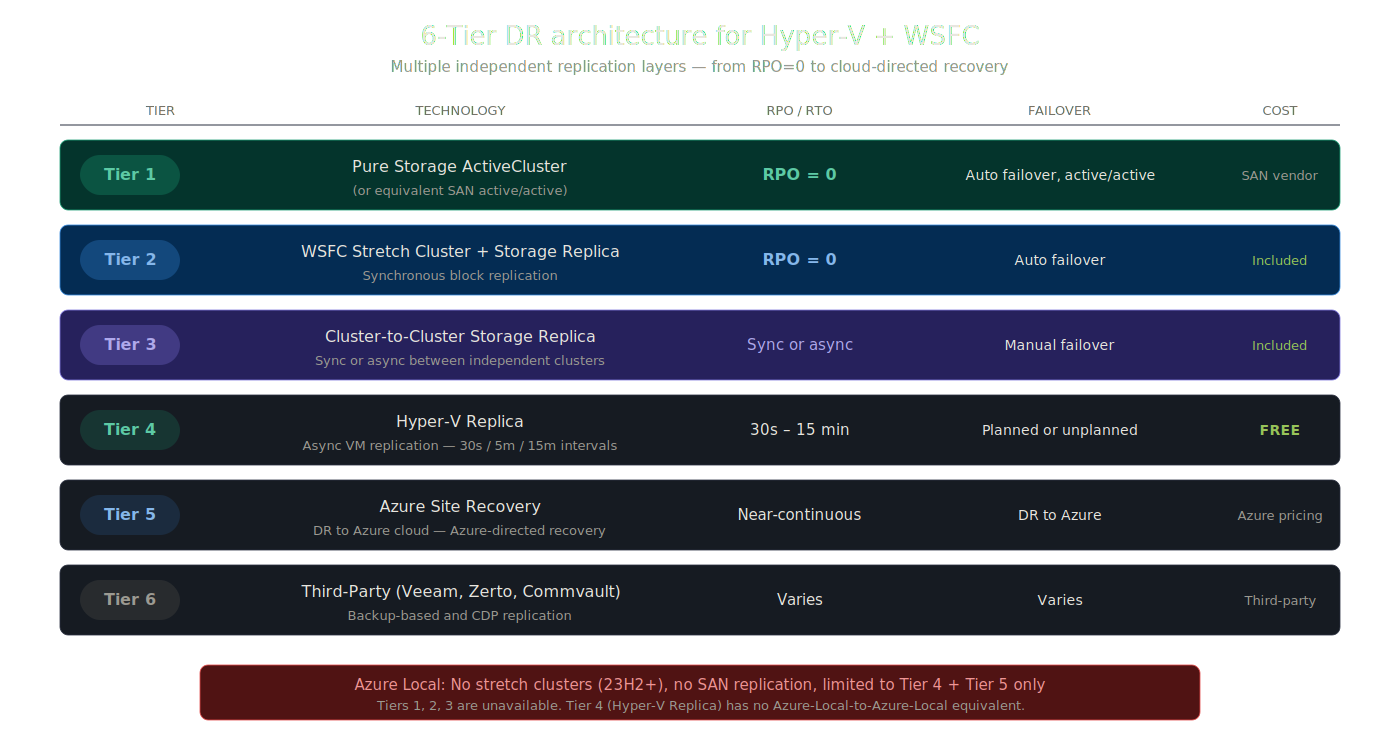 6-Tier DR architecture available to Hyper-V on SAN
The 6-Tier DR Architecture
When Hyper-V is backed by enterprise SAN storage, the DR options are not just adequate. They are enterprise-grade and multi-layered. Here’s the full resilience stack available to Hyper-V + WSFC deployments:
| Tier | Technology | RPO | Failover Type | Cost |
|---|---|---|---|---|
| Tier 1 | Pure Storage ActiveCluster (or equivalent SAN active/active) | RPO = 0 | Automatic failover, active/active | SAN vendor licensing |
| Tier 2 | Windows Server campus cluster on shared storage | RPO = 0 (synchronous) | Automatic failover | Included in Datacenter |
| Tier 3 | Cluster-to-Cluster Storage Replica | Sync or async | Manual failover | Included in Datacenter |
| Tier 4 | Hyper-V Replica | 30s / 5m / 15m intervals | Planned or unplanned | FREE — built into Windows Server |
| Tier 5 | Azure Site Recovery | Continuous replication | DR to Azure cloud | Azure consumption pricing |
| Tier 6 | Third-Party (Veeam, Zerto, Commvault) | Varies | Varies | Third-party licensing |
Azure Local’s DR story by comparison: Rack Aware Cluster provides same-campus resilience inside one Azure Local instance, but the older cross-site stretch-cluster model ended in 23H2. Azure Local has no SAN-based replication tier, no current equivalent to Windows Server campus cluster on shared storage or cluster-to-cluster Storage Replica designs, and no native Azure-Local-to-Azure-Local VM replication. Azure Site Recovery is the primary Azure-directed DR path; Hyper-V Replica exists at the OS level but isn’t part of Azure Local’s integrated management model.
Pure Storage Integration: A Concrete Example
The plan called for a concrete SAN example, and Pure Storage is a useful one:
- FlashArray: A mature enterprise SAN platform that Pure positions for mission-critical workloads, including virtualization and Microsoft SQL Server.
- ActiveCluster: Synchronous replication with zero RPO and storage-layer zero RTO across metro distances.
- ActiveDR: A disaster recovery option that Pure positions around near-zero-RPO protection and rapid restore.
- Operational model: FlashArray emphasizes non-disruptive upgrades, resilience, and simpler day-2 storage operations.
- Backup ecosystem: Pure publicly highlights integrations and joint data protection workflows with platforms such as Veeam and Commvault.
This is the kind of storage-side capability stack Hyper-V on SAN can preserve. The exact depth depends on the array and tooling in use, but the broader point holds: organizations that already run enterprise SAN platforms can keep storage-native replication, recovery, and operational workflows when they move to Hyper-V.
Management and Day-2 Operations
| VCF Capability | Why It Matters | Azure Local | Hyper-V on SAN | Hyper-V on S2D | Verdict |
|---|---|---|---|---|---|
| Central management plane | VMware’s strongest area | Azure portal + Azure CLI + Azure PowerShell. Local troubleshooting may still require Failover Cluster Manager and Hyper-V Manager. | SCVMM (closest vCenter equivalent). WAC for lighter ops. FCM for cluster. PowerShell for everything. Arc-enabled SCVMM extends to Azure. | Same tool set as SAN. | VMware still leads on single-pane polish. Azure Local pushes to cloud. Hyper-V requires tool-layer decisions. |
| Multi-cluster operations | Beyond a single cluster | Azure portal provides centralized visibility across Azure Local instances. | SCVMM multi-cluster management. Arc-enabled SCVMM extends estate to Azure. Cluster Sets group multiple clusters. | Same as SAN. | Azure Local has the Azure-connected fleet story. Hyper-V with SCVMM has the on-prem estate story. |
| Patching and lifecycle | Downtime planning, compliance | Azure Local solution updates in the Azure-connected model. | CAU for rolling host updates. OEM tools and CAU plug-ins handle broader firmware and driver work. | Same as SAN. | VCF and Azure Local are more opinionated. Hyper-V CAU is functional but broader lifecycle coordination is less unified. |
| Monitoring | Usable telemetry | Azure Monitor integration. Portal dashboards. | WAC dashboards. SCOM for enterprise monitoring. Azure Monitor via Arc. Defender for Cloud. | Same as SAN. | All achieve adequate observability. Hyper-V may need more tool assembly. |
| Automation | Scriptability over GUI polish | Azure CLI, Azure PowerShell, ARM/Bicep/Terraform. Ansible and DSC can complement Windows configuration workflows. | PowerShell-native. Deep WMI surface. SCVMM module. Full Hyper-V module. Arc REST APIs. Ansible and DSC fit well for Windows orchestration and configuration. | Same as SAN. | Hyper-V compares well. Azure Local has the cleaner IaC story; Hyper-V is strongest in PowerShell and Windows-native automation. |
| RBAC and delegation | Controlled operations | Azure RBAC integrated. Built-in Azure Local roles. | SCVMM provides role-based delegation. AD-based permissions. | Same as SAN. | Azure Local has the modern RBAC story through Azure. Hyper-V needs SCVMM for comparable delegation. |
| Server roles on host | Running additional services alongside VMs | Hypervisor-only. Cannot run full Windows Server roles. | Full Windows Server roles available. File server, print server, DNS, DHCP—anything Windows Server supports alongside Hyper-V. | Same as SAN. | Hyper-V wins on host flexibility. Azure Local is locked to hypervisor-only operation. |
What Hyper-V Does That Azure Local Cannot
This summary table crystallizes the operator-facing differences that matter most:
| Capability | Azure Local | Hyper-V + WSFC |
|---|---|---|
| Platform licensing model | ✗ Subscription billing per physical core through Azure | ✓ Perpetual Windows Server licensing; Software Assurance is optional |
| Windows Server workload licensing | ✗ Separate Windows Server subscription, Azure Hybrid Benefit, or OEM licensing path required | ✓ Datacenter includes unlimited Windows Server guest rights |
| Hardware freedom | ✗ Must use Azure Local catalog hardware | ✓ Any supported Windows Server hardware design |
| External SAN flexibility | ✗ FC SAN is still in limited preview; no iSCSI support | ✓ FC, iSCSI, and SMB3 shared storage are all supported |
| On-premises DR choices | ✗ No native Azure-Local-to-Azure-Local VM replication; Azure Site Recovery is primarily Azure-directed | ✓ Hyper-V Replica, Storage Replica, and SAN-native DR options |
| Backup and recovery ecosystem | ✗ Azure-directed and platform-specific workflows are the main story; fewer mature SAN-centric backup patterns | ✓ Broad Hyper-V backup support plus existing SAN-integrated backup and recovery workflows |
| Fully offline operation | ✗ Azure connectivity is still part of the standard operating model; Disconnected operations is separate | ✓ Fully offline with no Azure dependency |
Management and Tooling Transparency Matrix
The master table shows what the platforms can do. This second table shows what it feels like to operate Hyper-V day to day.
One of the biggest reasons people default to VMware is the belief that Hyper-V lacks a credible operational control plane. The honest answer isn’t to pretend Hyper-V has a neat vCenter equivalent. It’s to show the management story in layers and let operators decide.
| Capability | VMware VCF | Azure Local | Hyper-V Native Only | Hyper-V + WAC | Hyper-V + SCVMM | Verdict |
|---|---|---|---|---|---|---|
| Primary management experience | vCenter—single pane. Mature, polished, deeply integrated. | Azure portal for VM and cluster lifecycle. CLI and PowerShell for ops. Local troubleshooting may still require Failover Cluster Manager and Hyper-V Manager. | Fragmented. Hyper-V Manager, FCM, PowerShell. | Improved. Web-based cluster and VM management. Covers 70-80% of daily tasks. WAC Virtualization Mode (vMode) adds modern VM operations. | Closest to vCenter. Multi-host, multi-cluster, VM library, networking, storage fabric. | VMware leads on polish. SCVMM is capable but aging. WAC + vMode is promising. Azure Local pushes to the Azure portal. |
| Cluster deployment | VCF Installer automates bring-up. | Azure-connected, opinionated deployment via Microsoft/OEM workflows, with portal, PowerShell, and ARM/Bicep in the first-party model. Hardware must match the catalog. | Manual to script-driven. PowerShell and Failover Clustering tools give full control, but require more engineering effort. | WAC assists cluster creation and setup. Better than native-only, but not the main automation plane. | Strongest Microsoft deployment story for traditional Hyper-V estates. Fabric onboarding, bare-metal deployment, and templated host bring-up. | Azure Local is more opinionated; Hyper-V is more flexible. SCVMM is the strongest Microsoft deployment option for traditional Hyper-V estates. |
| Multi-cluster visibility | vCenter manages multiple clusters. Aria extends to fleet. | Azure portal provides centralized visibility across Azure Local instances. | Weakest. Each cluster independent. | Limited per-gateway. | SCVMM manages multiple clusters. Arc-enabled SCVMM extends to Azure portal. | Hyper-V at scale needs SCVMM or Arc-enabled SCVMM. Native-only isn’t viable for multi-cluster. |
| Patching / lifecycle | VCF Operations lifecycle workflows. BOM-driven releases and ordered component updates. | Azure Local solution updates. Azure-connected by default. Solution Builder Extension can carry OEM drivers and firmware in the validated package. | CAU handles rolling updates. Firmware and driver coordination relies on OEM tools and CAU plug-ins, with verification owned by the operator. | WAC surfaces CAU integration, not a full-stack validation plane. | SCVMM can help coordinate broader host maintenance, but it is not a full solution lifecycle or validation plane. | VCF and Azure Local provide the stronger curated lifecycle story. Hyper-V is flexible, but the operator owns more of the validation work. |
| Monitoring / health | vCenter alarms, Aria Operations. | Azure Monitor, portal health views. Cloud-connected. | Event logs, PerfMon, basic cluster health in FCM. | WAC provides cluster health dashboards, VM metrics, storage health. Solid improvement. | SCOM integration. SCVMM fabric health views. | Hyper-V achieves good observability, but from assembled parts, not one clean default pane. |
| Automation surface | PowerCLI, vSphere REST API, Terraform. Mature ecosystem. | Azure CLI, PowerShell, ARM/Bicep/Terraform. Ansible and DSC can complement Windows configuration workflows. | PowerShell Hyper-V module is comprehensive. WMI surface. CIM cmdlets. Full cluster module. Ansible and DSC fit naturally for Windows state management. | WAC is GUI-focused—not the automation core. | SCVMM PowerShell module adds fabric automation. | Hyper-V’s automation story is genuinely strong. Azure Local has the cleaner ARM/Bicep/Terraform model; Hyper-V is strongest in PowerShell with Ansible and DSC as complements. |
| RBAC / delegation | vCenter roles. Granular, well-documented. | Azure RBAC. Built-in roles. Cloud-native. | AD-based permissions. Limited granularity without SCVMM. | Gateway-level access control. Limited. | SCVMM self-service and delegated admin. Closer to vCenter delegation. | Azure Local has modern RBAC. VMware has mature local RBAC. Hyper-V needs SCVMM to compete. |
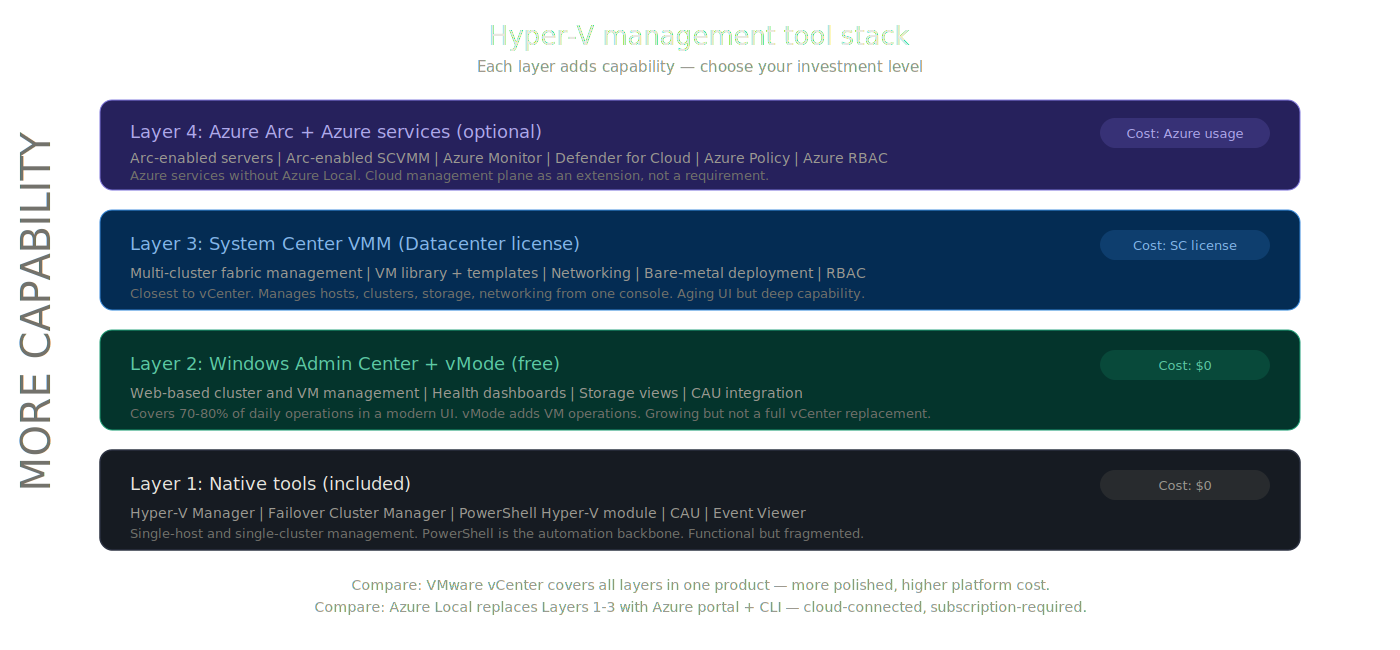 Hyper-V management tool stack: native → WAC → SCVMM → Arc
Operator Reality by Domain
Tables map capabilities. These sections answer the practical questions operators actually ask.
VM Migration: Getting Off VMware
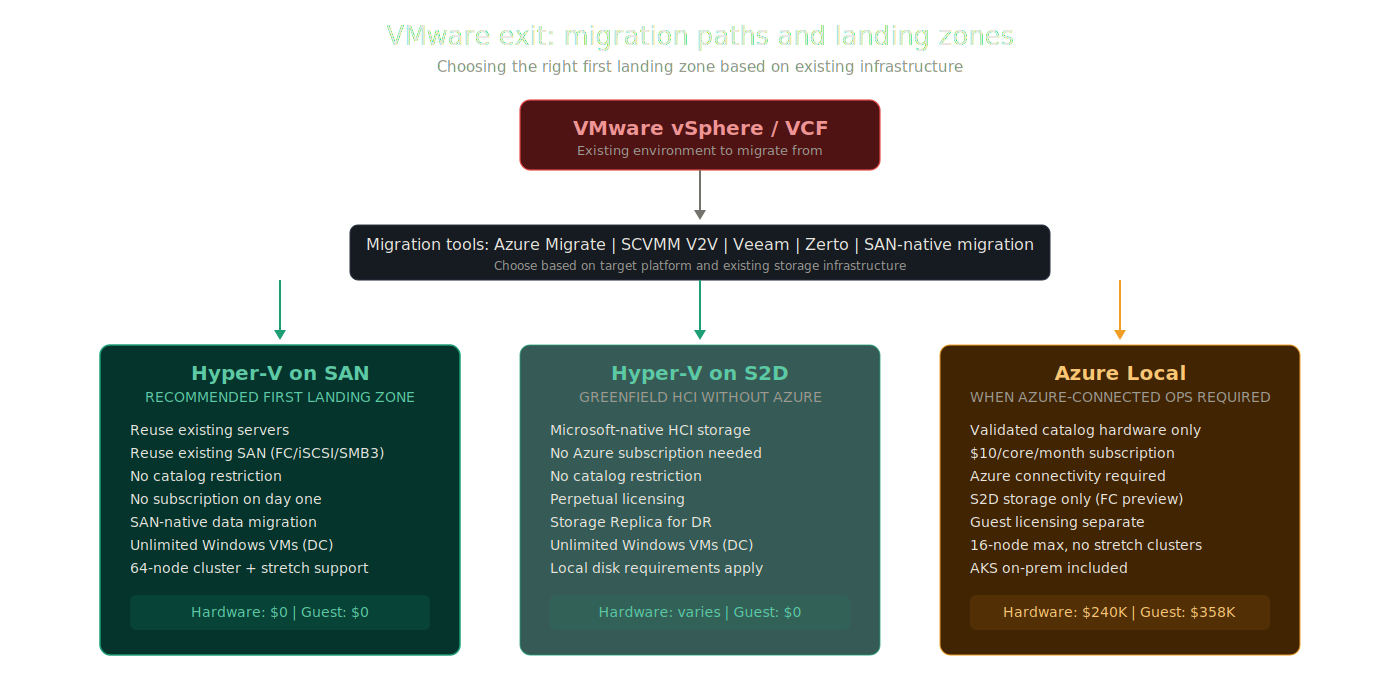 VMware exit: migration paths and landing zone comparison
The migration story matters because it determines whether VMware exit starts as a controlled platform change or a forced infrastructure redesign.
The Microsoft-native answer is not one tool for every destination. It splits by target:
- Azure Migrate remains the discovery, assessment, and migration path for Azure-oriented outcomes, including Azure-connected landing zones such as Azure Local.
- SCVMM V2V is the documented Microsoft path for VMware-to-Hyper-V conversion when the destination is traditional Hyper-V.
- Third-party tools remain important where lower downtime, broader storage support, or more flexible cutover options are needed.
For a blog arguing that Hyper-V is the smarter first landing zone, the key Microsoft-native tool is SCVMM, not Azure Migrate.
SCVMM V2V conversion provides direct VMware-to-Hyper-V conversion. SCVMM connects to vCenter, discovers ESXi hosts and VMware VMs, and converts supported VMware VMs into Hyper-V format for placement on Hyper-V hosts or Azure Local. That said, Microsoft documents real limits: VMware VMs must be stopped, snapshots must be removed, VMware Tools must be uninstalled, and VMs residing on vSAN cannot be converted with SCVMM.
Third-party tools such as Veeam, Zerto, Commvault, NAKIVO, and Carbonite matter because they cover the situations where the Microsoft path is too rigid or not a fit. They are especially relevant for large estates, lower-downtime migration programs, and environments where vSAN-backed source VMs rule out SCVMM V2V.
The critical question is: where does the migrated VM land?
With Hyper-V on SAN, the VM lands on infrastructure many operators already own. That is the cleanest first landing zone in environments with existing enterprise storage. You keep the servers, keep the SAN, and move the virtualization layer. In some environments, the storage move is simpler because the array and fabric are already in place. That reduces disruption and preserves established storage, backup, and replication workflows.
With Azure Local, the landing zone is different in kind, not just in branding. It is an Azure-connected operating model with hardware catalog requirements and storage constraints that may force earlier design changes. The source SAN generally is not the destination SAN. Unless the environment lines up with the supported Azure Local storage path, migration planning starts to include hardware, catalog, and platform-model decisions before the first VM moves.
With Hyper-V on S2D, the VM still lands on traditional customer-controlled Hyper-V, but on clustered local storage rather than an external SAN. That avoids Azure Local’s catalog and subscription model, but it does mean the target platform must be built around S2D-capable hosts and local disks.
Bottom line: if the goal is the lowest-friction first landing zone for a Windows-heavy VMware exit, Hyper-V on SAN remains the strongest opening move. The Microsoft-native case for that path is SCVMM V2V plus partner tooling where needed, not Azure Migrate as the headline story. Azure Local may still be the right destination for some estates, but it is a different migration decision because it introduces Azure-connected platform constraints much earlier.
Quick Reference: VM Migration Comparison
| Migration Factor | Hyper-V on SAN | Hyper-V on S2D | Azure Local |
|---|---|---|---|
| Primary migration tools | SCVMM V2V, Veeam, Zerto, Commvault, NAKIVO | SCVMM V2V, Veeam, Zerto, Commvault, NAKIVO | Azure Migrate |
| Target storage | Existing SAN (FC, iSCSI, SMB3) | S2D local disks | S2D local disks (FC SAN in preview) |
| Hardware requirement | Any Windows Server HCL hardware | Any Windows Server HCL hardware | Must be in Azure Local Catalog (Dell, HPE, Lenovo, DataON, Supermicro, and others) |
| Array-native data mobility | ✓ Pure, NetApp, Dell, HPE tools | ✗ Not applicable | ✗ Not applicable |
| New hardware required day one | ✗ Reuse existing ($0) | ✗ Reuse existing ($0) | ✓ $200K–$500K+ |
| Existing SAN reuse | ✓ Full | △ Partial. External SAN can coexist in mixed-mode designs, but S2D remains the primary storage model. | ✗ S2D only (FC preview) |
| Platform subscription before migration | ✗ None | ✗ None | ✓ $10/core/month from day 1 |
Storage Replication and Data Protection
Once VMs are on Hyper-V, the DR story is not just adequate. It is multi-layered in a way Azure Local cannot match.
Hyper-V Replica provides asynchronous VM replication built into Windows Server at no additional cost. It supports replication intervals of 30 seconds, 5 minutes, or 15 minutes. It works between any two Hyper-V hosts or clusters. It supports planned and unplanned failover with test failover capabilities. It is simple, proven, and free.
Azure Local does support Hyper-V Replica at the OS layer, so the limitation is narrower than “no equivalent.” The real gap is that there is no native Azure-managed Azure-Local-to-Azure-Local replication workflow. Microsoft documents Hyper-V Replica between Azure Local clusters, but it must be configured out of band with PowerShell or Failover Cluster Manager, not through the Azure portal. After failover, the VM runs on the target cluster as an unmanaged Hyper-V VM until it is registered and reconnected to Azure.
Storage Replica provides synchronous or asynchronous block-level replication between volumes. Available in both Datacenter edition (unlimited volumes and sizes) and Standard edition (single volume, 2 TB max per volume). The full-featured Datacenter implementation is the foundation of stretch cluster designs.
Array-native replication (Hyper-V on SAN) adds a third layer. Organizations running Pure Storage ActiveCluster, NetApp MetroCluster, Dell PowerMax SRDF, or HPE Peer Persistence maintain their existing storage-level replication alongside Hyper-V Replica and Storage Replica. Three independent replication layers, each solving a different RPO/RTO requirement.
Quick Reference: Data Protection Comparison
| DR Capability | Hyper-V on SAN | Hyper-V on S2D | Azure Local |
|---|---|---|---|
| VM-level replication | ✓ Hyper-V Replica (free, built-in) | ✓ Hyper-V Replica (free, built-in) | △ Hyper-V Replica is supported, but only through local tools. No Azure-managed cluster-to-cluster path. |
| Volume-level replication | ✓ Storage Replica (sync/async) | ✓ Storage Replica (sync/async) | ✗ Not applicable |
| Array-native replication | ✓ Pure ActiveCluster, NetApp MetroCluster, Dell PowerMax SRDF, HPE Peer Persistence | ✗ Not applicable | ✗ Not applicable |
| RPO = 0 option | ✓ Array active/active (SAN-layer) | ✗ No | ✗ No |
| Azure-directed DR | ✓ ASR (optional add-on) | ✓ ASR (optional add-on) | ✓ ASR (primary path) |
| On-prem site-to-site DR | ✓ Multiple independent options | ✓ Storage Replica + Hyper-V Replica | △ Hyper-V Replica is supported, but failover is out of band and the VM is unmanaged until reconnected. |
| Total replication layers | 3 (VM + volume + array) | 2 (VM + volume) | 2 (ASR + Hyper-V Replica) |
Patching and Host Maintenance
All platforms support rolling maintenance: drain VMs, patch, bring back, next node. The difference is not just orchestration. It is also who owns the driver and firmware package, and who verifies that the host stack is safe to advance.
VCF provides the most integrated lifecycle experience. In VCF 9, Broadcom centers deployment and lifecycle around VCF Operations, with maintenance releases synchronized to a new bill of materials and component updates applied in a defined order. VCF Operations also manages ESX components and vSphere Lifecycle Manager images. The broader point still holds: VMware offers the most opinionated lifecycle model, but that management stack alone still consumes 48 vCPUs, 194 GB RAM, and 3.2 TB in a minimal deployment, scaling to ~118 vCPUs, ~473 GB RAM, and ~5.7 TB in production HA.
Azure Local provides Microsoft’s most integrated Windows-based lifecycle model. Microsoft positions Azure Local solution updates as coordinated platform updates spanning the OS, agents and services, and the hardware vendor’s Solution Builder Extension. Where the OEM participates, that extension can include drivers and firmware, and Microsoft states that it bundles and validates the combined versions for interoperability before release. In the standard hyperconverged model, Azure connectivity is part of that operating model. However, offline operation is not simply unsupported anymore: Microsoft also documents Disconnected operations for Azure Local as a separate model with a local control plane.
Hyper-V uses Cluster-Aware Updating (CAU), which automates rolling updates across cluster nodes. CAU drains clustered roles, installs updates, reboots if needed, restores the node, and proceeds to the next node. For live-migrated Hyper-V workloads, Microsoft documents little or no loss of availability. The OS patching story is strong. CAU can coordinate non-Microsoft drivers, firmware, and BIOS tools through plug-ins, but Microsoft is not giving you one default validated full-stack bundle. In practice, supportability verification remains more operator-owned: align with the OEM support matrix, confirm the Windows Server cluster configuration is supported, run cluster validation, and stage the update sequence yourself.
Quick Reference: Patching and Maintenance Comparison
| Maintenance Factor | Hyper-V on SAN | Hyper-V on S2D | Azure Local |
|---|---|---|---|
| Rolling host updates | ✓ Cluster-Aware Updating (CAU) | ✓ Cluster-Aware Updating (CAU) | ✓ Azure Local solution updates |
| OS + firmware + driver coordination | CAU for OS; OEM tools and CAU plug-ins for firmware and drivers | CAU for OS; OEM tools and CAU plug-ins for firmware and drivers | More integrated platform-coordinated updating |
| Driver / firmware delivery model | OEM utilities, vendor baselines, or CAU custom/hotfix plug-ins | OEM utilities, vendor baselines, or CAU custom/hotfix plug-ins | Solution Builder Extension can include partner drivers and firmware in the orchestrated update |
| Who verifies the stack | Customer and OEM: validate support matrix, cluster config, and update sequence | Customer and OEM: validate support matrix, cluster config, and update sequence | Microsoft validates combined OS, agents/services, and solution-extension versions for interoperability |
| Azure connectivity required | ✗ No | ✗ No | ✓ Standard model; disconnected operations exists separately |
| Air-gap / offline patching | ✓ Supported | ✓ Supported | △ Via disconnected operations, not the default model |
| Update tooling | CAU + WSUS/WUA + OEM tools | CAU + WSUS/WUA + OEM tools | Azure tooling + local tools in the Azure Local model |
| Per-node VM downtime | ✗ Rolling—no VM downtime | ✗ Rolling—no VM downtime | ✗ Rolling—no VM downtime |
Multi-Site Resilience
For organizations with two rooms, buildings, or datacenters, Windows Server offers the most flexible resilience design:
- Campus clustering with shared SAN (synchronous replication or dual-fabric SAN)
- S2D Campus Cluster on Windows Server 2025 for two rooms or buildings in the same campus
- Hyper-V Replica for async VM replication between any two sites
- Storage Replica for volume-level sync/async replication
- Array-native replication (Pure ActiveCluster, NetApp MetroCluster, etc.) for storage-layer DR
- Azure Site Recovery for Azure-directed recovery when cloud DR is desired
Azure Local’s campus story is Rack Aware Cluster inside one Azure Local instance across two rooms or buildings. Its limitation is that the older cross-site stretch-cluster model ended in 23H2, there is no Azure-Local-to-Azure-Local VM replication, and ASR remains Azure-directed.
Quick Reference: Multi-Site Resilience Comparison
| Multi-Site Capability | Hyper-V on SAN | Hyper-V on S2D | Azure Local |
|---|---|---|---|
| Campus / multi-site clustering | ✓ Windows Server campus cluster on shared SAN | ✓ Windows Server 2025 S2D Campus Cluster | △ Azure Local Rack Aware Cluster for same-campus only |
| VM replication across sites | ✓ Hyper-V Replica (free, built-in) | ✓ Hyper-V Replica (free, built-in) | ✗ No native path |
| Storage replication | ✓ Storage Replica + array-native | ✓ Storage Replica | ✗ No on-prem-to-on-prem path |
| Automatic site failover | ✓ WSFC site policy + array active/active | ✓ WSFC site policy | ✗ Not supported (ASR is Azure-directed) |
| Azure-directed DR | ✓ ASR (optional add-on) | ✓ ASR (optional add-on) | ✓ ASR (primary path) |
| On-prem-to-on-prem recovery | ✓ Multiple independent options | ✓ Storage Replica path | ✗ Not supported |
Five-Year TCO Reality Check
This section uses modeled figures from the TCO scenario below, not vendor quotes. Hardware and platform-price inputs are directional estimates based on public pricing references and scenario assumptions.
The Scenario
- 4 nodes, dual-socket, 32 cores per socket (64 cores per node, 256 total cores)
- ~100 Windows Server VMs
- Pricing approximate, Q1 2026
VMware VCF 9
| Line Item | Detail |
|---|---|
| Cost Model | Scenario assumption: subscription modeled at $350/core/yr |
| Annual Host Cost | $89,600/year (modeled host hypervisor rent only) |
| 5-Year Host Cost | $448,000 (strictly the VCF stack) |
| Guest Licensing | ~$108,336 upfront + ~$27,000/year (Windows Datacenter buy-in + SA) |
| 5-Year Guest Cost | ~$243,336 |
| Hardware | ~$180,000 (scenario assumption for new All-NVMe ReadyNodes) |
| SAN Support | Yes — FC, NFS, vVols (+ vSAN included) |
| Max Nodes | 64 (vSAN) / up to 96 with external NFS or FC SAN |
| 5-Year Total Cost of Ownership | ~$871,336 (Host + Guest + Hardware) |
Azure Local
| Line Item | Detail |
|---|---|
| Cost Model | Hybrid subscription: $10/core/month host fee + optional Windows Server guest subscription |
| Annual Host Cost | $30,720/year (host fee only) |
| 5-Year Host Cost | $153,600 (strictly the host rent) |
| Guest Licensing | ~$71,578/year (Windows Server subscription at $23.30/physical core/month × 256 cores — covers unlimited Windows Server guest VMs) |
| 5-Year Guest Cost | ~$357,888 |
| Hardware | ~$240,000 (scenario assumption for new validated All-NVMe nodes) |
| SAN Support | Primary model is S2D local disks; FC SAN is in limited preview |
| Max Nodes | 16 (no stretch clusters) |
| 5-Year Total Cost of Ownership | ~$751,488 (Host + Guest + Hardware) |
Important: Azure Hybrid Benefit can dramatically change this math. If the customer already holds Windows Server Datacenter licenses with active Software Assurance (the same assumption used in the Hyper-V column below), Azure Hybrid Benefit waives both the $10/core/month host fee and the Windows Server guest subscription. Under AHB, this alternate Azure Local licensing scenario becomes: $240,000 (assumed hardware) + $0 (host fee) + $0 (guest subscription) = ~$240,000. This makes Azure Local cost-competitive with Hyper-V on SAN when existing hardware cannot be reused. The TCO table above shows Azure Local without AHB to illustrate the cost for customers who do not have existing Datacenter SA licenses. Both scenarios should be evaluated separately.
Hyper-V + WSFC (Windows Server Datacenter)
| Line Item | Detail |
|---|---|
| Cost Model | Perpetual Windows Server Datacenter license + optional Software Assurance |
| Upfront Buy-in | ~$108,336 (modeled Datacenter host core licenses) |
| Annual Cost | ~$27,000/year (optional Software Assurance for upgrade rights and related benefits) |
| 5-Year Host Cost | ~$243,336 (modeled as upfront license + 5yr SA) |
| Guest Licensing | $0 extra — already covered in your upfront host buy-in |
| 5-Year Guest Cost | $0 |
| Hardware | $0 — scenario assumes reuse of existing servers w/ HBA |
| SAN Support | Yes — FC, iSCSI, SMB3 |
| Max Nodes | 64 + full stretch cluster support |
| 5-Year Total Cost of Ownership | ~$243,336 (Host + Guest + Hardware) |
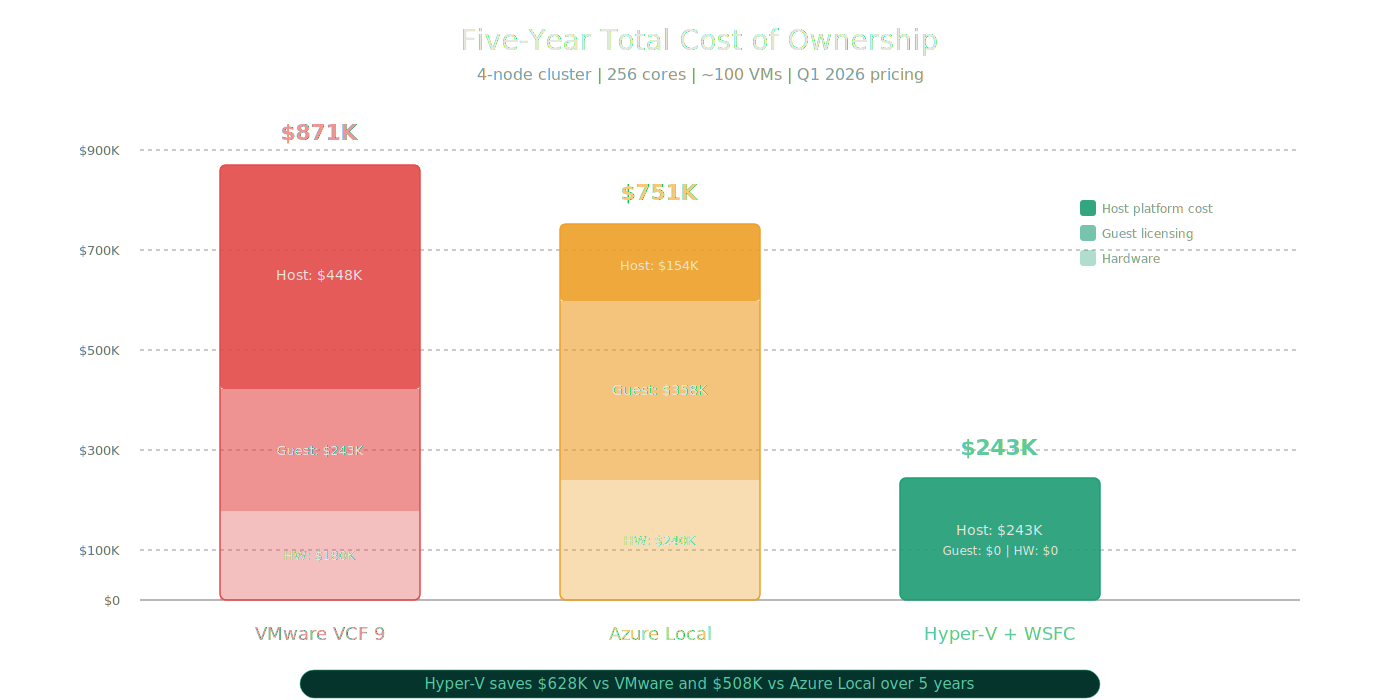 Five-year TCO comparison across all three platforms
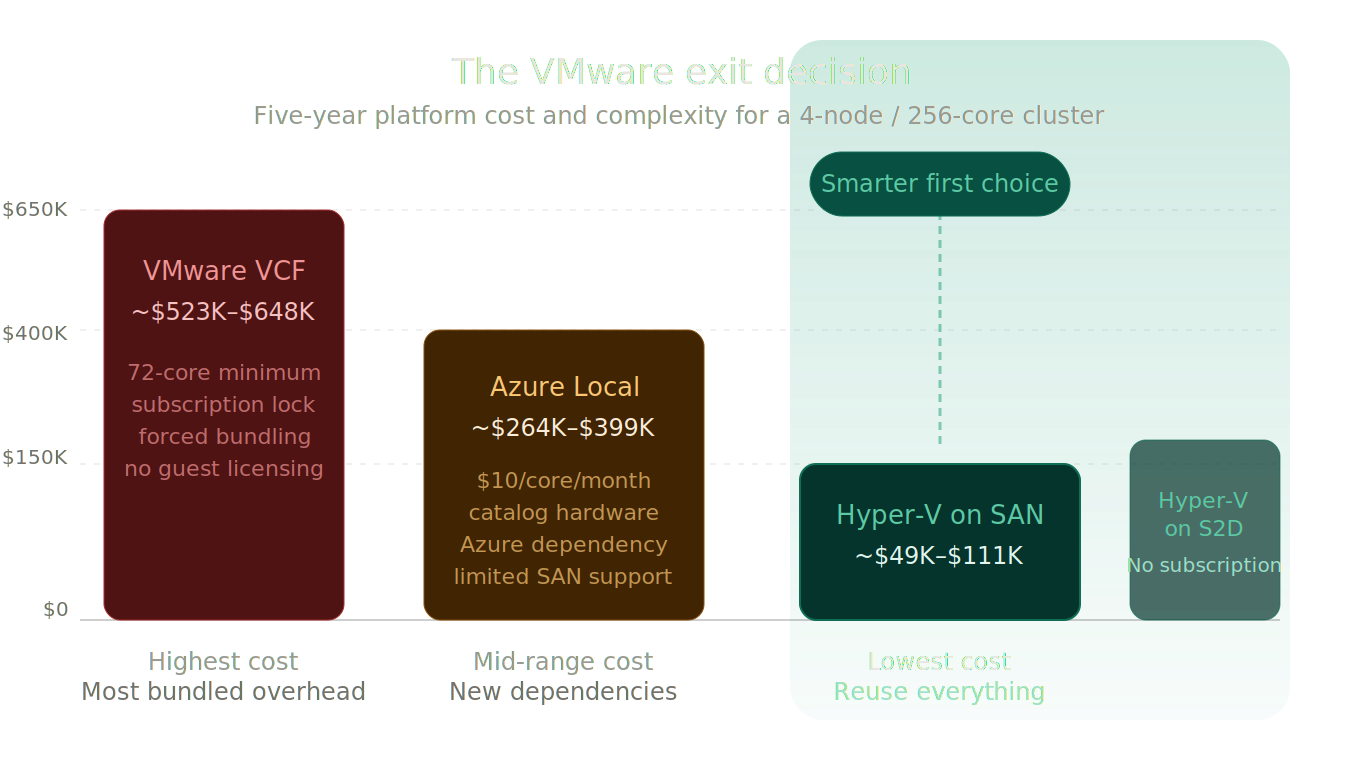 Five-year TCO stacked cost breakdown: Host + Guest + Hardware
The TCO Verdict
In this modeled scenario, Hyper-V lowers 5-year TCO by ~$628K vs VMware and ~$508K vs Azure Local without Azure Hybrid Benefit.
The three cost advantages that drive this:
Windows Server Datacenter includes unlimited Windows Server guest rights. Neither VCF nor Azure Local includes guest OS licensing. Azure Local’s guest licensing alone costs ~$357,888 over five years in this scenario, more than Hyper-V’s entire platform cost.
Hyper-V on SAN reuses existing hardware. No catalog lock, no net-new validation purchase. In this modeled scenario, VCF assumes new ReadyNodes (
$180K). Azure Local assumes new validated nodes ($240K). Hyper-V assumes $0 in new hardware.No recurring platform subscription. Windows Server is a perpetual license. SA is optional and provides upgrade rights and related benefits, but the platform does not stop functioning if you stop paying. Both VCF and Azure Local are subscription-only models. Stop paying, and you lose subscription entitlement/support.
These advantages are most pronounced in environments running primarily Windows workloads with existing SAN infrastructure, which describes a large percentage of the organizations currently reassessing their VMware position.
The Transparency Section
If the post stopped here, it would be a Hyper-V sales pitch. It would also be dishonest. The credibility of this argument depends on acknowledging where Hyper-V is weaker.
1. Hyper-V management is weaker than vCenter as a unified day-to-day experience.
This is real. vCenter gives administrators a single console for clusters, VMs, storage, networking, monitoring, and lifecycle management. In practice, that means one inventory model, one permissions model, one alarming surface, one certificate story, and one place for lifecycle workflows. Hyper-V operators split their time across Failover Cluster Manager, Windows Admin Center, SCVMM (if deployed), PowerShell, and potentially Azure portal through Arc. No single tool covers everything vCenter does in one place with the same day-2 consistency.
2. Microsoft failed to evolve SCVMM into what the market needed, and the consequences are real.
The vSphere 7 and 8 era gave VMware customers a formidable management and feature stack, built piece by piece, but deeply integrated when assembled: vCenter Server as the polished management plane, VMware NSX-T for distributed networking and micro-segmentation, vSAN for hyperconverged storage, VMware Site Recovery Manager (SRM) for automated site failover DR, and vRealize Operations Manager for capacity planning, trending, and analytics. Microsoft’s answer to that stack was SCVMM, and Microsoft chose not to build it to the same level.
SCVMM still works. It still has capabilities nothing else in the Microsoft stack replicates: service templates, VM library management, fabric management, multi-cluster operations, bare-metal deployment. For many single-enterprise estates, those shortcomings are tolerable because SCVMM still solves the core problem of managing a Windows virtualization fabric at scale. For MSPs, hosters, and private cloud teams that need strong tenancy boundaries, delegated self-service, service-provider-grade workflow, and deep network segmentation at scale, those shortcomings are much less tolerable. SCVMM never became a credible enterprise multi-tenancy platform. That is a Microsoft product investment failure, not a Hyper-V platform failure. The practical consequence for those customer segments, however, is the same.
The honest VMware cost counterpoint: Before crediting VMware with solving what SCVMM did not, the price of that solution was significant when assembled outside of VCF. A full modern vSphere 8 environment often meant not just vCenter Server, but vSAN (a high per-core add-on), NSX-T for distributed networking (one of the most expensive VMware add-ons, sold separately), SRM requiring licenses on both the protected and recovery sites, and vRealize Operations as yet another separate subscription. Assembling that stack for a medium enterprise meant $150–$250 per core per year before hardware. VCF 9 bundles all of this, but Broadcom’s bundling means you now pay for VMware NSX, vSAN, VCF Operations, and VCF Fleet Management whether you use them or not, at VCF 9’s pricing floor with a 72-core-per-socket minimum.
Note for MSPs and hosters: VCF 9.0 dropped VMware Cloud Director (VCD) support entirely with no in-place upgrade path within VCF 9. VCD was the primary multi-tenancy and tenant isolation layer that MSPs and hosting providers relied on for building vSphere-based multi-tenant clouds. VCF 9’s replacement is its own “Sovereign Multi-Tenancy” model. If you operated a VCD-based multi-tenant cloud, you are facing a forced architectural redesign, not just a price increase. This context matters when MSPs evaluate Hyper-V as a VCF alternative: the VMware multi-tenancy story they depended on no longer exists in VCF 9.
3. Windows Admin Center shows future promise but does not equal present-day parity.
WAC has improved meaningfully as a cluster and VM management interface. WAC Virtualization Mode (vMode) adds modern VM operations capabilities at no cost. The preview integration with Azure Local through Arc shows a direction that could eventually provide a modern, web-based management experience. But today, WAC does not replace SCVMM library and fabric concepts, does not provide the same depth of multi-cluster control, does not offer rich delegated administration, does not replace Failover Cluster Manager for all scenarios, and is not a vCenter equivalent. Treating WAC as the answer to the management gap overstates where it is today.
4. Hyper-V wins on flexibility and economics more than on polish.
This is the honest frame. Hyper-V’s advantage is that it does what you need for less money, with more hardware flexibility, and more storage freedom. Its disadvantage is that the operational experience is less integrated and requires more tool-layer decisions. That usually translates into more day-2 labor: more runbooks, more integration decisions, more internal expertise, and more operator-owned process. Hyper-V also gives you more freedom, which increases the burden on the operator to maintain a supportable combination of hardware, drivers, firmware, clustering design, and tooling. VMware and Azure Local reduce more of that decision surface. For organizations that value polish over economics, VMware may still be the better fit, but those organizations need to be honest about what that polish costs.
5. Hyper-V is weaker in virtual networking and micro-segmentation.
This is one of the biggest genuine VMware advantages. Hyper-V never developed a first-party answer with the same market traction as NSX for distributed networking, micro-segmentation, and security policy at scale. If a customer depends heavily on mature virtual networking constructs and east-west security controls inside the virtualization layer, VMware remains stronger.
6. Azure Local has legitimate strengths.
Azure Local is not a bad product. It is a real, capable platform with genuine value for the right customer profile. Its strongest case is not “Hyper-V but better.” It is the validated operating model: OEM-integrated lifecycle, alignment with Azure RBAC, Azure Policy, and Azure Monitor, Arc-native fleet visibility, and AKS Arc for customers who want cloud-style governance on-premises. For buyers who explicitly want that operating model, Azure Local is a legitimate strength in Microsoft’s portfolio, not just a licensing wrapper.
7. Native reporting and capacity planning are a DIY exercise on Hyper-V.
Hyper-V has no native capacity trending, performance analytics dashboards, or executive reporting equivalent to VMware Aria Operations (VCF Operations in VCF 9). Achieving comparable visibility on a Hyper-V environment requires deliberate assembly: Azure Monitor workbooks, System Center Operations Manager (SCOM), or third-party tools such as VirtualMetric or Turbonomic. Azure Local customers gain Azure portal dashboards and Azure Monitor integration automatically. Traditional Hyper-V requires those integrations to be built by the operations team. This is a real operational gap, not a philosophical one, and it particularly affects larger environments where capacity trending, chargeback reporting, and budget justification matter.
8. VMware still has the deeper third-party ecosystem and operational muscle memory.
Hyper-V can work very well, but the surrounding ecosystem is still shallower. VMware still benefits from deeper third-party tooling support, broader consulting muscle memory, and more standardized operational patterns across large enterprise shops. That matters during migration and in steady-state operations, especially when an organization needs outside help fast.
Where Azure Local Actually Fits
Azure Local is the right answer when the customer explicitly wants what Azure Local uniquely provides:
- A validated, Azure-managed HCI platform with a single operational model from Microsoft and the OEM. Customers who want turnkey HCI with cloud-connected lifecycle management will find Azure Local delivers exactly that.
- Azure-aligned identity, policy, and governance through native Arc integration. Organizations standardizing on Azure RBAC, Azure Policy, and Azure Monitor as their management plane will find Azure Local naturally integrated.
- Azure Kubernetes Service on-premises. Azure Kubernetes Service (AKS) enabled by Azure Arc on Azure Local, known as AKS Arc, provides on-premises Kubernetes with Azure Resource Manager-managed lifecycle, including Arc-native deployment, updates, and monitoring. This is a genuine differentiator for organizations standardizing on Kubernetes with Azure-managed operations. AKS Arc is included at no additional charge on Azure Local with the 2402 release and later (effective January 2025). Transparency note: AKS Arc on Windows Server (standalone, not Azure Local) is being retired in stages. Windows Server 2019 node pool support ended March 2026; Windows Server 2022 node pool support ends March 2027; Windows Server 2019, 2022, and 2025 as host operating systems are all being deprecated by March 2028. The full AKS Arc architecture on Windows Server is being wound down. AKS Arc on Azure Local remains the fully supported and recommended path going forward.
- A greenfield HCI deployment with no existing SAN investment where the customer wants Microsoft-native clustered storage with cloud management.
- Subscription-model preference. Some organizations genuinely prefer OpEx subscription billing over perpetual CapEx licensing.
Azure Local does not fit well when:
- The primary goal is to reuse existing servers and SAN infrastructure
- The migration depends on array-native storage mobility or replication
- Site-to-site VM replication is needed without Azure-directed recovery
- Recurring platform subscription costs must be avoided
- Continuous Azure connectivity cannot be guaranteed
- Hardware is not in the Azure Local catalog and a forced refresh would break the migration budget
- Full Windows Server roles are needed on the host alongside VMs
The distinction matters because Microsoft’s sales motion does not always draw this line clearly. Azure Local should be positioned as the right answer for customers who explicitly need its Azure-connected operating model, not as the answer for everyone who simply wants to leave VMware.
The Final Verdict
Stop assuming the only serious post-VMware answers are “buy the VCF stack” or “move to Azure Local.”
Start by asking whether Hyper-V on SAN or Hyper-V on S2D already gives you the operational outcomes you actually need (VM provisioning, live migration, rolling maintenance, DR, storage flexibility, Windows guest licensing) with less forced spend, less hardware churn, and more flexibility.
The buying logic:
If you own existing servers and SAN infrastructure, Hyper-V on SAN is the most economical and least disruptive first choice. You reuse the hardware. You reuse the storage. You get unlimited Windows Server guest licensing with Datacenter. You keep Hyper-V Replica, Storage Replica, and array-native replication for DR. You add Arc for Azure services if and when you want them, not because the platform forces you. Five-year savings: $620K+ versus VCF, $500K+ versus Azure Local.
If you want Microsoft-native HCI without Azure overhead, Hyper-V on S2D gives you Storage Spaces Direct on Windows Server 2025 without the Azure Local subscription, hardware catalog lock, or cloud connectivity dependency.
If you explicitly want Azure-connected operations, AKS on-premises, or validated HCI with cloud lifecycle management, Azure Local is a strong choice for those specific requirements.
If you need the absolute highest management polish today, VMware VCF still delivers that, at a cost that has become increasingly difficult to justify, and with a management overhead that now consumes 48–118 vCPUs, 194–473 GB RAM, and 3.2–5.7 TB (Simple to HA) before you run your first workload.
The server stays. The SAN stays. The network stays. Only the hypervisor changes.
For many organizations, Hyper-V is not the compromise answer. It is not the fallback. It is not the nostalgia play.
It is the smarter first choice.
Resources
Microsoft Documentation
- Windows Server 2025 Hyper-V — What’s New
- Hyper-V Scalability Targets
- Storage Spaces Direct Overview
- Hyper-V Replica Overview
- Storage Replica Overview
- Storage Replica — FAQ (Standard vs Datacenter editions)
- Azure Local — What Is It?
- Azure Local — Compare Azure Local to Windows Server
- Azure Local — FAQ
- Azure Local VM Management Overview
- Azure Local External Storage Support (Preview)
- Azure Local Pricing
- Azure Local — Disconnected Operations
- AKS enabled by Azure Arc — Supported Kubernetes Versions
- AKS on Windows Server Retirement Notice
- Arc-Enabled SCVMM
- Cluster-Aware Updating
- Network ATC Overview
- GPU Partitioning and Live Migration (NVIDIA vGPU requirement)
WAC Virtualization Mode (vMode) Blog Series — Microsoft Tech Community
- Part 1: Virtualization Mode Unlocked
- Part 2: Windows Admin Center Architectural Changes
- Part 3: WAC Virtualization Mode Preview Build Updated
- Part 4: Installing WAC Virtualization Mode
- Part 5: Resource Onboarding using vMode
- Part 6: Configuring Network ATC in vMode
- Part 7: Configuring Storage for Hyper-V Hosts in vMode
- Part 8: Configuring Compute in vMode
VMware / Broadcom Documentation
- VCF and VVF Core Licensing Counting (KB 95927)
- VMware Cloud Foundation Overview
- VMware Cloud Foundation 9.0 Official Documentation
- VCF 9.0 General FAQ
- VCF 9.0 Deployment Pathways
VCF 9 Sizing and Lab Resources
- Minimal Resources for Deploying VCF 9.0 in a Lab — William Lam, Broadcom
- Ultimate Lab Resource for VCF 9.0 — William Lam, Broadcom
Industry Research
Storage Vendor Documentation
Disclaimer: Pricing estimates use publicly available list rates as of Q1 2026 and are intended for directional comparison. Actual costs vary by Enterprise Agreement, LSP negotiation, and regional pricing. Feature availability is based on current Microsoft and Broadcom documentation. Azure Local external SAN support via Fibre Channel is in limited preview as of this writing. Always verify current capabilities and pricing against official vendor documentation for your specific deployment.