Hybrid Without the Handcuffs
Azure Arc, ASR, Defender, and the Services You Don't Need Azure Local For

“But what about all the cloud stuff Azure Local gets?”
It’s the first objection every decision-maker raises when you propose traditional Hyper-V over Azure Local. Azure Local comes with AKS, Azure Virtual Desktop, Azure Portal VM management, Azure Monitor, Azure Update Manager, Defender for Cloud , all integrated. How do you compete with that on standalone Hyper-V?
The answer: you don’t need Azure Local to get most of those services. Azure Arc brings much of the same Azure management plane to your existing Hyper-V infrastructure , selectively, incrementally, and without taking on the Azure Local platform fee just to reach the Azure control plane. You pick the services that add value. You skip the ones that don’t. You keep control over where the monthly bill starts.
This is the post that closes the gap. In this seventeenth post of the Hyper-V Renaissance series, we’ll map every Azure service available on Azure Local to its equivalent on Arc-enabled Hyper-V, compare costs honestly, and show you exactly what you gain and what you give up.
Repository: Arc enrollment scripts, cost comparison calculators, and service configuration guides are in the series repository.
The Azure Services Map , Azure Local vs. Arc-Enabled Hyper-V
This is the table that answers the question. Every Azure service available on Azure Local, mapped to whether it’s available on traditional Hyper-V via Arc, and at what cost.
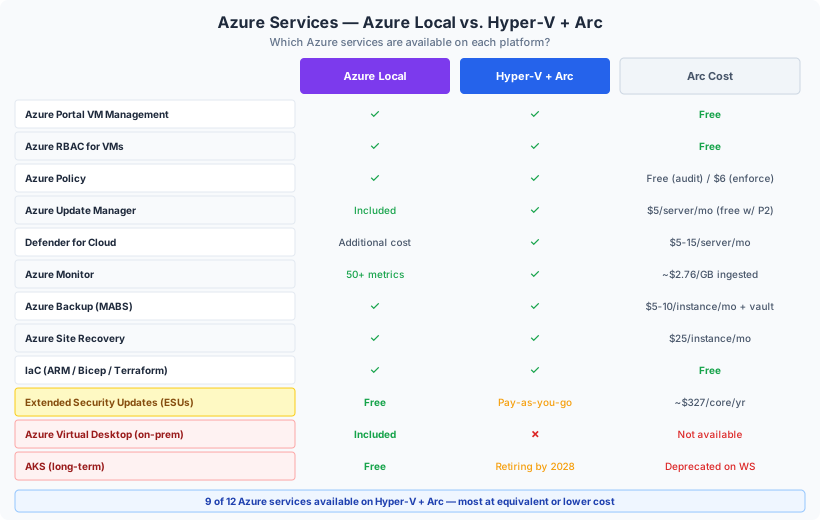
| Azure Service | Azure Local | Hyper-V + Arc | Cost on Arc | Notes |
|---|---|---|---|---|
| Azure Portal VM management | Built-in | Via Arc-enabled SCVMM | Free | Create, resize, start/stop VMs from Azure Portal |
| Azure RBAC for VMs | Built-in | Via Arc-enabled SCVMM | Free | Granular role-based access delegation |
| Azure Policy | Built-in | Via Arc-enabled servers | Free (audit) / $6/server (enforce) | Assign and audit policies on Arc machines |
| Azure Update Manager | Included | Via Arc-enabled servers | $5/server/month | Free with Defender P2 or ESU enrollment |
| Microsoft Defender for Cloud | Additional cost | Via Arc-enabled servers | $5-15/server/month | Plan 1 ($5) or Plan 2 ($15) , same price either way |
| Azure Monitor | 50+ built-in metrics | Via Azure Monitor Agent | ~$2.76/GB ingested | Same agent, same capabilities |
| Azure Backup | Via MABS | Via MABS | $5-10/instance/month + vault storage | Same tool, same pricing |
| Azure Site Recovery | Supported | Supported (with or without SCVMM) | $25/instance/month | Replicate Hyper-V VMs to Azure |
| ESUs (WS 2012/2016) | Free | Pay-as-you-go via Arc | ~$327/core/year (Datacenter) | Arc ESUs are cheaper than volume licensing ESUs |
| Azure Virtual Desktop | Included | Not available | N/A | Azure Local exclusive for on-prem AVD |
| AKS (Kubernetes) | Free (included) | Available but retiring on WS by 2028 | Varies | AKS on Windows Server being deprecated |
| IaC (ARM/Bicep/Terraform) | Built-in | Via Arc-enabled SCVMM | Free | Deploy VMs via templates against on-prem infra |
The key insight: Of the 12 Azure services listed, 9 are available on Hyper-V via Arc , most at the same price as Azure Local, several for free. Only AVD (on-prem) and AKS (long-term) are true Azure Local exclusives.
Arc-Enabled SCVMM , The Azure Portal for Your Hyper-V
Arc-enabled SCVMM is the single most important service for closing the gap between Hyper-V and Azure Local. It gives your existing SCVMM-managed Hyper-V infrastructure a full Azure Portal experience.
What You Get
| Capability | Details |
|---|---|
| VM lifecycle from Azure Portal | Create, resize, start, stop, restart, delete VMs , all from the Azure Portal, CLI, PowerShell, or REST API |
| Self-service provisioning | Delegate VM creation to teams via Azure RBAC. Users provision VMs from SCVMM templates through the Azure Portal without needing SCVMM console access. |
| IaC deployment | Deploy VMs using ARM templates, Bicep, or Terraform against your on-prem SCVMM. Same authoring experience as Azure-native VMs. |
| Azure Policy on VMs | Apply compliance policies to on-prem VMs the same way you do for Azure VMs |
| VM extensions | Install Azure Monitor Agent, Defender, custom script extensions , directly from the Azure Portal |
| Inventory and tagging | All SCVMM-managed VMs appear in Azure Resource Graph. Tag, search, organize alongside Azure resources. |
Architecture
Arc-enabled SCVMM requires:
- SCVMM 2019, 2022, or 2025 (you may already have this from Post 11)
- Azure Arc Resource Bridge , a lightweight appliance VM deployed on your Hyper-V cluster that brokers communication between SCVMM and Azure
- Supports up to 15,000 VMs per SCVMM management server
Cost
The Arc-enabled SCVMM control plane is free. There is no per-VM or per-host charge for discovery, inventory, lifecycle operations, or Azure Portal management. You pay only for optional layered services (Defender, Monitor, Backup) at their standard rates.
This is the equivalent of Azure Local’s built-in portal management , at zero cost.
Azure Arc-Enabled Servers , The Management Foundation
Every Hyper-V host (and optionally every guest VM) can be enrolled as an Arc-enabled server. This extends Azure’s management plane to your on-prem machines.
What’s Free
| Capability | Details |
|---|---|
| Azure Resource Manager representation | Every enrolled machine appears in the Azure Portal as a resource |
| Azure RBAC | Control who can manage which machines using Azure roles |
| Tagging and resource groups | Organize on-prem machines alongside Azure resources |
| Azure Resource Graph | Query and inventory all enrolled machines with Kusto queries |
| Azure Policy (audit mode) | Assign and evaluate compliance policies , audit only |
Paid Add-On Services
| Service | Price | What You Get |
|---|---|---|
| Azure Update Manager | $5/server/month | Unified patch management across Windows and Linux. Hotpatching (preview) on WS2025. Compliance dashboards. Free with Defender P2 or ESU enrollment. |
| Azure Policy Guest Config | $6/server/month | Enforce configuration inside the OS (GPO-like). Remediate drift. Free with Defender P2. |
| Defender for Servers Plan 1 | $5/server/month | Microsoft Defender for Endpoint (EDR), threat protection, security recommendations |
| Defender for Servers Plan 2 | $15/server/month | Plan 1 + agentless scanning, vulnerability assessment, file integrity monitoring, 500 MB/day free Log Analytics, Update Manager and Guest Config included |
| Azure Monitor | ~$2.76/GB ingested | Log Analytics workspace for centralized logging and alerting. Same capabilities as Azure-native monitoring. |
The Defender P2 bundle: At $15/server/month, Defender Plan 2 includes Update Manager ($5) and Guest Configuration ($6) , so you effectively get three services for the price of one. For Hyper-V hosts, this is the recommended bundle.
Extended Security Updates (ESUs) , The Cost Reality
ESUs are often cited as a reason to choose Azure Local over Hyper-V. Here’s the actual comparison:
| Platform | ESU Cost (WS 2012/R2) | ESU Cost (WS 2016) |
|---|---|---|
| Azure Local | Free (included) | Free (included) |
| Arc-enabled servers | Pay-as-you-go (~$327/core/year Datacenter, vCore pricing available) | Same model |
| Volume licensing (no Arc) | Annual commitment, higher per-core cost, no vCore option | Same |
The Arc advantage over volume licensing: Arc ESU delivery uses pay-as-you-go monthly billing , no upfront annual commitment. You can use vCore licensing (pay only for the VMs that need ESUs, not the entire host). You stop paying the month you complete migration. This makes Arc ESUs significantly cheaper than traditional volume licensing ESUs.
The honest gap: Azure Local gets ESUs for free. Arc-enabled Hyper-V does not. For organizations with large numbers of legacy Windows Server VMs, this cost difference is real. But it’s a transitional cost , once you migrate those workloads to WS2025, the ESU cost disappears.
Azure Site Recovery , DR to Azure
Azure Site Recovery (ASR) replicates on-prem Hyper-V VMs to Azure, providing cloud-based DR without a secondary physical site.
How It Works with Hyper-V
ASR works with or without SCVMM:
- With SCVMM: SCVMM provides coordinated recovery plans, network mapping, and multi-VM consistency groups. The Azure Site Recovery Provider is installed on the SCVMM server.
- Without SCVMM: The Provider is installed directly on each Hyper-V host. Simpler but less orchestrated.
In both cases, VMs replicate continuously to an Azure Recovery Services vault. During failover, VMs spin up as Azure IaaS VMs.
Capabilities
| Capability | Details |
|---|---|
| Replication | Continuous, asynchronous replication of Hyper-V VMs to Azure |
| Failover to Azure | VMs start as Azure IaaS VMs in your target region |
| Failback | Replicate back from Azure to on-prem Hyper-V after recovery |
| Test failover | Non-disruptive DR drills , spin up VMs in Azure without affecting production |
| Recovery plans | Orchestrate multi-VM failover with sequencing and custom scripts |
| Network mapping | Map on-prem VM networks to Azure virtual networks |
Pricing
| Component | Cost |
|---|---|
| Per protected instance | $25/month (first 31 days free) |
| Azure compute during failover | Standard Azure VM pricing (only when VMs are running in Azure) |
| Storage | Azure managed disk pricing for replica data |
For 50 protected VMs: ~$15,000/year in ASR licensing. Azure compute costs only apply during actual failover or DR drills.
Azure Backup , Protecting VMs to the Cloud
Post 13 covered on-prem backup solutions (Veeam, Commvault, Rubrik, HYCU). Azure Backup adds a cloud tier to your backup strategy.
MABS vs. MARS
| Tool | VM-Level Backup | Application-Aware | Cloud Vault | Best For |
|---|---|---|---|---|
| MABS (Azure Backup Server) | Yes , full Hyper-V VM backup | Yes (SQL, Exchange, SharePoint) | Yes , replicate to Azure vault | Primary VM backup with cloud offsite |
| MARS agent | No , files/folders/system state only | No | Yes , direct to Azure vault | Supplementary file-level backup |
For Hyper-V VM-level backup to Azure, MABS is required. MARS alone cannot back up VMs.
Pricing
| Instance Size | Per Instance/Month | Vault Storage |
|---|---|---|
| Up to 50 GB | $5 | LRS: ~$0.024/GB/month |
| 50-500 GB | $10 | GRS: ~$0.048/GB/month |
| Each additional 500 GB | +$10 |
The Cost Comparison , Hyper-V + Arc vs. Azure Local
This is the number that matters. For a typical 4-host, 64-core-each environment (256 total cores):
Azure Local Annual Cost
| Component | Without Azure Hybrid Benefit | With AHB (SA on Datacenter) |
|---|---|---|
| Host fee ($10/core/month) | $30,720/year | $0 (waived) |
| Guest OS ($23.30/core/month) | $71,500/year | $0 (waived) |
| Platform total | $102,220/year | $0/year |
With Azure Hybrid Benefit and active Software Assurance on Windows Server Datacenter, Azure Local platform costs can be reduced to $0. Without AHB, it’s over $100K/year.
Included free on Azure Local: AKS, AVD, ESUs, Update Manager, Arc VM management.
Hyper-V + Arc Annual Cost
| Component | Cost | Notes |
|---|---|---|
| Azure Arc enrollment | $0 | Free |
| Arc-enabled SCVMM | $0 | Free , VM management from Azure Portal |
| Windows Server Datacenter | $0 ongoing | Perpetual license already owned |
| Defender for Servers P2 (4 hosts) | $720/year | Includes Update Manager + Guest Config |
| Azure Backup (MABS, 50 VMs) | ~$8,400/year | Instance fees + vault storage |
| Azure Site Recovery (50 VMs) | $15,000/year | $25/instance/month |
| Azure Monitor (5 GB/day) | ~$5,040/year | Log Analytics ingestion |
| Total | ~$29,160/year | All optional , adopt incrementally |
What the Numbers Mean
| Factor | Azure Local (no AHB) | Azure Local (with AHB) | Hyper-V + Arc |
|---|---|---|---|
| Platform cost | $102,220/year | $0/year | $0/year |
| Cloud services | Many included | Many included | ~$29,160/year (optional) |
| ESUs | Free | Free | ~$327/core/year if needed |
| AVD on-prem | Included | Included | Not available |
| AKS long-term | Included | Included | Retiring on WS by 2028 |
| Commitment | Mandatory subscription | SA commitment | Zero , adopt incrementally |
| Hardware | Validated catalog only | Validated catalog only | Any server hardware |
The bottom line: If you have Azure Hybrid Benefit with Software Assurance, Azure Local’s platform cost is effectively $0 , making it very competitive. If you don’t have AHB, Azure Local’s $100K+ annual cost for a 256-core environment is significant, and Hyper-V + Arc delivers most of the same capabilities at ~$29K for the cloud services you actually use.
The real differentiator isn’t cost , it’s flexibility. Hyper-V + Arc lets you adopt services incrementally. Start with free Arc enrollment. Add Defender when you’re ready. Add ASR when DR becomes a priority. You never sign up for a platform subscription you can’t scale back.
What You Give Up on Hyper-V + Arc
Honesty demands we acknowledge the gaps:
| Capability | Azure Local | Hyper-V + Arc |
|---|---|---|
| Azure Virtual Desktop (on-prem) | Included | Not available , Azure Local exclusive |
| AKS (long-term) | Included, free | Retiring on Windows Server by March 2028 |
| Free ESUs | Yes | No , pay-as-you-go via Arc |
| Single-vendor support | Microsoft supports the full stack | Separate support for Windows Server, SCVMM, SAN |
| Automatic Azure integration | Everything pre-integrated | Requires Arc enrollment, SCVMM setup, service-by-service configuration |
| Hardware validation | Microsoft-validated catalog | Any compatible server hardware (flexibility, but no validation guarantee) |
| Disconnected operations | GA with management cluster (2602+) | Always works disconnected (no Azure dependency) |
If you need AVD on-premises, Azure Local is currently the only path. There’s no Arc-based alternative for on-prem virtual desktop infrastructure.
If you need long-term AKS on-premises, Azure Local is the strategic direction. AKS on Windows Server is being deprecated.
For everything else , VM management, security, monitoring, backup, DR, policy, RBAC , Hyper-V + Arc delivers equivalent functionality at equal or lower cost, with the flexibility to adopt incrementally.
The Adoption Path , Start Free, Grow as Needed
| Phase | What to Deploy | Cost |
|---|---|---|
| 1. Enroll | Azure Arc agent on all Hyper-V hosts | Free |
| 2. Inventory | See all machines in Azure Portal, apply tags, resource groups | Free |
| 3. Govern | Azure Policy (audit mode), Azure RBAC | Free |
| 4. Protect | Defender for Servers Plan 2 on hosts | $15/host/month |
| 5. Manage VMs | Arc-enabled SCVMM for Azure Portal VM management | Free (requires SCVMM) |
| 6. Monitor | Azure Monitor Agent + Log Analytics | ~$2.76/GB |
| 7. Back up | Azure Backup (MABS) for cloud-tier backup | $5-10/instance/month |
| 8. DR | Azure Site Recovery for cloud-based DR | $25/instance/month |
Each phase is independent. You can stop at any phase and have value. You can skip phases that don’t apply. There’s no all-or-nothing commitment.
Next Steps
This post showed that hybrid doesn’t require Azure Local , Azure Arc brings most of the same services to traditional Hyper-V, selectively and incrementally. But the infrastructure question remains: when does Azure Local make sense? When does S2D make sense? When does three-tier with SAN win?
In the next post, Post 18: S2D vs. Three-Tier and When Azure Local Makes Sense, we’ll provide the definitive comparison , performance, failure domains, cost, operational complexity , so you can make an informed platform decision.
Resources
- Series Repository: github.com/thisismydemo/hyper-v-renaissance
Microsoft Documentation
- Azure Arc-enabled SCVMM overview
- Azure Arc-enabled servers overview
- Azure Arc pricing
- ESU billing via Arc
- Azure Site Recovery for Hyper-V
- Azure Site Recovery pricing
- Azure Backup pricing
- Azure Update Manager pricing
- Microsoft Defender for Cloud pricing
- Azure Local pricing
- AVD on Azure Local
- AKS on Windows Server retirement
- Self-service VM access via Arc-enabled SCVMM
Series Navigation ← Previous: Post 16 , WSFC at Scale → Next: Post 18 , S2D vs. Three-Tier and When Azure Local Makes Sense