Infrastructure as Code with Ansible and Terraform
Ansible, Terraform, and the IaC Decision for Hyper-V

Post 19 built an automation practice around PowerShell , modules, DSC v3, CI/CD pipelines. For many organizations, that’s enough. PowerShell is native, it’s free, it covers 100% of Hyper-V functionality, and your Windows team already knows it.
But some organizations have standardized on Ansible for configuration management across Linux and Windows. Others use Terraform for all infrastructure provisioning. And some want both , Terraform for creating resources, Ansible for configuring them. The question isn’t “which tool is best” , it’s “which tool fits your team, your existing investments, and your Hyper-V use case.”
This twentieth post in the Hyper-V Renaissance series provides an honest assessment of three IaC approaches for Hyper-V: Ansible alone, Terraform with PowerShell, and Terraform with Ansible. We’ll cover what each tool can and cannot do, how mature the Hyper-V integration is, how to build pipelines for each, and when to choose which.
Repository: The full Post 20 companion deliverables are in the Post 20 folder, including the README, the execution walkthrough, Ansible examples, Terraform examples, PowerShell helpers, and pipeline samples.
Companion Deliverables
If you want to use the code from this post directly, start with these files in the toolkit:
- Orientation and run order: README.md and EXECUTION-WALKTHROUGH.md
- Ansible host configuration: ansible/playbooks/configure-hyperv-host.yml
- Ansible VM provisioning example: ansible/playbooks/provision-vm.yml
- Terraform lab environment: terraform/environments/lab
- Terraform reusable VM module: terraform/modules/hyperv-vm
- PowerShell helpers: Initialize-HyperVIacHost.ps1 and Invoke-HyperVGuestBootstrap.ps1
- Decision docs: IAC-PATTERNS.md and TOOLING-DECISION-GUIDE.md
The Three Approaches , At a Glance
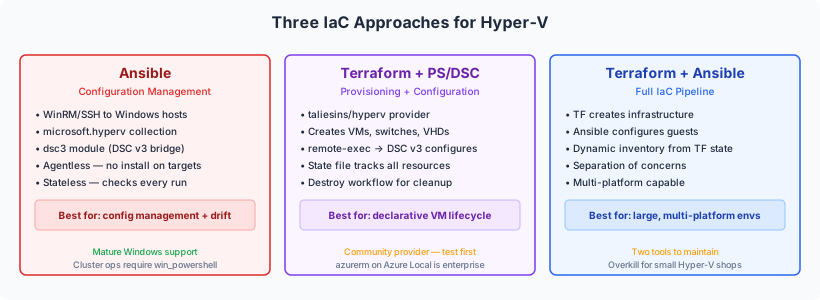
Before diving into each tool, understand what they do differently:
| Tool | What It Does | How It Thinks | State Management |
|---|---|---|---|
| Ansible | Configuration management , makes systems look a certain way | Procedural with idempotent modules , “ensure this is true” | Stateless , checks current state on every run |
| Terraform | Infrastructure provisioning , creates and destroys things | Declarative with state file , “these resources should exist” | Stateful , tracks what it created in a state file |
| PowerShell | Both , native access to everything | Imperative (scripts) or declarative (DSC v3) | Depends on approach , scripts are stateless, DSC is stateful |
The fundamental difference: Ansible asks “is the system configured correctly?” and fixes what’s wrong. Terraform asks “do these resources exist?” and creates or destroys to match. PowerShell does whatever you tell it to do , the structure depends on how you use it (Post 19 patterns).
In practice, Terraform excels at provisioning (creating VMs, switches, networks) and Ansible excels at configuring (installing roles, setting up services, applying security baselines). PowerShell does both natively but requires you to build the patterns yourself. Many organizations use Terraform + Ansible together, or Terraform + PowerShell/DSC , Terraform creates the infrastructure, and Ansible or DSC configures it.
Approach 1: Ansible for Hyper-V
Ansible is the most mature IaC tool for Windows/Hyper-V management after PowerShell itself. It connects to Windows hosts via WinRM (or SSH on WS2025), runs modules that check and apply configuration, and requires no agent installation on the target hosts.
How Ansible Connects to Windows
Ansible runs on a Linux or macOS control node (or WSL on Windows) and reaches Windows targets via one of three connection methods:
| Method | Transport | Authentication | Best For |
|---|---|---|---|
WinRM (winrm plugin) | HTTPS on port 5986 | Kerberos (recommended), NTLM, Certificate, CredSSP | Domain-joined hosts, most environments |
PSRP (psrp plugin) | PowerShell Remoting Protocol over HTTPS | Same as WinRM | Better performance than WinRM for large payloads |
SSH (ssh plugin) | OpenSSH on port 22 | SSH keys | WS2025 (OpenSSH built-in), non-domain hosts |
For production Hyper-V environments, use WinRM with Kerberos authentication. Kerberos provides mutual authentication, encryption, and credential delegation (needed for operations that access network resources from the target host). This is the same reason Post 5 recommended Kerberos for live migration.
SSH support for Windows became officially supported in Ansible 2.18. It’s simpler to configure (no WinRM setup) but requires key-based authentication only , Kerberos TGT forwarding doesn’t work over SSH from Ansible. Use SSH for environments where WinRM setup is impractical.
The Ansible Collections for Hyper-V
Ansible organizes modules into collections. Three collections matter for Hyper-V:
ansible.windows (v3.5.0) , The core Windows collection with 71 modules. This is your foundation:
| Module | What It Does | Hyper-V Use |
|---|---|---|
win_feature | Install/remove Windows features | Hyper-V role, Failover Clustering, MPIO, DCB |
win_service | Manage Windows services | MSiSCSI, vmms, WinDefend |
win_firewall_rule | Manage firewall rules | Hyper-V management rules, WinRM |
win_powershell | Run arbitrary PowerShell | Anything not covered by a module |
win_regedit | Manage registry keys | Credential Guard, HVCI, MPIO settings |
win_reboot | Reboot and wait for reconnection | Post-feature-install reboots |
win_updates | Install Windows Updates | Patch management |
win_dsc | Invoke DSC v2 resources | Legacy DSC configurations |
dsc3 | Invoke DSC v3 resources (new in v3.4.0) | Modern DSC configurations under PS7 |
microsoft.hyperv , Red Hat Ansible Certified Content for Hyper-V management. This is the official path for VM lifecycle:
| Module | What It Does |
|---|---|
hv_vm | Create, modify, delete VMs |
hv_vm_state | Start, stop, save, pause VMs |
hv_checkpoint | Create and manage VM checkpoints |
hv_processor / hv_memory | Configure VM CPU and memory |
hv_hard_disk / hv_dvd_drive | Manage VM storage devices |
hv_network_adapter | Configure VM network adapters |
hv_scsi_controller | Manage SCSI controllers |
hv_vhd | Create and manage virtual hard disks |
hv_host / hv_host_info | Configure and query Hyper-V host settings |
Install with: ansible-galaxy collection install microsoft.hyperv
What’s not covered (yet): Virtual switch management, clustering operations (live migration, CSV, quorum), Hyper-V Replica, and SCVMM integration don’t have dedicated modules. For these, use win_powershell to run PowerShell commands , Ansible orchestrates the workflow, PowerShell handles the Hyper-V specifics.
community.windows , Extended Windows modules for scheduled tasks, disk management, event log, and more. In maintenance mode (bugfixes only, no new modules).
The dsc3 Module , Bridging Ansible and DSC v3
This is significant. Added in ansible.windows v3.4.0 (March 2025), the dsc3 module lets Ansible invoke DSC v3 resources directly. This means you can:
- Use Ansible for orchestration (ordering, inventory, credential management, rolling execution)
- Use DSC v3 for declarative configuration (roles, services, registry, firewall)
- Combine both in a single playbook
The dsc3 module runs under PowerShell 7, unlike the older win_dsc module which requires PowerShell 5.1. This aligns with the Post 19 approach of targeting PS7 for all automation.
Ansible Inventory for Hyper-V
Ansible inventory defines your target hosts. For Hyper-V clusters, structure by role:
# inventory/hosts.ini

[hyperv_hosts]
hv-host-prod-sea01-001 ansible_host=10.10.10.11
hv-host-prod-sea01-002 ansible_host=10.10.10.12

[hyperv_hosts:vars]
ansible_connection=winrm
ansible_winrm_transport=kerberos
ansible_winrm_server_cert_validation=ignore
ansible_port=5986

[hyperv_clusters]
cl-hvhost-prod-sea01 ansible_host=10.10.10.20

[all:vars]
ansible_winrm_kerberos_delegation=true
Group variables (in group_vars/hyperv_hosts.yml) define the desired state , VLANs, features, services , the same data that Post 19’s variables file contains, but in Ansible’s YAML format.
What an Ansible Playbook Looks Like
A playbook for configuring a Hyper-V host combines multiple modules into an ordered workflow. Here’s the conceptual structure (full playbooks are in the companion repository):
# playbooks/configure-hyperv-host.yml
---
- name: Configure Hyper-V cluster node
  hosts: hyperv_hosts
  gather_facts: true

  tasks:
    - name: Install required Windows features
      ansible.windows.win_feature:
        name: "{{ item }}"
        state: present
      loop:
        - Hyper-V
        - Failover-Clustering
        - Multipath-IO
        - Data-Center-Bridging
      register: features_result

    - name: Reboot if features require it
      ansible.windows.win_reboot:
      when: features_result.results | selectattr('reboot_required', 'equalto', true) | list | length > 0

    - name: Ensure iSCSI Initiator service is running
      ansible.windows.win_service:
        name: MSiSCSI
        start_mode: auto
        state: started

    - name: Apply security baseline via DSC v3
      ansible.windows.dsc3:
        resource_name: Microsoft.Windows/Service
        properties:
          serviceName: Browser
          startupType: Disabled
          state: Stopped

    - name: Configure SET virtual switch (PowerShell)
      ansible.windows.win_powershell:
        script: |
          if (-not (Get-VMSwitch -Name '{{ switch_name }}' -EA SilentlyContinue)) {
              New-VMSwitch -Name '{{ switch_name }}' -NetAdapterName {{ nic_names | join(',') }} `
                  -EnableEmbeddedTeaming $true -AllowManagementOS $true
          }
Notice the pattern: Ansible uses native modules where they exist (win_feature, win_service, dsc3) and drops to win_powershell for Hyper-V-specific operations that don’t have dedicated modules. This is pragmatic , use the right tool for each task.
When Ansible Is the Right Choice for Hyper-V
- Your team already uses Ansible for Linux or other Windows management , extend it to Hyper-V rather than maintaining two automation platforms
- Mixed-OS environments where you manage Linux, Windows, and network devices from a single tool
- Configuration management focus , you need to enforce and remediate configuration drift across many hosts
- No state file complexity , Ansible doesn’t track state between runs; it checks and fixes on every execution
- Red Hat ecosystem , your organization has Ansible Automation Platform or AWX deployed
When Ansible Is Not the Best Fit
- Pure Windows/Hyper-V shop , PowerShell alone (Post 19) provides native access without the overhead of maintaining an Ansible control node and learning YAML syntax
- VM provisioning at scale , Ansible can create VMs but doesn’t track them in a state file. Terraform is better for declarative “these VMs should exist” workflows
- Cluster-level operations , live migration, CSV management, and quorum configuration don’t have Ansible modules; you’ll be writing
win_powershelltasks for most cluster work
Approach 2: Terraform + PowerShell
Terraform is a declarative infrastructure provisioning tool. You define what resources should exist (VMs, switches, disks), Terraform creates them, and it tracks what it created in a state file. If you remove a VM from the configuration and run terraform apply, Terraform destroys it. This create-track-destroy lifecycle is Terraform’s superpower , and its complexity.
The Hyper-V Provider , Honest Assessment
The community provider taliesins/hyperv (v1.2.1, February 2024) connects to Hyper-V hosts via WinRM and manages basic resources:
| Resource | What It Does | Maturity |
|---|---|---|
hyperv_machine_instance | Create/modify/delete VMs | Functional , covers basic VM settings |
hyperv_network_switch | Create/modify/delete virtual switches | Functional |
hyperv_vhd | Create/modify/delete VHDs | Functional |
hyperv_iso_image | Manage ISO images | Basic |
What’s missing: Cluster operations, CSV management, live migration, Hyper-V Replica, GPU-P, vTPM, advanced NUMA configuration, and SCVMM integration. The provider covers VM provisioning basics but not the full Hyper-V feature set.
The honest assessment: This is a community project with 259 GitHub stars and no corporate backing. Recent releases are dependency updates, not feature additions. It’s functional for basic VM lifecycle (create, modify, destroy) but it is not a production-grade, enterprise-supported provider. Test thoroughly in your environment before relying on it.
For organizations also running Azure Local (covered in Post 18), the azurerm provider offers an enterprise-grade Terraform experience via Arc. But this series focuses on standalone Hyper-V , and for that, the community provider plus PowerShell is the practical path.
The Pattern: Terraform Provisions, PowerShell/DSC Configures
Because the Hyper-V provider has gaps, the practical pattern is:
- Terraform creates the VM (CPU, memory, disk, network adapter) via the
hypervprovider - PowerShell/DSC v3 configures the guest OS (join domain, install roles, apply security baseline) via
remote-execprovisioner
# Conceptual example ,  full modules in companion repository

resource "hyperv_machine_instance" "web_server" {
  name       = "vm-web-prod-sea01-001"
  generation = 2

  processor { count = 4 }
  memory {
    startup = 4096
    dynamic_memory { enabled = true; minimum = 2048; maximum = 8192 }
  }

  hard_disk { path = "C:\\ClusterStorage\\Volume1\\VHDs\\vm-web-prod-sea01-001.vhdx" }
  network_adapter { switch_name = "vsw-set-prod" }

  # After VM is created, configure it with DSC v3
  provisioner "remote-exec" {
    connection {
      type     = "winrm"
      host     = self.network_adapter[0].ip_addresses[0]
      user     = var.admin_user
      password = var.admin_password
      https    = true
      insecure = true
    }
    inline = [
      "dsc config set --file C:\\deploy\\web-server.dsc.yaml"
    ]
  }
}
Important caveats about provisioners: HashiCorp considers provisioners a “last resort.” They run once during creation and don’t re-run on subsequent terraform apply. For ongoing configuration management, use Ansible or DSC on a schedule , not Terraform provisioners.
State Management for On-Prem
Terraform tracks every resource it creates in a state file. This file is critical , lose it and Terraform can’t manage the resources anymore.
| Backend | Where State Lives | Team Use | On-Prem Friendly |
|---|---|---|---|
| Local | File on disk | Single operator only | Yes, but dangerous |
| Azure Storage | Azure Blob with lease locking | Teams (concurrent access safe) | Needs Azure subscription |
| S3-compatible | MinIO, Wasabi, etc. | Teams | Fully on-prem with MinIO |
| Consul | HashiCorp Consul cluster | Teams | Fully on-prem |
| HCP Terraform | HashiCorp Cloud | Teams | SaaS , requires internet |
For on-prem Hyper-V environments without Azure, MinIO (S3-compatible object storage) or Consul are the self-hosted options for team state management with locking.
When Terraform + PowerShell Is the Right Choice
- Your team already uses Terraform for cloud or other infrastructure , extend it to on-prem rather than maintaining separate tooling
- Declarative VM lifecycle , you want “these 50 VMs should exist” expressed in code, with Terraform handling creates, updates, and destroys
- State tracking matters , you need to know exactly what Terraform created and destroy it cleanly when decommissioning
- Combined with Arc-enabled SCVMM , Terraform can provision VMs via the Azure Arc control plane using ARM/Bicep patterns (Post 17)
When Terraform Is Not the Best Fit
- Configuration management , Terraform provisions resources but doesn’t manage ongoing configuration. You need Ansible or DSC for drift remediation.
- Advanced Hyper-V features , the community provider doesn’t cover clustering, CSVs, or live migration. PowerShell provides more complete coverage.
- Cluster operations , the provider doesn’t support clustering, CSVs, or live migration. PowerShell is required.
- Small environments , Terraform’s state management overhead isn’t justified for 2-5 hosts and a handful of VMs.
Approach 3: Terraform + Ansible
This is the “best of both worlds” approach , Terraform handles infrastructure provisioning (VMs, switches, disks) and Ansible handles configuration management (OS setup, roles, security, ongoing drift remediation).
How They Work Together
Terraform creates VM → outputs IP address and hostname →
Ansible dynamic inventory reads Terraform state →
Ansible configures the guest OS (domain join, roles, security, application)
The integration point: Terraform writes its state file. An Ansible dynamic inventory plugin reads that state to discover which hosts exist and how to reach them. No manual inventory updates when VMs are added or removed.
When This Combination Makes Sense
- Large environments with dozens of VMs that are provisioned and decommissioned regularly
- Teams with Terraform and Ansible expertise , DevOps teams that already use both
- Multi-platform environments , Terraform provisions VMs on Hyper-V, Azure, and AWS; Ansible configures all of them consistently
- Separation of concerns , infrastructure team owns Terraform, application team owns Ansible playbooks
When It’s Overkill
- Small Hyper-V environments , two tools to maintain instead of one
- Windows-only shops , PowerShell + DSC (Post 19) covers both provisioning and configuration natively
- Teams without existing Terraform/Ansible experience , the learning curve for both tools simultaneously is steep
CI/CD Pipelines for IaC
Every IaC approach needs a pipeline. The patterns differ by tool.
Ansible Pipeline Flow
Developer changes playbook/inventory → Pipeline triggers →
  Stage 1: Lint (ansible-lint) → catches syntax and best-practice issues
  Stage 2: Dry run (--check --diff) → shows what would change without applying
  Stage 3: Apply (ansible-playbook) → executes the playbook (manual approval gate)
  Stage 4: Verify → re-run in check mode to confirm desired state
Key detail: Ansible’s --check mode runs every module in “check” (dry-run) mode. Modules report what they would change without actually changing it. The --diff flag shows the exact differences. This is your “plan” step , review it before approving the apply.
The self-hosted runner (same concept as Post 19) needs:
- Python with
pywinrminstalled (for WinRM connections) - Kerberos client libraries (for Kerberos auth)
- Network access to Hyper-V hosts on port 5986 (WinRM HTTPS) or 22 (SSH)
- Ansible collections installed:
ansible.windows,microsoft.hyperv
Terraform Pipeline Flow
Developer changes .tf files → Pipeline triggers →
  Stage 1: Validate (terraform validate) → syntax and configuration checks
  Stage 2: Plan (terraform plan) → shows what will be created/modified/destroyed
  Stage 3: Apply (terraform apply) → executes the plan (manual approval gate)
  Stage 4: Post-apply → trigger Ansible or DSC for configuration
Key detail: terraform plan is the most important step. It shows you exactly what will change , “1 to add, 0 to change, 2 to destroy.” Review this carefully. In a pipeline, save the plan output as an artifact and require approval before terraform apply.
State locking: When multiple people or pipelines can run Terraform concurrently, state locking prevents conflicts. The remote backend (Azure Storage, MinIO + DynamoDB, Consul) handles this. Without locking, two concurrent applies can corrupt the state file.
Pipeline Examples
The companion repository includes CI/CD pipeline definitions for both tools across all three platforms:
| Pipeline | Platform | What It Runs |
|---|---|---|
ansible-validate.yml | GitHub Actions | ansible-lint → check mode → apply (manual) |
terraform-plan-apply.yml | GitHub Actions | validate → plan (PR comment) → apply (manual) |
.gitlab-ci.yml | GitLab CI | Same stages for both tools |
azure-pipelines.yml | Azure DevOps | Same stages with environment approval gates |
All pipelines use self-hosted runners with network access to on-prem Hyper-V hosts. Credentials are injected via pipeline secrets , never stored in the repository.
The Decision Framework , Which Approach for Your Environment
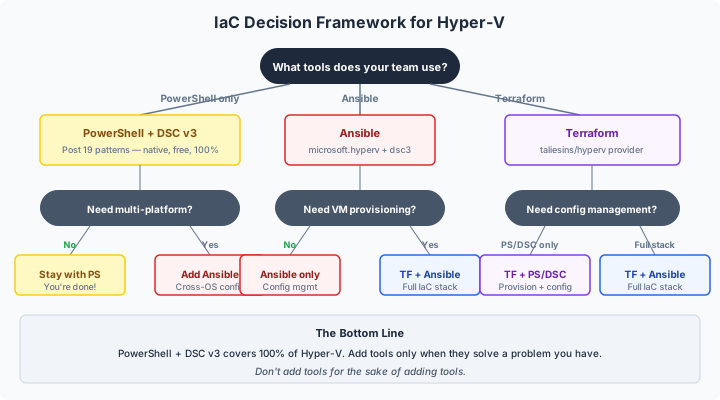
| Your Situation | Recommended Approach | Why |
|---|---|---|
| Windows-only team, Hyper-V focus | PowerShell + DSC v3 (Post 19) | Native, free, 100% Hyper-V coverage, no external dependencies |
| Existing Ansible investment | Ansible with microsoft.hyperv + dsc3 | Extend existing tooling, single config management platform |
| Existing Terraform investment | Terraform + PowerShell/DSC v3 | Terraform provisions, PowerShell configures, familiar workflow |
| DevOps team, multi-platform | Terraform + Ansible | Terraform for provisioning, Ansible for configuration, both mature |
| Small environment (< 10 hosts) | PowerShell alone | Simplest option, no overhead, direct access to everything |
| Large environment (50+ hosts) | Ansible or Terraform + Ansible | Scale requires automation platforms with inventory management and RBAC |
The Honest Bottom Line
PowerShell + DSC v3 (Post 19) is the most complete option for Hyper-V. It covers 100% of functionality, runs natively, costs nothing, and your Windows team already has the skills. Every other approach is an overlay that adds capability (multi-platform management, declarative provisioning, team collaboration) at the cost of complexity and additional tooling.
Ansible is the strongest third-party option. Mature Windows support, the new microsoft.hyperv collection, the dsc3 module bridging to DSC v3, and production-ready WinRM connectivity make it a solid choice , especially if you already use Ansible.
Terraform is functional but limited for Hyper-V. The community provider handles basic VM lifecycle but lacks cluster operations and advanced features. It’s most valuable when combined with PowerShell/DSC for the configuration layer that the provider doesn’t cover.
Don’t add tools for the sake of adding tools. If PowerShell covers your needs, use PowerShell. Add Ansible when you need cross-platform configuration management. Add Terraform when you need declarative provisioning with state tracking. Each tool should solve a problem you actually have, not a problem you might have someday.
The Hyper-V Renaissance , One Final Step
This is the twentieth post in the series, not the end of the argument. Over twenty posts, we’ve demonstrated that Hyper-V with Windows Server 2025 is a mature, enterprise-ready virtualization platform that deserves serious consideration , whether you’re migrating from VMware, evaluating alternatives to Azure Local, or building new infrastructure.
The series covered:
- The Case for Change (Posts 1-4) , market context, TCO, capabilities, hardware reuse
- Foundation Building (Posts 5-8) , hands-on deployment, storage, migration, POC
- Production Architecture (Posts 9-16) , monitoring, security, management, storage, backup, DR, live migration, scale
- Strategy & Automation (Posts 17-20) , hybrid Azure, platform comparison, PowerShell automation, IaC
The tools are mature. The costs are lower. The automation is real. PowerShell returned to its throne.
One more post wraps the whole series together and answers the strategic question that sat underneath every build guide, cost model, and comparison table: why Hyper-V so often ends up being the better fit when the VMware bill no longer works and Azure Local still asks you to buy into more platform than you need.
Read that final wrap-up next, then go build something.
Resources
- Post 20 Toolkit Folder: github.com/thisismydemo/hyper-v-renaissance/tree/main/04-strategy-automation/post-20-iac-ansible-terraform
- Execution Walkthrough: EXECUTION-WALKTHROUGH.md
- Series Repository: github.com/thisismydemo/hyper-v-renaissance
Ansible Documentation
- Ansible Windows WinRM setup
- Ansible SSH for Windows
- ansible.windows collection
- microsoft.hyperv collection
- Ansible DSC guide
Terraform Documentation
- Terraform Hyper-V provider
- Terraform provisioners
- Terraform backend configuration
- Azure Stack HCI VM Terraform module
Related Posts
- Post 19: PowerShell Automation Patterns , the PowerShell-native foundation
- Post 17: Hybrid Without the Handcuffs , Azure Arc services
- Post 18: S2D vs. Three-Tier and Azure Local , platform comparison
Series Navigation ← Previous: Post 19 , PowerShell Automation Patterns → Next: Post 21 , What Was Under Your Nose All Along