S2D vs. Three-Tier and When Azure Local Makes Sense
The Honest Comparison , Performance, Cost, and When Each Approach Wins

This series advocates for on-premises Hyper-V with three-tier SAN architecture. But intellectual honesty , and the credibility of everything we’ve written , demands that we evaluate every option fairly. Storage Spaces Direct and Azure Local have legitimate use cases. Three-tier isn’t always the right answer.
The cost lens matters, though. For many organizations leaving VMware, the decision is not just about technical elegance. It is about whether Azure Local’s host fee and potential hardware refresh are justified, or whether reusing existing compute and existing SAN is the smarter move for the workloads they actually run.
Here is a factual comparison of three infrastructure approaches so you can choose the right one for your environment, not the one that any vendor (including this series) is selling you.
In this eighteenth post of the Hyper-V Renaissance series, we’ll compare Storage Spaces Direct, traditional three-tier with external SAN, and Azure Local across performance, failure domains, cost, operational complexity, and appropriate use cases , with diagrams and numbers, not marketing.
Repository: Cost comparison calculators, workload assessment templates, and decision framework tools are in the series repository.
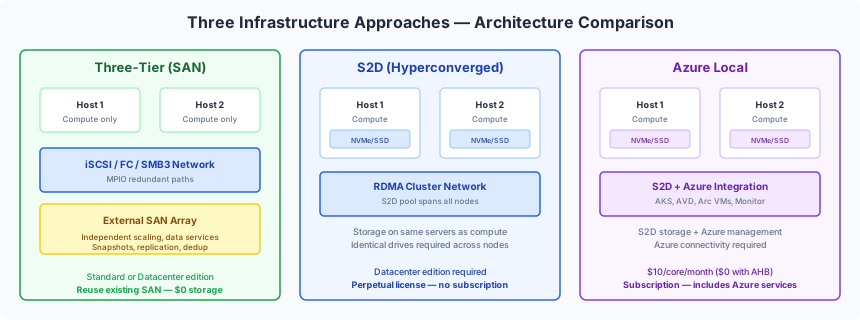
The Three Approaches
Storage Spaces Direct (S2D)
Software-defined storage built into Windows Server. Pools direct-attached NVMe, SSD, or HDD across 2-16 cluster nodes into a unified storage layer. Hyperconverged , compute and storage share the same servers.
Windows Server 2025 improvements:
- Native NVMe stack: up to 80% more IOPS and 45% lower CPU per I/O vs WS2022
- Native ReFS dedup and compression (all editions)
- Thin-provisioned volumes
- Campus Clusters with Rack-Level Nested Mirror (RLNM)
- Rack-Local Reads for reduced cross-rack traffic
Requirements: Datacenter edition. Identical drive models per tier across all nodes. RDMA recommended for 4+ nodes.
Scale: 2-16 nodes, up to 400 TB raw per server, 4 PB per pool. Microsoft benchmark: 13.7M IOPS per server with all-NVMe.
Traditional Three-Tier (External SAN)
Separate compute hosts connect to external storage arrays (Pure Storage, Dell PowerStore, NetApp, HPE) via iSCSI, Fibre Channel, or SMB3. Storage is independent from compute.
No WS2025 storage licensing required , the SAN is an independent appliance. Windows Server Standard or Datacenter on the compute nodes.
Requirements: SAN array with Hyper-V integration. MPIO for redundant paths. Any Windows Server edition.
Scale: Up to 64 cluster nodes, 8,000 VMs. Storage scales independently by adding capacity to the array.
Azure Local (formerly Azure Stack HCI)
Microsoft’s hybrid cloud platform. Runs on the WS2025 kernel with Azure integration built in. Uses S2D for storage. Requires Azure connectivity and subscription billing.
Current version: 2603 (March 2026). Base price: ~$10/physical core/month.
Included services: AKS, AVD, Arc VM management, Azure Monitor (50+ metrics), Azure Update Manager, Azure Policy.
Connectivity requirement: Must sync with Azure at least every 30 days. Disconnected Operations mode available (GA in 2602+) but requires 3-node management cluster and Microsoft approval.
Performance Comparison
| Metric | S2D All-NVMe | External SAN All-Flash | Notes |
|---|---|---|---|
| Random read latency | Sub-100 microseconds (local node) | 200-500 microseconds (network hop) | S2D wins on local reads , data locality advantage |
| Random write latency | Sub-100 microseconds (cache tier) | 100-300 microseconds (controller cache) | Comparable , SAN controller cache is purpose-built |
| IOPS per node | Up to 13.7M (Microsoft benchmark) | Depends on array; midrange 500K-2M | S2D benchmark is synthetic; real workloads are lower |
| Sequential throughput | 500+ GB/s (cluster aggregate) | Constrained by FC/iSCSI fabric | SAN fabric is shared; S2D uses dedicated RDMA |
| CPU overhead | Storage consumes host CPU (mitigated by RDMA) | Near-zero host CPU for storage I/O | SAN offloads storage processing entirely |
When S2D Outperforms SAN
Local reads on the owner node bypass the network entirely. The VM’s data is on the same server’s NVMe drives, accessed through a software stack without any network hop. All-NVMe with RDMA delivers the lowest possible read latency for workloads pinned to a single node. The WS2025 native NVMe stack reduces CPU overhead by 45%.
When SAN Outperforms S2D
Remote reads , when a VM runs on Node A but its data resides on Node B , traverse the cluster network even with RDMA. SAN provides consistent latency regardless of which host accesses data because all hosts access the array through dedicated storage paths. Dedicated storage controllers handle rebuild, replication, and snapshots without consuming host CPU. For mixed workloads across many hosts, SAN avoids the “noisy neighbor” CPU contention that S2D can experience when storage operations compete with VM workloads for the same processors.
Failure Domain Comparison
S2D / Azure Local
| Failure | Response | Impact |
|---|---|---|
| Disk failure | Mirror rebuilds from pool across remaining drives. Automatic. | Host CPU and network consumed during rebuild |
| Node failure | Data available on mirror copies on other nodes. VMs restart on surviving nodes. | Rebuild consumes cluster resources |
| Rack failure | Campus Clusters (WS2025): RLNM keeps copies in both racks | Survives full rack loss (requires 2-rack config) |
Three-Tier (SAN)
| Failure | Response | Impact |
|---|---|---|
| Disk failure | RAID group or erasure-coded set rebuilds within the array | Zero host impact , rebuild is entirely within the array |
| Controller failure | Dual-controller active/active or active/passive failover | Sub-second failover, transparent to hosts |
| Path failure | MPIO with multiple FC/iSCSI paths | Automatic path failover, no VM impact |
| Site failure | Array-based synchronous/async replication to remote site | Orchestrated failover (Post 14) |
The key difference: S2D rebuilds consume host CPU and cluster network bandwidth , the same resources your VMs are using. SAN rebuilds are contained entirely within the array’s dedicated hardware. For large rebuilds (multi-TB), this matters.
Cost Comparison , 4 Hosts, 64 Cores Each, 3-Year TCO
This is where the decision often gets made. All numbers are approximate and based on publicly available pricing as of early 2026.
Three-Tier Hyper-V (with Existing SAN)
| Component | Cost | Notes |
|---|---|---|
| Windows Server 2025 Datacenter (perpetual) | ~$24,620 (4 hosts × 64 cores) | One-time purchase with SA |
| SAN storage | $0 additional | Existing investment , already amortized |
| SAN maintenance (annual) | ~$15,000-30,000/year | Depends on vendor/contract |
| 3-year total | ~$69,620-$114,620 | Perpetual license + SAN maintenance |
S2D Hyper-V (New Local Storage)
| Component | Cost | Notes |
|---|---|---|
| Windows Server 2025 Datacenter (perpetual) | ~$24,620 | Same as three-tier |
| NVMe/SSD drives (4 hosts × ~$10-20K each) | ~$40,000-$80,000 | New hardware purchase |
| 3-year total | ~$64,620-$104,620 | Perpetual license + drives |
Azure Local (No Azure Hybrid Benefit)
| Component | Cost | Notes |
|---|---|---|
| Azure Local host fee ($10/core/month) | $92,160 over 3 years | 256 cores × $10 × 36 months |
| Windows Server subscription ($23.30/core/month) | $214,733 over 3 years | Or use AHB to waive |
| Local NVMe/SSD drives | ~$40,000-$80,000 | Same as S2D |
| 3-year total (no AHB) | ~$346,893-$386,893 | Subscription + drives |
Azure Local (With Azure Hybrid Benefit + SA)
| Component | Cost | Notes |
|---|---|---|
| Azure Local host fee | $0 (waived by AHB) | Requires active SA on WS Datacenter |
| Guest OS licensing | $0 (waived by AHB) | Same SA covers guests |
| Software Assurance cost | ~$24,620 over 3 years | Renewal cost for SA |
| Local NVMe/SSD drives | ~$40,000-$80,000 | Same as S2D |
| 3-year total (with AHB) | ~$64,620-$104,620 | SA renewal + drives |
What the Numbers Show
| Platform | 3-Year TCO (Low) | 3-Year TCO (High) |
|---|---|---|
| Three-Tier (existing SAN) | $69,620 | $114,620 |
| S2D (new drives) | $64,620 | $104,620 |
| Azure Local (no AHB) | $346,893 | $386,893 |
| Azure Local (with AHB) | $64,620 | $104,620 |
The takeaway: With Azure Hybrid Benefit, Azure Local costs are comparable to S2D (both need new drives). Without AHB, Azure Local is 3-5x more expensive. Three-tier with existing SAN is the cheapest path when you already own the storage , the SAN is a sunk cost that carries forward.
Important: These numbers exclude Azure services (Defender, Monitor, Backup, ASR) which cost the same regardless of platform. They also exclude operational labor costs, which vary by organization.
Operational Complexity
| Factor | Three-Tier | S2D | Azure Local |
|---|---|---|---|
| Storage management | Vendor console (mature, dedicated) | PowerShell / WAC (admin manages pool, disks, rebuild) | Azure Portal + automatic updates |
| Skills required | Storage team + compute team (separated) | Single admin owns compute AND storage | Single admin + Azure familiarity |
| Update process | Independent: patch hosts and array separately | Cluster-Aware Updating for hosts; manual drive firmware | Azure Update Manager orchestrates full stack |
| Monitoring | Vendor tools + SCOM / Grafana (Post 9) | WAC + Health Service + PerfMon | Azure Monitor (50+ built-in metrics) |
| Day-2 simplicity | Medium (mature but two systems) | Medium (single system but broader skill) | Highest (cloud-managed) but cloud-dependent |
| Air-gap capability | Full , zero internet required | Full , zero internet required | Limited , 30-day sync required; disconnected mode needs special approval |
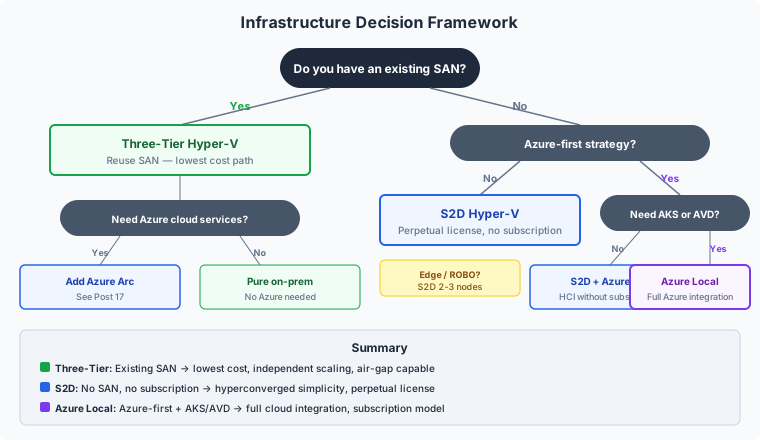
Decision Framework , When Each Approach Wins
Three-Tier Wins When
- You have an existing SAN investment with remaining useful life , the storage cost is already amortized
- You need array-level data services , hardware snapshots, thin clones, synchronous replication handled by dedicated controllers
- Your organization has dedicated storage team expertise , separation of duties is a feature, not a limitation
- You need to scale compute and storage independently , add hosts without touching storage, or expand storage without adding servers
- Air-gapped or SCIF environments with zero internet connectivity , no Azure dependency, no 30-day sync
- Windows Server Standard edition is sufficient , fewer VMs per host, lower licensing cost. S2D requires Datacenter.
S2D Wins When
- No existing SAN infrastructure , greenfield deployment where buying a SAN adds unnecessary cost and complexity
- ROBO or edge deployments , 2-3 node clusters where a SAN is impractical (small offices, factory floors, retail locations)
- You want hyperconverged simplicity without cloud dependency , one system to manage, perpetual licensing
- Local NVMe performance matters , data locality provides the lowest possible read latency for workloads pinned to a node
- Budget favors perpetual licensing over recurring subscription
Azure Local Wins When
- Azure-first strategy with hybrid cloud as the operating model , your organization is committed to Azure management
- You need AKS or AVD on-premises , these are Azure Local exclusives (AVD permanently, AKS long-term)
- Unified Azure Portal management across cloud and edge is a priority for your operations team
- Your team already manages Azure and wants consistent tooling, RBAC, and policy across all infrastructure
- You have Azure Hybrid Benefit , with SA on Datacenter, the platform cost drops to $0, making the total cost comparable to S2D
- Automatic lifecycle management matters more than flexibility , Azure Local handles updates, monitoring, and policy automatically
The Hybrid Path , You Don’t Have to Choose Just One
The approaches aren’t mutually exclusive. Many organizations run multiple architectures for different use cases:
| Use Case | Recommended Architecture |
|---|---|
| Primary datacenter (existing SAN) | Three-tier Hyper-V |
| DR site (new build) | S2D or three-tier (depends on SAN replication needs) |
| Edge / ROBO (2-3 nodes) | S2D |
| Azure-integrated workloads (AKS, AVD) | Azure Local |
| Dev/test (cost-sensitive) | S2D on commodity hardware |
The key insight from this series: your primary datacenter with existing SAN infrastructure is best served by three-tier Hyper-V. The SAN is already paid for. Windows Server licensing is a fraction of VCF or Azure Local (without AHB). And Azure Arc brings the cloud management services you need without the platform tax (Post 17).
For new builds without existing storage, S2D and Azure Local both have merit , the decision comes down to whether you want perpetual (S2D) or subscription with Azure integration (Azure Local).
Next Steps
With the infrastructure decision made, the final two posts in the series focus on automation. In the next post, Post 19: PowerShell Automation Patterns, we’ll cover DSC for configuration management, idempotent scripting, module development, and CI/CD integration , the patterns that make “PowerShell Returned to Its Throne” more than a tagline.
Resources
- Series Repository: github.com/thisismydemo/hyper-v-renaissance
Microsoft Documentation
- Storage Spaces Direct overview
- S2D hardware requirements
- S2D cache behavior
- Azure Local pricing
- Azure Local billing and payment
- Azure Local disconnected operations
- Native NVMe in Windows Server 2025
- Campus Clusters announcement
Related Posts
- Post 6: Three-Tier Storage Integration , basic SAN connectivity
- Post 12: Storage Architecture Deep Dive , CSV internals, tiering, cost case
- Post 14: Multi-Site Resilience , replication strategies across platforms
- Post 17: Hybrid Without the Handcuffs , Azure services on traditional Hyper-V
Series Navigation ← Previous: Post 17 , Hybrid Without the Handcuffs → Next: Post 19 , PowerShell Automation Patterns