Security Architecture for Hyper-V Clusters
Threat Models, VBS, and Defense in Depth

A Hyper-V host is the most valuable target on your network.
Compromise a workstation, you get one user’s data. Compromise an application server, you get one application’s data. Compromise a Hyper-V host, you get every virtual machine running on it , their memory, their disks, their network traffic. Compromise the cluster, and you get them all.
The hypervisor is the trust boundary. Everything above it , every VM, every guest OS, every application , depends on the integrity of what’s below. Security architecture for Hyper-V isn’t about checking boxes on a hardening guide. It’s about understanding what you’re protecting, what you’re protecting it from, and which layers of defense map to which threats.
If you’re leaving VMware because the VCF 9 bill stopped making sense, security is one of the places where the economics of traditional Hyper-V matter. You can keep using existing hardware, existing storage, and familiar Windows security controls without taking on a new platform tax just to get back to a defensible baseline.
In this tenth post of the Hyper-V Renaissance series, we’ll build that understanding layer by layer. We start with the threat model, explain how Windows Server 2025’s security technologies actually work, and then map each defense to specific attack scenarios. We’ll separate the achievable hardening that every organization should implement from the advanced features that require deliberate investment , and we’ll be honest about where that line is.
Repository: Security baseline scripts, hardening checklists, and HGS readiness assessment tools are available in the series repository.
The Threat Model , What Are You Defending Against?
Before hardening anything, define the threats. Security without a threat model is just compliance theater.
| Threat | Attack Scenario | Defense | Layer |
|---|---|---|---|
| Credential theft from host | Attacker gains admin access to host, extracts cached domain credentials (NTLM hashes, Kerberos TGTs) to move laterally | Credential Guard (VBS-isolated credential storage) | Host |
| Kernel-level rootkit on host | Attacker loads a malicious kernel driver to persist on the host undetected | HVCI / Memory Integrity (hypervisor-enforced code integrity) | Host |
| Lateral movement between VMs | Compromised VM attacks other VMs on the same host via network | VLAN isolation, port ACLs, DHCP Guard, Router Guard | VM |
| Eavesdropping on cluster traffic | Attacker on the network captures unencrypted SMB/CSV data between nodes | SMB encryption (AES-256-GCM) | Cluster |
| Offline disk exfiltration | Attacker copies VHDX files from storage and reads contents offline | BitLocker on CSVs (data at rest), vTPM for guest BitLocker | Cluster / VM |
| Boot integrity attack | Malicious bootloader or firmware modification loads before the OS | UEFI Secure Boot, TPM 2.0, Measured Boot | Hardware |
| Compromised fabric administrator | A trusted admin with host access inspects VM memory, copies VM disks, or clones VMs to unauthorized hosts | Shielded VMs with HGS attestation | Advanced |
The first six threats can be mitigated with features that are either default in Windows Server 2025 or straightforward to enable. The seventh , compromised fabric admin , requires Host Guardian Service, which is a significant infrastructure investment. Understanding this distinction is critical: don’t deploy HGS because it sounds impressive; deploy it because your threat model demands it.
Security in Layers
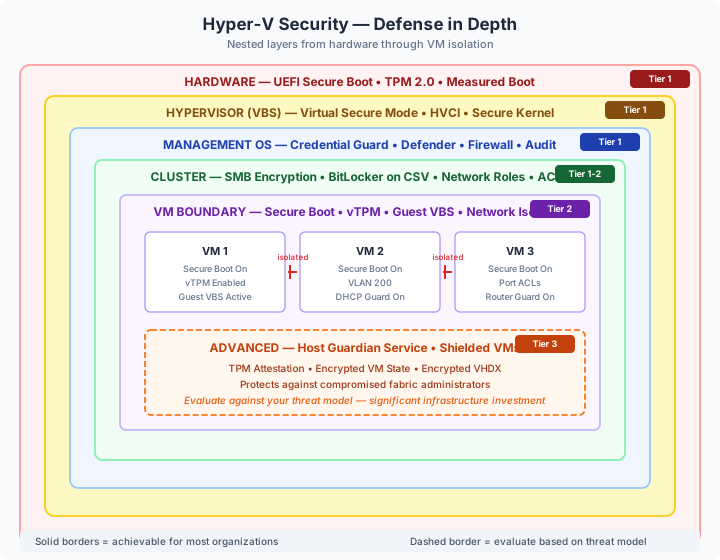
| Layer | What It Protects | Complexity | Tier |
|---|---|---|---|
| Hardware | Boot integrity, platform identity | Built-in (UEFI, TPM) | Baseline |
| Hypervisor (VBS) | Credential isolation, code integrity | Enabled by default in WS2025 | Baseline |
| Management OS | Host-level attack surface | Low , configure and verify | Baseline |
| Cluster | Data in transit, admin access | Low–Medium | Baseline / Enhanced |
| VM Boundary | VM-to-VM isolation, guest integrity | Medium | Enhanced |
| Advanced (HGS) | Protection from fabric admins | High | Evaluate carefully |
Virtualization-Based Security , The Foundation
Every security feature we discuss in this post , Credential Guard, HVCI, guest VBS , depends on Virtualization-Based Security (VBS). Understanding VBS is understanding the entire security architecture.
What VBS Actually Does
VBS uses the Hyper-V hypervisor to create an isolated virtual environment called Virtual Secure Mode (VSM). This isn’t a VM you can see in Hyper-V Manager , it’s a separate, hardware-isolated container that runs alongside the main Windows kernel but is invisible and inaccessible to it.
Think of it this way: the hypervisor sits at the bottom of the stack. It creates two partitions:
- The normal Windows kernel , where the management OS runs, where your services run, where an attacker would land if they compromise the host
- The Secure Kernel (VSM) , a separate, isolated partition that the normal kernel cannot access, even with SYSTEM privileges
Even if an attacker gains full kernel-level control of the host operating system, they cannot reach into VSM. The isolation is enforced by the hypervisor at the hardware level using Second Level Address Translation (SLAT) , the same mechanism that isolates VMs from each other.
What Runs Inside VSM
| VSM Component | Purpose |
|---|---|
| Isolated LSA (LSAISO) | Credential Guard’s credential storage. NTLM hashes and Kerberos TGTs are processed here, never exposed to the normal kernel. |
| Hypervisor-Enforced Code Integrity (HVCI) | Validates all kernel-mode code before it loads. Drivers and kernel modules must be properly signed. Unsigned or tampered code is blocked at the hypervisor level. |
| Secure Kernel | The minimal kernel that runs VSM services. It handles memory management and scheduling for VSM, separate from the main kernel. |
Hardware Requirements
| Requirement | Purpose |
|---|---|
| VT-x / AMD-V | Hardware virtualization extensions (required for the hypervisor) |
| SLAT (EPT/NPT) | Second Level Address Translation for memory isolation |
| UEFI Secure Boot | Ensures the boot chain is trusted from firmware through bootloader |
| TPM 2.0 | Platform identity and measured boot (recommended, not strictly required for VBS) |
Windows Server 2025 Defaults
WS2025 shipped with significantly stronger security defaults than any prior release:
- VBS is enabled by default on systems with qualifying hardware
- HVCI is enabled by default and cannot be permanently disabled
- Credential Guard is enabled by default on domain-joined systems with UEFI + TPM
This means that if your hardware supports it , and any server manufactured in the last five years should , you’re already running VBS. The question isn’t whether to enable it; it’s whether to verify it’s active and understand what it’s doing.
# Verify VBS, Credential Guard, and HVCI status
$DevGuard = Get-CimInstance -ClassName Win32_DeviceGuard -Namespace root\Microsoft\Windows\DeviceGuard
Write-Host "VBS Status: $($DevGuard.VirtualizationBasedSecurityStatus)"
# 0 = Not enabled, 1 = Enabled but not running, 2 = Running
Write-Host "Security Services Running: $($DevGuard.SecurityServicesRunning -join ', ')"
# 1 = Credential Guard, 2 = HVCI, 3 = System Guard Secure Launch
Full enablement and verification scripts for VBS, Credential Guard, and HVCI are in the companion repository.
Credential Guard , Why It Matters for Hyper-V
Credential Guard deserves specific attention because Hyper-V hosts are domain-joined machines that administrators log into regularly. Without Credential Guard, a compromised host exposes every domain credential that has been used on it , cached NTLM hashes, Kerberos TGTs, stored passwords. An attacker uses these for pass-the-hash or pass-the-ticket attacks to move laterally to domain controllers, other hosts, and management servers.
With Credential Guard, those credentials are processed inside the VSM’s Isolated LSA. The normal kernel never sees them. Even a kernel-level exploit can’t extract them. This single feature defeats the most common post-exploitation technique against Windows infrastructure.
The operational catch: Credential Guard breaks CredSSP-based delegation. CredSSP passes credentials by transmitting them to the remote server , exactly what Credential Guard prevents. This affects:
- Live migration configured with CredSSP authentication
- SCVMM connections that use CredSSP
- PowerShell remoting with CredSSP delegation
The fix is Kerberos constrained delegation, which doesn’t transmit credentials , it uses Kerberos tickets instead. This is why Post 5 recommended Kerberos from the start. If you’re still using CredSSP, switch to Kerberos before enabling Credential Guard.
HVCI , Protecting the Kernel Itself
HVCI ensures that only properly signed kernel-mode code can execute. Every driver, every kernel module, every piece of code that runs in kernel mode must be validated by the hypervisor before it loads.
This prevents an entire class of attacks: kernel-mode rootkits, malicious drivers, and tampering with the kernel after boot. On WS2025, HVCI is enabled by default and cannot be permanently disabled , Microsoft made the architectural decision that kernel code integrity is non-negotiable.
Practical impact: Legitimate unsigned drivers will be blocked. This is rare in 2026 , major hardware vendors (Dell, HPE, Lenovo) and storage vendors sign their drivers. But if you have legacy hardware with unsigned drivers, you’ll discover this when HVCI blocks them. Test your driver stack before deploying to production.
Cluster Communication Security
With the host secured, the next layer is the data flowing between hosts in the cluster.
SMB Signing vs. Encryption , What Changed in WS2025
Windows Server 2025 made significant changes to SMB security defaults:
| Feature | WS2022 Default | WS2025 Default | Purpose |
|---|---|---|---|
| SMB Signing | Required on DCs only | Required on all connections | Integrity , prevents tampering |
| SMB Encryption | Not required | Not required | Confidentiality , prevents eavesdropping |
| Minimum cipher | AES-128-CCM | AES-128-GCM | Faster, more secure authenticated encryption |
SMB signing verifies that packets haven’t been tampered with in transit. It provides integrity but not confidentiality , an attacker can still read the traffic, they just can’t modify it undetected. WS2025 requires signing by default on all client and server connections.
SMB encryption provides both integrity and confidentiality , traffic is encrypted so it can’t be read or modified. When encryption is active, signing is automatically disabled because encryption already provides tamper protection (no need for both).
For Hyper-V clusters, enable SMB encryption. Cluster traffic includes CSV I/O between nodes (your VM storage traffic), live migration data (when using SMB transport), and management file shares. All of this should be encrypted in transit.
# Enable SMB encryption and set preferred ciphers
Set-SmbServerConfiguration -EncryptData $true -Force
Set-SmbServerConfiguration -EncryptionCiphers "AES_256_GCM, AES_128_GCM" -Force
BitLocker on Cluster Shared Volumes
SMB encryption protects data in transit. BitLocker protects data at rest. If someone physically removes a disk from your storage array , or copies VHDX files from the CSV , encrypted data is unreadable without the BitLocker keys.
BitLocker on CSVs has been supported since Windows Server 2022. The key considerations for cluster environments:
- Key management: BitLocker keys must be available on any node that might own the CSV. Active Directory-based key protector or network unlock are the typical approaches.
- Performance: AES-XTS hardware acceleration on modern CPUs means BitLocker overhead is minimal (typically <5% impact).
- Recovery: Plan and test your recovery process. A node that can’t unlock a CSV at boot time will have its VMs unavailable until the issue is resolved.
Detailed BitLocker on CSV configuration is in the companion repository. The process requires careful planning for cluster environments , not a one-liner.
Cluster Network Isolation
Cluster networks serve different roles, and not all traffic should share the same network:
| Network Role | Value | Traffic Type |
|---|---|---|
| Role 0 | Do not allow cluster communication | Networks that should never carry cluster traffic (e.g. a DMZ-facing network) |
| Role 1 | Cluster communication only | Internal cluster traffic , heartbeat, CSV I/O. No client access. |
| Role 3 | Cluster and client | Both cluster communication and client/VM traffic |
For security, ensure that your storage and migration networks are configured as Role 1 (cluster only) , client traffic should never traverse these networks.
Administrative Access Control
The principle of least privilege applies to cluster management:
- Create dedicated AD groups for Hyper-V cluster administration (e.g.
HyperV-Admins,HyperV-Operators) - Grant cluster access to these groups, not to Domain Admins
- Enable audit logging for cluster operations so you have a forensic trail of who did what
- Consider Just-In-Time (JIT) access and Privileged Access Workstations (PAWs) for cluster management
VM Isolation and Security
The VM boundary is where you protect workloads from each other and from the host.
Secure Boot for VMs
Secure Boot on Generation 2 VMs verifies the boot chain before the guest OS loads. A VM with Secure Boot enabled will refuse to start if the bootloader has been tampered with , preventing rootkits from loading before the guest OS has a chance to defend itself.
WS2025 enables Secure Boot by default on new Gen 2 VMs. Three Secure Boot templates are available:
| Template | Use For | What It Validates |
|---|---|---|
MicrosoftWindows | Windows guests | Microsoft Windows bootloader certificates |
MicrosoftUEFICertificateAuthority | Linux guests | Microsoft UEFI CA certificates (broader compatibility) |
OpenSourceShieldedVM | Open-source shielded scenarios | Open-source signing certificates |
# Verify Secure Boot status across all Gen 2 VMs
Get-VM | Where-Object Generation -eq 2 | ForEach-Object {
    $fw = Get-VMFirmware -VMName $_.Name
    Write-Host "$($_.Name): SecureBoot=$($fw.SecureBoot) Template=$($fw.SecureBootTemplate)"
}
Virtual TPM , The Key Trade-Off
A virtual TPM (vTPM) gives guest VMs a trusted platform module, enabling BitLocker drive encryption, Windows Hello, and measured boot inside the guest. On WS2025, vTPM works without Host Guardian Service using a local key protector.
This is one of the most important architectural decisions in Hyper-V security because of a single constraint:
VMs with a local key protector cannot be live migrated.
The key protector is bound to the specific host that created it. Move the VM to another host, and it can’t decrypt its vTPM data. The VM won’t boot.
This creates a clear decision point:
| Scenario | vTPM Approach | Live Migration |
|---|---|---|
| Stationary VMs that don’t need migration | Local key protector | Not supported |
| VMs that require both vTPM and migration | HGS key protector | Supported |
| VMs that prioritize mobility over vTPM | No vTPM | Fully supported |
For many organizations, this means vTPM with local key protector for security-sensitive VMs that are pinned to specific hosts (e.g. a domain controller that doesn’t need to migrate), and no vTPM for VMs that need full cluster mobility. If you need both , vTPM and live migration , you need Host Guardian Service (see the next section).
# Enable vTPM with local key protector (VM must be off)
Set-VMKeyProtector -VMName "DC-01" -NewLocalKeyProtector
Enable-VMTPM -VMName "DC-01"
Guest VBS , Security Inside the VM
Windows Server 2025 enables guest Virtual Secure Mode on Generation 2 VMs by default. This means VBS features , Credential Guard, HVCI , work inside guest VMs without requiring nested virtualization.
The benefit: even if a guest VM’s operating system is compromised, the attacker still can’t extract domain credentials stored in the guest’s Credential Guard. The security boundary extends from the host hypervisor all the way into the guest, creating defense in depth.
Guest VBS is enabled automatically for Gen 2 VMs. Verify it isn’t opted out:
Get-VM -Name "MyVM" | Select-Object Name, VirtualizationBasedSecurityOptOut
# Should be False (guest VBS enabled)
Network Isolation
Network isolation prevents a compromised VM from attacking other VMs or the host. Multiple mechanisms work together:
| Feature | What It Prevents | How to Configure |
|---|---|---|
| VLAN isolation | VMs on different VLANs can’t communicate at Layer 2 | Set-VMNetworkAdapterVlan -VMName "VM" -Access -VlanId 100 |
| Port ACLs | Fine-grained IP-based traffic filtering per VM | Add-VMNetworkAdapterAcl , filter by source/dest IP and direction |
| DHCP Guard | Prevents a compromised VM from running a rogue DHCP server | Set-VMNetworkAdapter -VMName "VM" -DhcpGuard On |
| Router Guard | Prevents a VM from acting as a rogue router | Set-VMNetworkAdapter -VMName "VM" -RouterGuard On |
| MAC spoofing protection | Prevents a VM from impersonating another NIC | Disabled by default , verify with Get-VMNetworkAdapter |
At minimum, every production environment should have VLAN isolation and DHCP/Router Guard enabled. Port ACLs add micro-segmentation for environments that need tighter control (e.g. PCI-DSS scope reduction).
Shielded VMs and Host Guardian Service , The Honest Assessment
Shielded VMs are the most advanced security feature available in Hyper-V. They encrypt VM state (memory) and virtual disks, prevent fabric administrators from inspecting VM contents, and use attestation to ensure VMs only run on approved hosts.
What Shielded VMs Actually Protect Against
The specific threat that Shielded VMs address is the compromised or malicious fabric administrator. In a standard Hyper-V deployment, anyone with admin access to the host can:
- Inspect VM memory using debugging tools
- Mount and read VM virtual disk files
- Clone a VM to an unauthorized host
- Inject drivers or code into a VM’s virtual hardware
Shielded VMs prevent all of these. The VM’s vTPM keys are protected by HGS and only released to hosts that pass attestation. The VHDX files are encrypted. VM memory is encrypted. Even a host administrator cannot access the VM’s contents.
HGS Architecture
Host Guardian Service is a separate server role that provides two services:
- Attestation Service , verifies that a Hyper-V host meets security requirements before allowing it to run shielded VMs
- Key Protection Service , releases encryption keys (key protectors) to attested hosts so they can start shielded VMs
Infrastructure requirements:
| Component | Requirement |
|---|---|
| HGS cluster | 3 nodes recommended (separate Windows Server instances) |
| AD forest | Separate AD forest from the production fabric (security boundary) |
| TPM 2.0 | Required on all guarded hosts (for TPM attestation) |
| UEFI Secure Boot | Required on all guarded hosts |
| Network | HGS must be reachable from all guarded hosts |
Attestation Modes
| Mode | Trust Level | Complexity | Status |
|---|---|---|---|
| TPM attestation | Highest , host proves identity via TPM endorsement key + code integrity policy | High , requires managing CI policies across all hosts | Recommended |
| Host Key attestation | Moderate , host proves identity via asymmetric key pair | Medium , simpler than TPM but weaker trust model | Supported |
| Admin-trusted attestation | Lowest , trusts an AD group membership | Low | Deprecated since WS2019 |
The Honest Trade-Off
| Factor | Without HGS (vTPM local) | With HGS (Shielded VMs) |
|---|---|---|
| Complexity | Low | High , separate AD forest, 3-node HGS cluster |
| Infrastructure cost | None additional | 3+ additional servers for HGS |
| Live migration + vTPM | Not possible | Supported |
| Protection from fabric admin | None | Full , VM state and disks encrypted |
| Guest disk encryption | Host-bound BitLocker | Portable, attestation-verified BitLocker |
| Operational overhead | Minimal | Significant , attestation policies, CI policies, HGS availability |
When HGS Is Worth It
- Hosting providers running untrusted multi-tenant workloads where tenants don’t trust the fabric operator
- Regulated industries with explicit compliance requirements for VM isolation and encryption (ITAR, classified workloads)
- High-security environments where fabric administrator compromise is an explicit entry in the threat model
When HGS Is Overkill
- Single-organization private clouds where you trust your infrastructure team , the fabric admin is the customer
- Small environments where the cost of 3+ HGS servers exceeds the security value they provide
- Environments without TPM 2.0 on all hosts , Host Key attestation provides weaker guarantees, reducing the value proposition
For most organizations reading this series , those running Hyper-V as a VMware alternative for their own workloads , vTPM with local key protector plus SMB encryption plus BitLocker on CSVs provides strong security without HGS complexity. Evaluate HGS against your actual threat model, not against a checklist.
HGS readiness assessment scripts and detailed deployment guidance are in the companion repository.
Host Hardening Baseline
Beyond the architectural security features, every Hyper-V host needs basic hardening. These items were introduced in Post 5 and should be verified on every host:
- Windows Defender with Hyper-V exclusions , WS2025 auto-configures exclusions when the Hyper-V role is installed. Verify they’re in place, add custom CSV paths. Scripts in the companion repo.
- Unnecessary services disabled , Browser, LLTD, ICS, WLAN, and other services that have no place on a server. Script in the companion repo.
- Windows Firewall enabled on all profiles with Hyper-V management rules configured. Never disable the firewall.
- Audit logging configured , subcategories for object access, logon events, privilege use. Feed these into your monitoring platform (Post 9).
Security Hardening Checklist
Use this checklist to track your hardening progress. Items are tiered by complexity:
Tier 1 , Baseline (Every Environment)
| Item | Status |
|---|---|
| VBS active and verified | ☐ |
| Credential Guard enabled (WS2025 default) | ☐ |
| HVCI / Memory Integrity active (WS2025 default) | ☐ |
| Live migration using Kerberos, not CredSSP | ☐ |
| SMB signing required (WS2025 default) | ☐ |
| SMB encryption enabled on cluster | ☐ |
| Windows Defender with Hyper-V exclusions verified | ☐ |
| Unnecessary services disabled | ☐ |
| Windows Firewall enabled on all profiles | ☐ |
| Secure Boot enabled on all Gen 2 VMs | ☐ |
| DHCP Guard and Router Guard enabled on VMs | ☐ |
| Administrative access limited to dedicated groups | ☐ |
| Audit logging enabled for cluster operations | ☐ |
Tier 2 , Enhanced (Recommended for Production)
| Item | Status |
|---|---|
| vTPM enabled on applicable Gen 2 VMs | ☐ |
| BitLocker on CSV volumes (data at rest) | ☐ |
| VM network isolation via VLANs | ☐ |
| Port ACLs for micro-segmentation where needed | ☐ |
| Guest VBS verified (not opted out) on Gen 2 VMs | ☐ |
| SMB encryption ciphers set to AES-256-GCM | ☐ |
| Cluster networks assigned correct roles (0/1/3) | ☐ |
| Firewall logging enabled for forensics | ☐ |
Tier 3 , Advanced (Evaluate Based on Threat Model)
| Item | Status |
|---|---|
| Host Guardian Service deployed | ☐ |
| TPM attestation configured for guarded hosts | ☐ |
| Code integrity policies deployed to guarded hosts | ☐ |
| Shielded VMs provisioned for sensitive workloads | ☐ |
Compliance Mapping
If you’re subject to compliance frameworks, here’s how Hyper-V security features map:
| Security Requirement | CIS WS2025 Benchmark | NIST 800-53 | Hyper-V Feature |
|---|---|---|---|
| Credential protection | 18.x (Credential Guard) | IA-5 (Authenticator Management) | Credential Guard (VBS) |
| Encryption at rest | 18.x (BitLocker) | SC-28 (Protection of Information at Rest) | BitLocker on CSVs, vTPM guest BitLocker |
| Encryption in transit | 18.x (SMB signing/encryption) | SC-8 (Transmission Confidentiality) | SMB encryption (AES-256-GCM) |
| Boot integrity | 18.x (Secure Boot) | SI-7 (Software, Firmware, and Information Integrity) | UEFI Secure Boot, HVCI, Measured Boot |
| Access control | 1.x (Account policies) | AC-2, AC-3 (Account Management, Access Enforcement) | AD groups, cluster ACLs, JIT access |
| Audit logging | 17.x (Audit policies) | AU-2 (Event Logging) | Windows audit policy, cluster event logs |
| Network segmentation | 9.x (Firewall rules) | SC-7 (Boundary Protection) | VLANs, port ACLs, firewall rules |
| VM isolation | N/A | SC-3 (Security Function Isolation) | Guest VBS, Shielded VMs, HGS attestation |
Reference: The CIS Benchmark for Windows Server 2025 (v1.0.0, released March 2025) provides specific hardening recommendations with over 400 configuration items. Download from cisecurity.org. The companion repository includes a script that checks key CIS recommendations relevant to Hyper-V hosts.
Next Steps
Security is layers, not a single feature. Start with Tier 1 , most of it is already default in WS2025, you just need to verify and configure SMB encryption. Grow into Tier 2 as your operational maturity allows. Evaluate Tier 3 against your actual threat model, not against a vendor pitch.
With your environment secured, you need to manage it efficiently at scale. In the next post, Post 11: Management Tools for Production, we’ll cover the management tooling landscape , Windows Admin Center, SCVMM, Failover Cluster Manager, PowerShell remoting, and Azure Arc , and help you select the right management stack for your environment’s size and complexity.
Resources
- Series Repository: github.com/thisismydemo/hyper-v-renaissance
Microsoft Documentation
- Virtualization-Based Security overview
- Credential Guard overview
- Credential Guard known issues
- Enable memory integrity (HVCI)
- SMB security enhancements in Windows Server 2025
- SMB signing overview
- BitLocker on Cluster Shared Volumes
- Generation 2 VM security features
- Guarded fabric and shielded VMs overview
- Antivirus exclusions for Hyper-V hosts
- CIS Microsoft Windows Server 2025 Benchmark
Series Navigation ← Previous: Post 9 , Monitoring and Observability → Next: Post 11 , Management Tools for Production