Multi-Site Resilience
Hyper-V Replica, Storage Replica, Campus Clusters, and SAN Replication

Post 13 protects your data with backups. This post protects your services with replication.
Backups recover data , you restore a VM from yesterday’s backup and accept the data loss between the backup and the failure. Replication recovers services , your VMs are already running (or can start within minutes) at a secondary site with near-zero data loss. Production environments need both, and the architecture decisions you make here determine whether a site failure is a business disruption or a page in the runbook.
Windows Server 2025 and the Hyper-V ecosystem give you multiple replication technologies, each with different RPO/RTO characteristics, complexity, and cost. The right choice depends on your requirements, not on which technology sounds most impressive.
That is especially important if your broader strategy is to leave VMware licensing behind without immediately replacing it with a new platform bill. The practical win for many organizations is not “buy everything new.” It is pairing Hyper-V with the replication approach that matches the business requirement and the storage they already trust.
In this fourteenth post of the Hyper-V Renaissance series, we’ll cover every major multi-site resilience strategy available for Hyper-V, from built-in Windows Server features to SAN-level replication, with a decision framework that maps your requirements to the right technology.
Repository: DR runbook templates, Hyper-V Replica configuration scripts, and Storage Replica deployment guides are in the series repository.
The Decision Framework , Start Here
Before diving into technology details, match your requirements to the right solution:
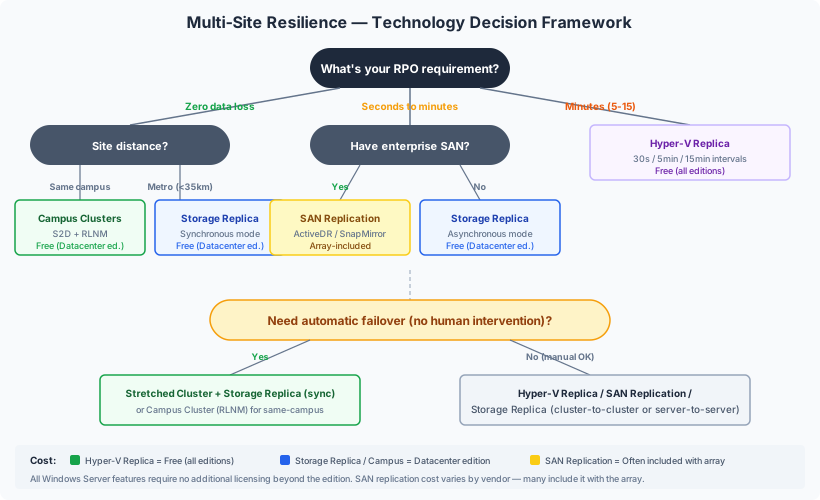
| Technology | RPO | RTO | Distance | Complexity | Cost | Best For |
|---|---|---|---|---|---|---|
| Hyper-V Replica | 30s – 15min | Minutes (manual failover) | Unlimited (async only) | Low | Free (built into Windows Server) | VM-level DR without SAN replication |
| Storage Replica (sync) | 0 (zero data loss) | Seconds – minutes | <5ms RTT (~35km) | Medium | Datacenter edition | Metro-distance zero-loss protection |
| Storage Replica (async) | Seconds – minutes | Minutes | Unlimited | Medium | Datacenter edition | Long-distance volume replication |
| Campus Clusters | 0 (zero data loss) | Automatic failover | Same campus (<1ms) | Medium | Datacenter + KB5072033 | Single-campus rack-level protection |
| SAN Replication | Vendor-dependent (near-zero to minutes) | Vendor-dependent | Vendor-dependent | Medium–High | Array licensing | Organizations with enterprise SAN investment |
Hyper-V Replica , Built-In, VM-Level DR
Hyper-V Replica is the simplest path to VM-level disaster recovery. It’s built into every edition of Windows Server, requires no shared storage between sites, and works across any network connection.
How It Works
Hyper-V Replica uses Resilient Change Tracking (RCT) to track block-level changes to a VM’s virtual hard disks. Changed blocks are compressed and sent asynchronously to a replica server at a secondary site, where a copy of the VM is maintained in an offline state. The replica VM is a point-in-time copy that can be brought online during a failover event.
Architecture
| Component | Primary Site | Secondary Site |
|---|---|---|
| VMs | Running, production workloads | Offline replicas (not consuming compute) |
| Storage | Production CSVs / local storage | Replica storage (can be different type/vendor) |
| Network | HTTP or HTTPS (port 80/443) | Same |
| Shared storage | Not required between sites | Not required |
| Cluster integration | Replica Broker role for clustered VMs | Replica Broker on target cluster |
Replication Frequencies
| Frequency | RPO | Bandwidth Impact | Use Case |
|---|---|---|---|
| 30 seconds | ~30 seconds | Highest , continuous stream of changes | Critical workloads requiring near-zero RPO |
| 5 minutes (default) | ~5 minutes | Moderate , batched changes | Most production workloads |
| 15 minutes | ~15 minutes | Lowest , larger batches, less frequent | Non-critical workloads, limited bandwidth |
The Replica Broker , Cluster Integration
When your Hyper-V hosts are clustered (and they should be in production), the Replica Broker is essential. It’s a cluster role that:
- Provides a stable endpoint for replication regardless of which node owns the VM
- Redirects incoming replication traffic to the correct node when VMs move between cluster nodes via live migration
- Without it, replication breaks every time a VM migrates to a different node
The Replica Broker must be configured on both the primary and secondary clusters.
Failover Types
| Failover Type | Initiated From | Data Loss | When to Use |
|---|---|---|---|
| Test Failover | Secondary site | None , primary keeps running | DR validation testing. Creates an isolated copy on the secondary. Replication continues unaffected. |
| Planned Failover | Primary site | Zero , final sync before switchover | Planned site maintenance, datacenter migration. Primary shuts down gracefully, remaining changes sync, then roles switch. |
| Unplanned Failover | Secondary site | Up to last replication interval | Primary site is down. Replica VM starts immediately on secondary. Potential data loss equal to the replication frequency. |
Failback
After the primary site recovers:
- Reverse replication , synchronize changes made on the former replica back to the original primary
- Planned failover , switch roles back to the original primary with zero data loss
- Resume normal replication , primary produces, secondary receives
Extended Replication
Hyper-V Replica supports chain replication , the secondary site can replicate to a third site. This provides an additional layer of redundancy (primary → secondary → extended replica). The extended replica can use a different replication frequency than the primary-to-secondary link.
Limitation: Fan-out replication (primary to two separate secondaries simultaneously) is not supported. Only chain topology.
Limitations , Be Honest
- Asynchronous only , no synchronous mode. There will always be some data loss potential during unplanned failover.
- Replica VMs are offline , they consume storage but not compute at the secondary site until failover.
- No automatic failover , failover must be initiated manually or scripted. There’s no built-in heartbeat-triggered automatic failover.
- Cannot live migrate replicas , replica VMs can’t be moved between hosts at the secondary site while they’re receiving replication.
- Bandwidth proportional to change rate , high-churn workloads (databases under heavy write load) generate significant replication traffic.
When Hyper-V Replica Is the Right Choice
- You need VM-level DR without shared storage between sites
- Your RPO tolerance is 30 seconds to 15 minutes
- You don’t have SAN-level replication capabilities
- Budget is constrained , Hyper-V Replica is free
- You need to replicate to a remote/cloud-hosted site over WAN
Storage Replica , Volume-Level, Zero-Loss Capable
Storage Replica is a Windows Server feature that provides block-level, volume-level replication between servers, clusters, or sites. Unlike Hyper-V Replica (which operates at the VM level), Storage Replica replicates entire volumes , everything on the volume is replicated, including all VMs, files, and metadata.
Synchronous vs. Asynchronous
| Mode | RPO | Latency Requirement | Data Loss | Use Case |
|---|---|---|---|---|
| Synchronous | 0 (zero data loss) | <5ms round-trip time (~35km) | None , writes committed at both ends before acknowledged | Metro-distance protection where zero data loss is mandatory |
| Asynchronous | Seconds to minutes | No limit | Potential loss of in-flight writes | Long-distance protection where some data loss is acceptable |
Synchronous mode deep-dive: When an application writes data, Storage Replica sends the write to both the source and destination volumes simultaneously. The write is only acknowledged to the application after both copies are committed. This guarantees zero data loss but adds write latency equal to the network round-trip time. For this reason, synchronous mode is practical only at metro distances where RTT is under 5ms.
Architecture
Storage Replica uses SMB 3.0 as its transport and requires a dedicated log volume on both source and destination (SSD recommended , faster than the data volume for optimal performance).
Deployment topologies:
| Topology | Description | Failover |
|---|---|---|
| Stretched cluster | Single WSFC cluster spanning two sites, Storage Replica syncs data | Automatic , cluster handles failover between sites |
| Cluster-to-cluster | Two independent clusters replicating between them | Manual , administrator initiates failover to secondary cluster |
| Server-to-server | Two standalone servers | Manual |
Stretched cluster is the most powerful topology , combined with synchronous Storage Replica, it provides automatic failover with zero data loss between sites. The cluster treats both sites as fault domains and uses site-aware policies to control VM placement and failover behavior.
Edition Requirements
| Edition | Capability |
|---|---|
| Datacenter | Unlimited volumes, unlimited size |
| Standard | Single volume, maximum 2 TB |
For production multi-site resilience with Storage Replica, Datacenter edition is required.
Key Behaviors
- Destination volume is inaccessible during replication , it’s dismounted. You can’t use it for reads or backups.
- Test-Failover cmdlet (WS2019+) , mounts a read-write snapshot of the destination for testing or backup without breaking replication.
- Encryption , AES-128-GCM with Kerberos authentication. Intel AES-NI acceleration supported.
When Storage Replica Is the Right Choice
- You need zero data loss (synchronous mode) between sites at metro distance
- You want volume-level replication that protects everything on the volume without per-VM configuration
- You’re building a stretched cluster with automatic site-level failover
- You have Datacenter edition licensing
Campus Clusters , Rack-Level Protection (New in WS2025)
Campus Clusters are a new capability in Windows Server 2025 that provides rack-level fault tolerance within a single physical location. This is relevant for organizations with a single datacenter or campus that want protection against an entire rack failure , power distribution failure, top-of-rack switch failure, or physical damage to a rack.
What Campus Clusters Are
A Campus Cluster is a Storage Spaces Direct (S2D) cluster configured across exactly two rack fault domains using Rack Level Nested Mirror (RLNM). Data is mirrored between racks so that losing an entire rack doesn’t lose data or availability.
Required: Windows Server 2025 with the December 2024 cumulative update KB5072033.
How RLNM Works
| Volume Type | Data Copies | Rack Survivability |
|---|---|---|
| Two-copy | One copy in each rack | Survives loss of one rack |
| Four-copy | Two copies in each rack | Survives loss of one rack plus one node in the surviving rack |
A 2+2 configuration (2 nodes per rack) with four-copy volumes provides the strongest resilience , an entire rack plus a node can fail simultaneously.
Requirements and Constraints
| Requirement | Details |
|---|---|
| Rack fault domains | Exactly two (no more, no less) |
| Network latency | <1ms between racks (LAN , same building/campus) |
| Node distribution | Symmetric: 1+1, 2+2, 3+3, 4+4, or 5+5 (max 10 nodes) |
| Storage | All capacity drives same type (flash SSD/NVMe recommended). HDDs and caching tiers not recommended. |
| NICs | RDMA recommended |
| Quorum witness | Must be in a third location separate from both racks |
| Edition | Datacenter |
Campus Clusters vs. Stretched Clusters
| Factor | Campus Cluster | Stretched Cluster |
|---|---|---|
| Distance | Same campus (<1ms) | Geographically separated (metro or WAN) |
| Storage | Single S2D pool with RLNM across racks | Two separate S2D pools or SANs with Storage Replica |
| Data sync | S2D handles replication natively | Storage Replica over SMB 3.0 |
| Failover | Automatic (within the cluster) | Automatic (stretched cluster) or manual (cluster-to-cluster) |
| Use case | Rack-level protection within a datacenter | Site-level protection across datacenters |
When Campus Clusters Make Sense
- Single datacenter with two-rack infrastructure
- Need protection against rack failure (power, network, physical)
- Don’t have a secondary site for geographic DR
- Starting fresh without existing SAN (S2D is the storage layer)
Note: Campus Clusters use S2D, which is a hyperconverged model , not three-tier SAN. If your strategy is three-tier with external storage, Campus Clusters aren’t the right fit. Use Storage Replica or SAN replication for multi-site protection with external storage.
SAN-Level Replication , Vendor-Native Protection
For organizations with enterprise SAN infrastructure , which is the core audience of this series , SAN-level replication provides the most transparent and performant multi-site protection. The replication happens at the array level, below the hypervisor, with no impact on host CPU or cluster network bandwidth.
How SAN Replication Complements Hyper-V
SAN replication protects the storage volumes that your CSVs reside on. The Hyper-V cluster at the DR site is pre-configured with the replicated volumes. During failover:
- SAN replication promotes the DR volumes to read-write
- The DR Hyper-V cluster imports and starts VMs from the replicated CSVs
- VMs come online at the DR site
This approach is transparent to the Hyper-V layer , the VMs don’t know they’re being replicated, and there’s no per-VM replication configuration required.
Pure Storage ActiveDR (Detailed Example)
Pure Storage ActiveDR provides continuous, asynchronous, bidirectional replication built into Purity//FA 6.0+ on FlashArray systems.
How it works: When a write lands on a source volume protected by ActiveDR, it’s acknowledged to the host immediately, then forwarded continuously to the target array. Unlike traditional periodic async replication (which batches snapshots at intervals), ActiveDR streams writes continuously, minimizing replication lag.
| Attribute | Details |
|---|---|
| RPO | Near-zero , typically measured in seconds, not minutes |
| Mechanism | Continuous write streaming (not snapshot-based batch) |
| Configuration | Pod-based , volumes, protection groups, and snapshots all replicate together |
| Direction | Bidirectional , either site can be primary |
| Licensing | Included with Purity 6.0+ at no additional cost |
| Host impact | None , replication is entirely array-to-array, no host CPU or network |
Integration with Hyper-V: ActiveDR operates at the storage layer. VMs on CSVs backed by ActiveDR-protected volumes are replicated automatically. The DR site needs a pre-configured Hyper-V cluster (or standalone hosts) ready to import VMs from the replicated volumes. Failover involves promoting the DR volumes and starting VMs , not a one-click operation, but scriptable and well-documented in Pure’s Microsoft Platform Guide.
Other SAN Vendors
The replication architecture is similar across vendors , differences are in features, RPO capabilities, and automation:
| Vendor | Technology | Sync Mode | Async Mode | Key Feature |
|---|---|---|---|---|
| Pure Storage | ActiveDR | ActiveCluster (sync) | ActiveDR (continuous async) | Near-zero RPO with continuous streaming |
| Dell | PowerStore Metro Volume | Synchronous (active/active) | Asynchronous | Bidirectional active/active metro replication (PowerStoreOS 3.0+) |
| NetApp | SnapMirror Active Sync | Symmetric active/active (ONTAP 9.15.1+) | SnapMirror async | Integration with Windows stretch clusters for zero RPO/RTO |
| HPE | Peer Persistence / Remote Copy | Synchronous metro | Asynchronous long-distance | Automatic Transparent Failover (ATF) , redirects host I/O on failure |
Each vendor provides a Hyper-V integration guide with specific configuration steps for their array. Consult your vendor’s documentation for deployment procedures.
When SAN Replication Is the Right Choice
- You have enterprise SAN infrastructure at both sites
- You want transparent, below-the-hypervisor replication with no host CPU impact
- Your SAN vendor provides replication at no additional cost (many do)
- You need near-zero RPO without the overhead of per-VM replication configuration
- You want to leverage array-level data services (snapshots, clones) at the DR site
DR Testing , Prove It Works
A DR strategy you haven’t tested is hope, not a plan. Schedule regular tests for every replication technology you deploy:
| Test | Frequency | What You Verify |
|---|---|---|
| Hyper-V Replica test failover | Monthly | Replica VM boots at secondary, applications function, network connectivity works |
| Storage Replica test failover | Quarterly | Test-SRTopology for bandwidth verification; Test-Failover for volume mount validation |
| SAN replication failover | Semi-annually | Full site failover , promote DR volumes, start VMs, verify application functionality |
| Failback procedure | Semi-annually | Reverse replication and return to primary site , this is where most DR plans fail |
| Runbook walkthrough | Annually | Full tabletop exercise , walk through the entire DR runbook with the operations team |
DR runbook templates and testing checklists are in the companion repository.
Combining Technologies
These technologies aren’t mutually exclusive. A comprehensive resilience strategy often layers them:
| Layer | Technology | What It Protects Against |
|---|---|---|
| Backup (Post 13) | Veeam / Commvault / Rubrik | Data corruption, accidental deletion, ransomware |
| VM-level replication | Hyper-V Replica | Site failure (async, for VMs not on SAN replication) |
| Volume-level replication | Storage Replica | Site failure (sync or async, for stretched cluster scenarios) |
| SAN replication | ActiveDR / SnapMirror / Metro Volume | Site failure (transparent, near-zero RPO, for SAN-connected workloads) |
The typical three-tier Hyper-V deployment with SAN would use:
- SAN replication as the primary DR mechanism (transparent, near-zero RPO)
- Hyper-V Replica for VMs that aren’t on SAN-replicated volumes (if any)
- Backup (Veeam or equivalent) for data protection against non-site-failure scenarios
Next Steps
With multi-site resilience in place, your Hyper-V environment is protected against site-level failures. In the next post, Post 15: Live Migration Internals and Optimization, we’ll go behind the scenes on how live migration actually works , the memory pre-copy algorithm, dirty page tracking, WS2025 improvements, and what affects migration time.
Your data survives site failure. Let’s understand how your VMs move between hosts.
Resources
- Series Repository: github.com/thisismydemo/hyper-v-renaissance
Microsoft Documentation
- Hyper-V Replica overview
- Storage Replica overview
- Storage Replica FAQ
- Failover Clustering topologies , Campus Clusters
- What’s new in Windows Server 2025
Vendor Documentation
- Pure Storage ActiveDR
- Pure Storage Microsoft Platform Guide
- Dell PowerStore Metro Volume
- NetApp SnapMirror Active Sync with Hyper-V
- HPE Peer Persistence overview
Related Posts
- Post 13: Backup Strategies for Hyper-V , data protection (backups complement replication)
- Post 6: Three-Tier Storage Integration , basic storage connectivity
- Post 12: Storage Architecture Deep Dive , CSV internals and storage design
Series Navigation ← Previous: Post 13 , Backup Strategies for Hyper-V → Next: Post 15 , Live Migration Internals and Optimization