WSFC at Scale
Cluster Sets, Cluster-Aware Updating, and the 64-Node Architecture

A two-node cluster is an architecture decision. A 64-node cluster is a lifestyle choice.
Posts 5 through 8 built your first cluster. Posts 9 through 15 hardened, monitored, secured, and protected it. This post asks the question that comes next: what happens when you need more?
Scaling Hyper-V is also where the economics need to stay honest. The goal is not to recreate every premium reference architecture just because it exists. The goal is to scale a platform that is already cheaper than the VCF path and often more flexible than an Azure Local design that assumes new hardware and a new recurring bill.
Windows Server 2025 supports up to 64 nodes and 8,000 running VMs per cluster. Those are impressive numbers, but they’re maximums, not recommendations. The real architectural questions are: when does a single cluster become unwieldy? When do you split into multiple clusters? How do you manage patching across 64 nodes without downtime? How do you keep domain controllers on separate hosts from each other?
This is the architecture of scale , not just the maximums, but the operational realities.
In this sixteenth and final post of the Production Architecture section, we’ll cover cluster sets, Cluster-Aware Updating, stretched clusters, anti-affinity rules, and the practical guidance for scaling Hyper-V infrastructure from a single cluster to a multi-cluster estate.
Repository: Scale architecture templates, CAU configuration scripts, and anti-affinity examples are in the series repository.
Windows Server 2025 Scale Maximums
Before discussing architecture, establish the ceiling:
| Component | Maximum |
|---|---|
| Nodes per cluster | 64 |
| Running VMs per cluster | 8,000 |
| Running VMs per host | 1,024 |
| Logical processors per host | 2,048 |
| Memory per host | 4 PB (5-level paging) / 256 TB (4-level paging) |
| vCPUs per Gen 2 VM | 2,048 |
| Memory per Gen 2 VM | 240 TB |
| Checkpoints per VM | 50 |
These are tested and supported limits. In practice, most organizations operate well below them , and for good reasons.
When to Scale Up vs. Scale Out
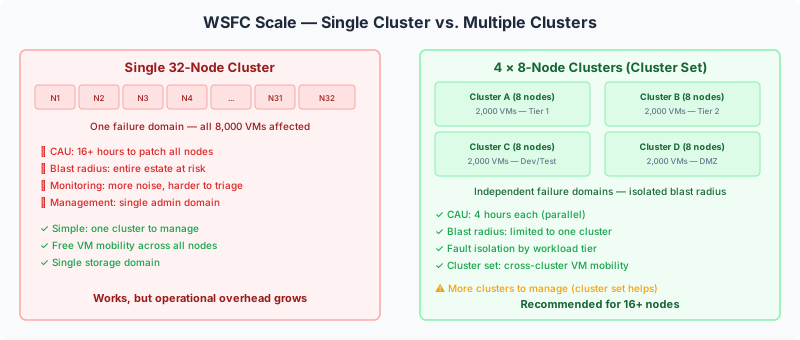
The first architectural decision at scale is whether to add nodes to your existing cluster (scale up) or create additional clusters (scale out).
Scale Up , Larger Clusters
When it makes sense:
- All nodes share the same storage (SAN)
- All workloads need to live-migrate freely across all nodes
- You want a single management domain (one cluster to monitor, patch, and manage)
- You haven’t hit operational friction with patching, monitoring, or blast radius
Operational reality at scale:
- Patching time increases linearly. CAU patches one node at a time. A 64-node cluster with 30-minute patch cycles per node takes 32 hours to fully patch. Even with optimized windows, large clusters mean long maintenance cycles.
- Blast radius grows. A cluster-wide event (quorum loss, storage failure affecting all CSVs) affects every VM. In a 64-node cluster, that’s potentially 8,000 VMs.
- Monitoring complexity increases. More nodes means more metrics, more events, more alert noise. Your monitoring platform (Post 9) must scale with the cluster.
Scale Out , Multiple Smaller Clusters
When it makes sense:
- You need fault isolation between workload groups
- Patching windows must be shorter
- Different workloads have different SLA or compliance requirements
- You want to limit blast radius
- Administrative domains need separation (different teams manage different clusters)
The practical transition point: When patching cycles become unacceptably long, when you need fault isolation between workload groups, or when administrative delegation requires separate clusters. For most organizations, this happens somewhere between 8-16 nodes per cluster.
The recommendation: Deploy multiple smaller clusters (4-16 nodes each) rather than one massive cluster. Each cluster is an independent failure domain. Use cluster sets (below) to manage them as a logical unit when needed.
Cluster Sets , Managing Multiple Clusters as One
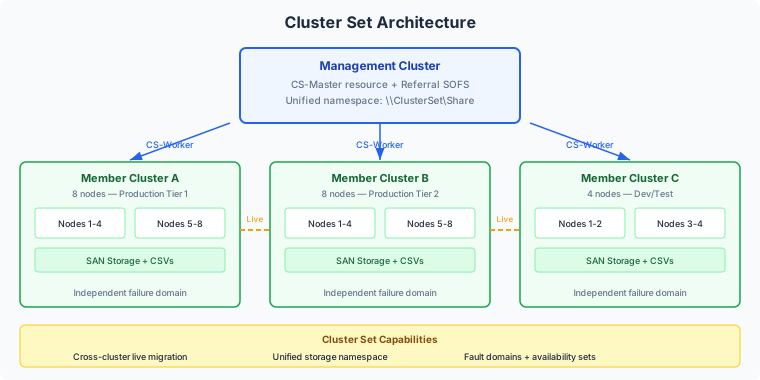
Cluster sets solve the “I need multiple clusters but I want to manage them together” problem. Introduced in Windows Server 2019, a cluster set groups multiple independent failover clusters into a logical unit with cross-cluster capabilities.
Architecture
| Component | Role |
|---|---|
| Management cluster | Hosts the cluster set control plane. Runs the CS-Master resource and the namespace referral SOFS (Scale-Out File Server). |
| Member clusters | Run VM workloads and storage. Each member is a fully independent failover cluster. CS-Worker resources on each member respond to placement and inventory queries. |
| Unified namespace | The referral SOFS provides a single storage namespace across all member clusters. |
What Cluster Sets Enable
| Capability | Details |
|---|---|
| Cross-cluster live migration | Move VMs between member clusters without shutting them down. Requires Kerberos constrained delegation, same OS version, and compatible processors across all members. |
| Unified storage namespace | Referral SOFS provides a single \\ClusterSet\Share namespace that spans storage across member clusters. |
| Fault domains and availability sets | Azure-like placement concepts across the cluster set. Define fault domains (racks, sites) and availability sets (keep related VMs spread across domains). |
| Optimal VM placement | Get-ClusterSetOptimalNodeForVM queries the entire set and recommends the best node based on available resources. |
| Cluster-wide inventory | Single view of all VMs, hosts, and resources across all member clusters. |
Requirements and Constraints
| Requirement | Details |
|---|---|
| OS version | All member clusters must run the same Windows Server version |
| AD forest | All members must be in the same Active Directory forest |
| Processor compatibility | Same vendor (Intel or AMD) across all members, or processor compatibility mode enabled |
| Scale | Tested and supported up to 64 total nodes across all member clusters |
Limitations , Be Honest
- No automatic cross-cluster failover. If a member cluster fails, VMs do NOT automatically migrate to another member cluster. Cross-cluster moves are manual or scripted. Within a single member cluster, WSFC HA works normally.
- S2D doesn’t span across members. Each cluster has its own storage pool. For cross-cluster storage resilience, use Storage Replica between members.
- Complexity. The management cluster adds infrastructure. The referral SOFS adds a namespace layer. This is justified at scale (50+ nodes across multiple clusters) but overkill for smaller environments.
When Cluster Sets Make Sense
- Large environments with 3+ clusters that need coordinated management
- Cross-cluster VM mobility for load balancing or maintenance
- Unified storage namespace across multiple clusters
- Availability set requirements (keeping related VMs on separate clusters/racks)
Cluster-Aware Updating , Zero-Downtime Patching
Cluster-Aware Updating (CAU) orchestrates rolling updates across cluster nodes with zero downtime for highly available workloads. This is how you patch a production Hyper-V cluster without taking any VMs offline.
How It Works
CAU processes nodes one at a time through a coordinated sequence:
- Pause node , put the node into maintenance mode
- Drain roles , live-migrate all VMs and cluster roles off the node to other nodes
- Install updates , apply Windows Updates, hotfixes, or custom updates
- Restart , reboot if required
- Resume node , bring the node back into the cluster
- Restore roles , optionally move VMs back to the original node
- Move to next node , repeat for every node in the cluster
Because VMs live-migrate off each node before updates are applied, continuously available workloads experience no interruption. The end result: a fully patched cluster with zero VM downtime.
Operating Modes
| Mode | Description | Best For |
|---|---|---|
| Self-updating | CAU runs as a cluster role. Updates on a configured schedule (daily/weekly/monthly). Fully automated , no external coordination needed. | Production , set it and forget it |
| Remote-updating | An external Update Coordinator computer triggers updates on-demand. No CAU role on the cluster. | Server Core environments, manual/controlled patching, testing |
CAU Configuration
| Setting | Recommendation |
|---|---|
| Schedule | Weekly or monthly maintenance window aligned with your organization’s patch policy |
| Max retries per node | 3 (default) , if a node fails to update after 3 attempts, CAU flags it and moves on |
| Update source | WSUS for managed environments, Windows Update for smaller deployments |
| Pre/post update scripts | Use for custom validation, backup triggers, or notification automation |
| Updating Run Profile | Save as a reusable profile and apply consistently across clusters |
CAU at Scale
For large clusters, CAU’s sequential approach means patching takes time proportional to the number of nodes:
| Nodes | Estimated Patch Cycle (30 min/node) | Estimated Patch Cycle (60 min/node) |
|---|---|---|
| 4 | 2 hours | 4 hours |
| 8 | 4 hours | 8 hours |
| 16 | 8 hours | 16 hours |
| 32 | 16 hours | 32 hours |
| 64 | 32 hours | 64 hours |
This is why large environments benefit from multiple smaller clusters , four 8-node clusters can all be patched in parallel (4 hours each) instead of one 32-node cluster taking 16+ hours sequentially.
CAU Plug-In Architecture
CAU supports plug-ins beyond standard Windows Updates:
| Plug-in | What It Updates |
|---|---|
| Microsoft.WindowsUpdatePlugin (default) | Windows Updates via WUA/WSUS |
| Microsoft.HotfixPlugin | Microsoft hotfixes from a file share |
| Custom plug-ins | BIOS updates, firmware updates, NIC/HBA driver updates. Extensible for vendor-specific maintenance. |
Dell, HPE, and Lenovo provide CAU plug-ins for their server platforms, enabling firmware and driver updates as part of the same orchestrated rolling cycle.
Stretched Clusters , Multi-Site with Automatic Failover
Stretched clusters span a single WSFC cluster across two physical sites with automatic failover between sites. Combined with synchronous Storage Replica, they provide zero data loss and automatic VM recovery during a site failure.
Architecture
| Component | Site A | Site B |
|---|---|---|
| Nodes | Half the cluster nodes | Half the cluster nodes |
| Storage | Local SAN or S2D | Local SAN or S2D |
| Replication | Storage Replica (sync or async) | Storage Replica |
| Network | WAN link between sites (<5ms for sync) | Same |
| Quorum | Cloud witness or file share witness in a third location | Same |
Site-Aware Failover
Windows Server 2025 supports site-aware failover policies:
- Preferred site , VMs are assigned a preferred site. After a failover, the cluster automatically migrates VMs back to their preferred site when it recovers.
- Fault domains , nodes are assigned to fault domains representing each site. The cluster keeps VMs distributed across sites based on anti-affinity and placement rules.
- Quorum witness placement , for a two-site stretched cluster, the quorum witness must be in a third location. This prevents a single-site failure from causing quorum loss.
When Stretched Clusters Make Sense
- Metro-distance sites (<5ms RTT) where synchronous Storage Replica provides zero data loss
- Automatic failover is required (no human intervention during site failure)
- Both sites have comparable compute and storage capacity
- Network bandwidth between sites supports Storage Replica traffic plus cluster heartbeat
When Stretched Clusters Don’t Make Sense
- Sites are too far apart for synchronous replication (>5ms RTT)
- Asymmetric capacity between sites
- Budget doesn’t support duplicate infrastructure at both sites
- Simpler technologies (Hyper-V Replica, SAN replication) meet the RPO/RTO requirements
Anti-Affinity Rules , Keeping VMs Apart
Anti-affinity rules tell the cluster to keep specific VMs on separate hosts. This is critical for high availability of redundant workloads , you don’t want both domain controllers on the same host, because a single host failure would take out both.
How Anti-Affinity Works
The AntiAffinityClassNames property on cluster groups assigns a class name. Groups with matching class names are kept on different nodes.
| Enforcement | Behavior | When to Use |
|---|---|---|
| Soft (default) | Best-effort , cluster tries to separate VMs but will co-locate them if no other option exists (e.g. N-1 host failure) | Most scenarios , provides separation without risking availability |
| Hard | Strict , VMs with matching class names will NEVER run on the same node. If they can’t be separated, one goes Offline. | Critical workloads where co-location is worse than an offline VM |
Hard enforcement: Set (Get-Cluster).ClusterEnforcedAntiAffinity = 1. Use with caution in small clusters , in a 2-node cluster, if one node fails, the hard rule will keep one VM offline rather than co-locate both on the surviving node.
Common Anti-Affinity Patterns
| Workload | Anti-Affinity Class | Why |
|---|---|---|
| Domain Controllers | “DC” | Both DCs on the same host = single point of failure for AD |
| SQL Always On replicas | “SQL-AG-MyApp” | Both replicas on the same host defeats the purpose of AG |
| DNS servers | “DNS” | Both DNS servers on the same host = DNS outage on host failure |
| Paired application servers | “AppTier-MyApp” | Load-balanced pairs should be on separate hosts |
Combined with Preferred Owners
Anti-affinity can be combined with preferred owners for more granular placement:
- Anti-affinity keeps VMs on different nodes
- Preferred owners guide VMs to specific nodes (e.g. DC-01 prefers Node 1, DC-02 prefers Node 2)
Together, they provide predictable VM placement while ensuring separation.
Operational Runbooks at Scale
Scale requires documented, repeatable procedures. Here are the operational runbooks every large Hyper-V environment should have:
Node Maintenance Runbook
| Step | Action | Verify |
|---|---|---|
| 1 | Notify , inform the team of planned maintenance | Ticket/change request created |
| 2 | Pause node , Suspend-ClusterNode -Drain | All VMs migrated off, node shows “Paused” |
| 3 | Perform maintenance , updates, firmware, hardware | Maintenance complete |
| 4 | Resume node , Resume-ClusterNode -Failback Immediate | Node shows “Up” |
| 5 | Verify , check cluster health, VM health, CSV state | All green |
Capacity Planning Runbook
| Metric | Check | Threshold | Action |
|---|---|---|---|
| Host CPU average (business hours) | Weekly | >60% | Plan additional compute within 3-6 months |
| Memory Average Pressure | Weekly | >70 sustained | Add memory or migrate VMs |
| CSV free space | Daily | <20% | Extend LUNs or add CSVs |
| N+1 capacity | Monthly | Lost if one node fails | Add nodes before capacity is exceeded |
| VM count growth | Quarterly | Trending toward cluster maximum | Plan new cluster or cluster set |
Cluster Expansion Runbook
| Step | Action |
|---|---|
| 1 | Build new node using Post 5 procedures (consistent with existing nodes) |
| 2 | Run Test-Cluster including the new node |
| 3 | Add node: Add-ClusterNode -Name "HV-NODE-NEW" |
| 4 | Present shared storage (same LUNs as existing nodes) |
| 5 | Verify CSVs are accessible from new node |
| 6 | Rebalance CSV ownership: Move-ClusterSharedVolume |
| 7 | Migrate VMs to new node to distribute load |
| 8 | Update monitoring and backup configurations |
Complete runbook templates including cluster expansion, node decommission, DR failover, and CAU configuration are in the companion repository.
The Scale Architecture Recommendation
Based on everything in this post, here’s the recommended architecture by environment size:
| Environment | Architecture | Why |
|---|---|---|
| 1-8 nodes | Single cluster | Simple, efficient, CAU patches in reasonable time |
| 8-16 nodes | Single cluster or 2 clusters | Evaluate based on fault isolation needs and patching windows |
| 16-32 nodes | 2-4 clusters | Shorter patching cycles, fault isolation between workload groups |
| 32-64 nodes | Cluster set (4-8 member clusters) | Cross-cluster management, fault domain isolation, parallel patching |
| 64+ nodes | Multiple cluster sets | Administrative domain separation, geographic distribution |
The pattern: multiple smaller clusters managed as a set > one massive cluster. Smaller clusters mean shorter patching cycles, smaller blast radius, simpler troubleshooting, and better fault isolation. Cluster sets provide the cross-cluster management and VM mobility when needed.
Production Architecture , Complete
This post concludes the Production Architecture section of the Hyper-V Renaissance series. Over eight posts, we’ve covered:
| Post | Topic |
|---|---|
| 9 | Monitoring and Observability |
| 10 | Security Architecture |
| 11 | Management Tools |
| 12 | Storage Architecture Deep Dive |
| 13 | Backup Strategies |
| 14 | Multi-Site Resilience |
| 15 | Live Migration Internals |
| 16 | WSFC at Scale |
The foundation is built. The production architecture is in place. Next up is the Strategy & Automation section (Posts 17-20), where we shift from “how to build it” to “how to decide and automate” , hybrid Azure integration, S2D vs. three-tier decision frameworks, PowerShell automation patterns, and infrastructure as code.
Resources
- Series Repository: github.com/thisismydemo/hyper-v-renaissance
Microsoft Documentation
- Hyper-V maximum scale limits
- Cluster Sets
- Cluster-Aware Updating overview
- Cluster affinity and anti-affinity
- Stretched clusters with Storage Replica
- What’s new in Windows Server 2025
Series Navigation ← Previous: Post 15 , Live Migration Internals → Next: Post 17 , Hybrid Without the Handcuffs