
PowerShell

Infrastructure as Code with Ansible and Terraform

Infrastructure as Code with Ansible and Terraform

Ansible, Terraform, and the IaC Decision for Hyper-V

Post 19 built an automation practice around PowerShell , modules, DSC v3, CI/CD pipelines. For many organizations, that’s enough. PowerShell is native, it’s free, it covers 100% of Hyper-V functionality, and your Windows team already knows it.

But some organizations have standardized on Ansible for configuration management across Linux and Windows. Others use Terraform for all infrastructure provisioning. And some want both , Terraform for creating resources, Ansible for configuring them. The question isn’t “which tool is best” , it’s “which tool fits your team, your existing investments, and your Hyper-V use case.”

PowerShell Automation Patterns (2026 Edition)

PowerShell Automation Patterns (2026 Edition)

DSC v3, Idempotent Modules, and CI/CD for Infrastructure

“PowerShell Returned to Its Throne” isn’t just a series tagline. It’s the architectural reality.

Every post in this series has used PowerShell for configuration, validation, and management. But there’s a difference between running scripts manually and building an automation practice. If you’re honest with yourself, most of us do the same thing: write a script, run it, tweak something, run it again, save it in a folder called “scripts-final-v3-FINAL,” and hope we remember the parameters next quarter.

S2D vs. Three-Tier and When Azure Local Makes Sense

S2D vs. Three-Tier and When Azure Local Makes Sense

The Honest Comparison , Performance, Cost, and When Each Approach Wins

This series advocates for on-premises Hyper-V with three-tier SAN architecture. But intellectual honesty , and the credibility of everything we’ve written , demands that we evaluate every option fairly. Storage Spaces Direct and Azure Local have legitimate use cases. Three-tier isn’t always the right answer.

The cost lens matters, though. For many organizations leaving VMware, the decision is not just about technical elegance. It is about whether Azure Local’s host fee and potential hardware refresh are justified, or whether reusing existing compute and existing SAN is the smarter move for the workloads they actually run.

Hybrid Without the Handcuffs

Hybrid Without the Handcuffs

Azure Arc, ASR, Defender, and the Services You Don't Need Azure Local For

“But what about all the cloud stuff Azure Local gets?”

It’s the first objection every decision-maker raises when you propose traditional Hyper-V over Azure Local. Azure Local comes with AKS, Azure Virtual Desktop, Azure Portal VM management, Azure Monitor, Azure Update Manager, Defender for Cloud , all integrated. How do you compete with that on standalone Hyper-V?

The answer: you don’t need Azure Local to get most of those services. Azure Arc brings much of the same Azure management plane to your existing Hyper-V infrastructure , selectively, incrementally, and without taking on the Azure Local platform fee just to reach the Azure control plane. You pick the services that add value. You skip the ones that don’t. You keep control over where the monthly bill starts.

Management Tools for Production Hyper-V

Management Tools for Production Hyper-V

WAC vMode, SCVMM, and the VMware-to-Hyper-V Management Map

In VMware, you had vCenter. One console, one login, everything managed , hosts, VMs, networking, storage, templates, live migration, HA, monitoring. You opened the vSphere Client and the entire virtualization fabric was in front of you.

So you’ve migrated to Hyper-V. You’ve built the cluster, connected the storage, moved the VMs. Now you sit down Monday morning and ask the obvious question: where’s my vCenter?

The honest answer: there isn’t a single tool that does everything vCenter does. There’s a toolbox , and the right combination depends on your scale. But the management landscape for Hyper-V has changed dramatically. Windows Admin Center is the management front end most organizations should evaluate first. Virtualization Mode (vMode) is Microsoft’s most direct attempt to close the vCenter-style gap, but because its release status, scale targets, and feature set are evolving, verify the latest Microsoft release notes before standardizing on it. SCVMM remains the enterprise option for organizations that need broader orchestration and Dynamic Optimization. And PowerShell , the constant through everything , can do things no GUI tool can.

Monitoring and Observability, From Built-In to Best-of-Breed

Monitoring and Observability, From Built-In to Best-of-Breed

SCOM, Prometheus, Grafana, and the Metrics That Matter

You built the cluster. You connected the storage. You migrated the VMs. Everything’s running.

Now how do you know it’s healthy at 3am?

Moving from “it works in the lab” to “it runs in production” isn’t about adding more VMs. It’s about proving your environment is healthy, knowing when it’s not, and understanding why before your users file a ticket. That requires observability , not a dashboard you glance at, but a system that collects, correlates, and alerts on the data your infrastructure produces.

Build and Validate a Cluster-Ready Host

Build and Validate a Cluster-Ready Host

PowerShell Deployment and Validation

This is where the keyboards come out.

Posts 1 through 4 made the business case, dismantled the myths, and confirmed your hardware is ready. Now it’s time to build something. In this fifth post of the Hyper-V Renaissance series, we’re going to take a bare-metal server, or a freshly wiped former VMware host, and turn it into a production-ready Hyper-V node that’s fully validated for cluster membership.

Every step is scripted. Every configuration is documented. If you can’t reproduce it with PowerShell, it doesn’t belong in a production deployment.

Welcome to the Hyper-V Renaissance

Welcome to the Hyper-V Renaissance

Why It's Time to Reevaluate Microsoft's On-Prem Champion

Introduction

A Perfect Storm Creates Opportunity

If you’ve been watching the virtualization market over the past eighteen months, you’ve witnessed something extraordinary: a once-stable industry thrown into chaos by a single acquisition. When Broadcom completed its $69 billion purchase of VMware in November 2023, few anticipated how dramatically, and rapidly, the landscape would shift. What followed wasn’t just a pricing adjustment; it was a fundamental restructuring that has sent shockwaves through data centers worldwide.

Azure Stack HCI - Part V - From one to Sixteen

Azure Stack HCI - Part V - From one to Sixteen

This is a series of blogs about my experiences with Azure Stack HCI

In this blog series I plan to blog about everything I know about Azure Stack HCI. So, it should be a very short blog series. Just kidding. Again, I tend to blog about subjects that I am currently working on or will be currently working on. So, Azure Stack HCI is fresh on my mind again these days.

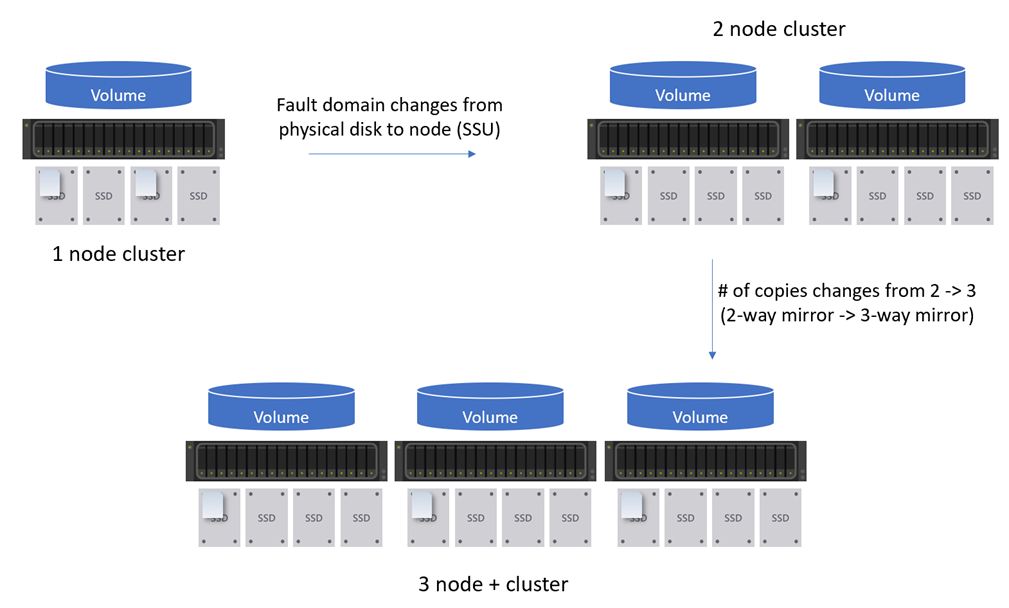
The last three or so blogs I have talked about deploying a single-node cluster and then how to scale that single-node cluster to a two-node cluster. This blog I want to share my experience about scaling my Azure Stack HCI cluster to a three-node cluster and more. The over all process is fairly the same as scaling out a one-node to a two-node cluster. However, there are some differences that I wanted to call out. So instead of actually walking through the scale out process, I will discuss the differences between scaling out to a two-node cluster to three-nodes or more.

Azure Stack HCI - Part IV - Scale-out Azure Stack HCI Single Node Cluster

Azure Stack HCI - Part IV - Scale-out Azure Stack HCI Single Node Cluster

This is a series of blogs about my experiences with Azure Stack HCI

In this blog series I plan to blog about everything I know about Azure Stack HCI. So, it should be a very short blog series. Just kidding. Again, I tend to blog about subjects that I am currently working on or will be currently working on. So, Azure Stack HCI is fresh on my mind again these days.

This blog will be about scaling out a single-node Azure Stack HCI cluster up to a two-node cluster. My previous blog, Azure Stack HCI - Part III - Advance Deployment of A Single Node Cluster discussed my experiences deploying a single-node cluster. There is a lot of information about my environment, how I setup my lab, and more that would be good to know before continuing with this blog. However, I will try and include as much as I can within this blog to make sense of everything.