
WAC

Management Tools for Production Hyper-V

Management Tools for Production Hyper-V

WAC vMode, SCVMM, and the VMware-to-Hyper-V Management Map

In VMware, you had vCenter. One console, one login, everything managed , hosts, VMs, networking, storage, templates, live migration, HA, monitoring. You opened the vSphere Client and the entire virtualization fabric was in front of you.

So you’ve migrated to Hyper-V. You’ve built the cluster, connected the storage, moved the VMs. Now you sit down Monday morning and ask the obvious question: where’s my vCenter?

The honest answer: there isn’t a single tool that does everything vCenter does. There’s a toolbox , and the right combination depends on your scale. But the management landscape for Hyper-V has changed dramatically. Windows Admin Center is the management front end most organizations should evaluate first. Virtualization Mode (vMode) is Microsoft’s most direct attempt to close the vCenter-style gap, but because its release status, scale targets, and feature set are evolving, verify the latest Microsoft release notes before standardizing on it. SCVMM remains the enterprise option for organizations that need broader orchestration and Dynamic Optimization. And PowerShell , the constant through everything , can do things no GUI tool can.

Azure Stack HCI - Part V - From one to Sixteen

Azure Stack HCI - Part V - From one to Sixteen

This is a series of blogs about my experiences with Azure Stack HCI

In this blog series I plan to blog about everything I know about Azure Stack HCI. So, it should be a very short blog series. Just kidding. Again, I tend to blog about subjects that I am currently working on or will be currently working on. So, Azure Stack HCI is fresh on my mind again these days.

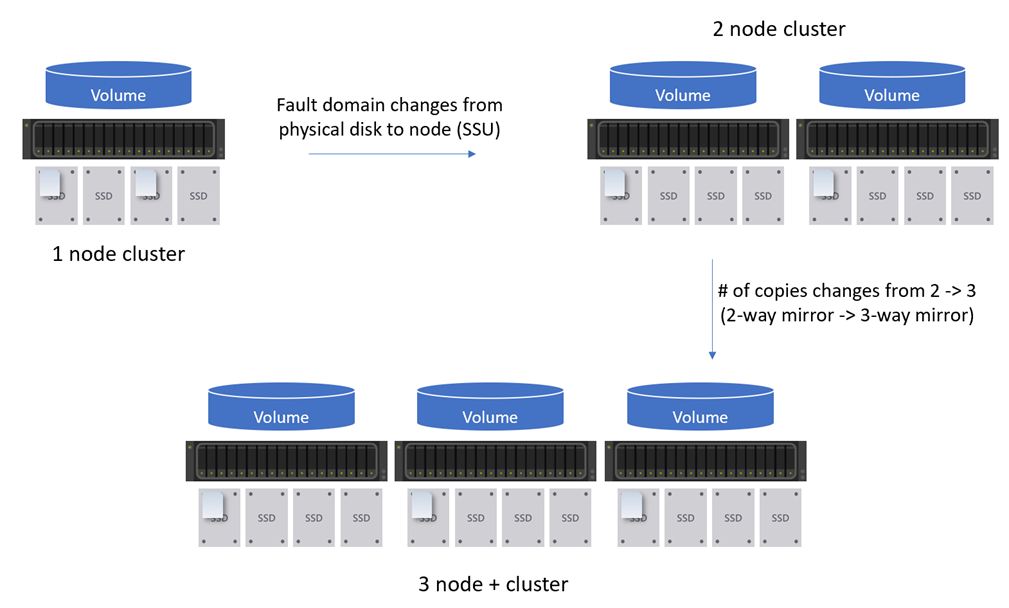
The last three or so blogs I have talked about deploying a single-node cluster and then how to scale that single-node cluster to a two-node cluster. This blog I want to share my experience about scaling my Azure Stack HCI cluster to a three-node cluster and more. The over all process is fairly the same as scaling out a one-node to a two-node cluster. However, there are some differences that I wanted to call out. So instead of actually walking through the scale out process, I will discuss the differences between scaling out to a two-node cluster to three-nodes or more.

Azure Stack HCI - Part III - Advanced Deployment of A Single Node Cluster

Azure Stack HCI - Part III - Advanced Deployment of A Single Node Cluster

This is a series of blogs about my experiences with Azure Stack HCI

In this blog series I plan to blog about everything I know about Azure Stack HCI. So, it should be a very short blog series. Just kidding. Again, I tend to blog about subjects that I am currently working on or will be currently working on. So, Azure Stack HCI is fresh on my mind again these days.

I had planned to have a Part III that would have focused on scaling out a single node cluster. However, as I was writing that blog and going back to Part II, Azure Stack HCI - Part II - Deploying A Single Node Cluster I found myself wanting to add to that blog. There where things that I didn’t cover I felt would be important. So instead of deleting that blog, because it did do a decent job at a high level overview, I am going to keep that blog and write another one that goes more in-depth. Which is the birth of this blog, Part III - Advance Deployment of A Single Node Cluster.

Azure Stack HCI - Part II - Deploying A Single Node Cluster

Azure Stack HCI - Part II - Deploying A Single Node Cluster

This is a series of blogs about my experiences with Azure Stack HCI

In this blog series I plan to blog about everything I know about Azure Stack HCI. So, it should be a very short blog series. Just kidding. Again, I tend to blog about subjects that I am currently working on or will be currently working on. So, Azure Stack HCI is fresh on my mind again these days.

Note: After reading this blog a few times myself I have decided to write another blog but adding more details around areas I did not bring up in this current blog. More details into how to get hardware setup for a single node with either physical hardware or even an Azure VM. More information on how to configure storage and more. I figure the more advanced one would be better to follow when moving into scaling out the single node cluster to two or more nodes in my future blogs.